

SaaSKit: Add auth to my app
SaaSKit — Hosted auth pages, managed sessions, secure logout. Purpose built. Simple where it counts
You’ll implement sign-up, login, and logout flows with secure session management and user management included. The foundation you build here extends to features like workspaces, enterprise SSO, MCP authentication, and SCIM provisioning.
See Demo
Review the authentication sequence
Scalekit handles the complex authentication flow while you focus on your core product:
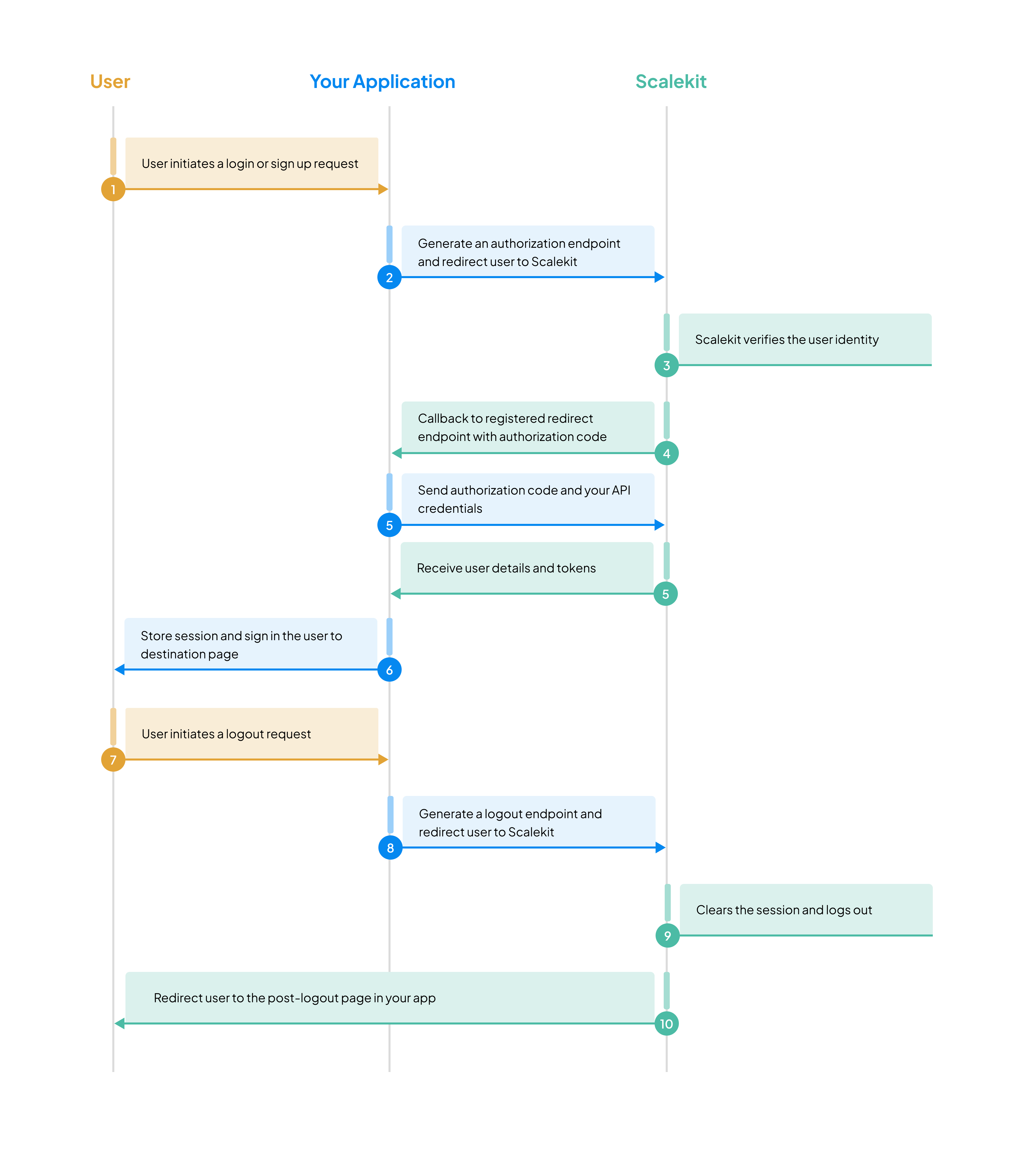
- User initiates sign-in - Your app redirects to Scalekit’s hosted auth page
- Identity verification - User authenticates via their preferred method
- Secure callback - Scalekit returns user profile and session tokens
- Session creation - Your app establishes a secure user session
- Protected access - User accesses your application’s features
Using a coding agent?
-
Set up Scalekit
Section titled “Set up Scalekit”Use the following instructions to install the SDK for your technology stack.
npm install @scalekit-sdk/nodepip install scalekit-sdk-pythongo get -u github.com/scalekit-inc/scalekit-sdk-go/* Gradle users - add the following to your dependencies in build file */implementation "com.scalekit:scalekit-sdk-java:2.1.3"<!-- Maven users - add the following to your `pom.xml` --><dependency><groupId>com.scalekit</groupId><artifactId>scalekit-sdk-java</artifactId><version>2.1.3</version></dependency>If you haven’t already, add your Scalekit credentials to your environment variables file:
.env SCALEKIT_ENVIRONMENT_URL=<your-environment-url>SCALEKIT_CLIENT_ID=<your-client-id>SCALEKIT_CLIENT_SECRET=<your-client-secret>COOKIE_ENCRYPTION_SECRET= # openssl rand -base64 32 — encrypts the session cookieREDIRECT_URI=http://localhost:3000/callbackNode.js and Python use
/callback. Go and Java use/auth/callback. Register the path for your stack.Register redirect URLs for your app
Section titled “Register redirect URLs for your app”You need to register redirect URLs for your application. Go to Scalekit dashboard → Authentication → Redirect URLs and configure:
- Allowed callback URLs: The endpoint where users are sent after successful authentication to exchange authorization codes and retrieve profile information. Learn more
- Initiate login URL: The endpoint in your app that redirects users to Scalekit’s
/authorizeendpoint. Required when authentication is not initiated from your app, for example, when a user accepts an organization invitation or starts sign-in directly from their identity provider (IdP-initiated SSO). Learn more
-
Redirect users to sign up (or) login
Section titled “Redirect users to sign up (or) login”An authorization URL is an endpoint that redirects users to Scalekit’s sign-in page. Use the Scalekit SDK to construct this URL with your redirect URI and required scopes.
server.ts import express from 'express';import { ScalekitAuth } from '@scalekit-sdk/node/express';const auth = new ScalekitAuth({envUrl: process.env.SCALEKIT_ENVIRONMENT_URL,clientId: process.env.SCALEKIT_CLIENT_ID,clientSecret: process.env.SCALEKIT_CLIENT_SECRET,redirectUri: process.env.REDIRECT_URI,cookieEncryptionSecret: process.env.COOKIE_ENCRYPTION_SECRET,});const app = express();app.use(auth.router);app.get('/account', auth.requiresAuth, (req, res) => {res.json({ sub: req.scalekitUser?.sub });});app.listen(3000);Open
http://localhost:3000/account. A missing session goes to/login. After login, the visitor returns to/account. Registerhttp://localhost:3000/callbackas the dashboard Redirect URI.lib/auth.ts import { ScalekitClient } from '@scalekit-sdk/node';import { ScalekitAuthNext } from '@scalekit-sdk/node/next';const scalekit = new ScalekitClient(process.env.SCALEKIT_ENVIRONMENT_URL!,process.env.SCALEKIT_CLIENT_ID!,process.env.SCALEKIT_CLIENT_SECRET!);export const auth = new ScalekitAuthNext({client: scalekit,redirectUri: process.env.REDIRECT_URI!,cookieEncryptionSecret: process.env.COOKIE_ENCRYPTION_SECRET!,});app/login/route.ts import { auth } from '../../lib/auth';export const GET = auth.createLoginHandler();app/callback/route.ts import { auth } from '../../lib/auth';export const GET = auth.createCallbackHandler();app/logout/route.ts import { auth } from '../../lib/auth';export const GET = auth.createLogoutHandler();app/account/route.ts import { auth } from '../../lib/auth';export const GET = auth.withAuth(async (request, { user }) => {return Response.json({ sub: user?.sub });});Open
http://localhost:3000/account. A missing session goes to/login.Terminal window pip install "scalekit-sdk-python[flask]"app.py import osfrom flask import Flaskfrom scalekit.frameworks.flask import ScalekitAuthapp = Flask(__name__)auth = ScalekitAuth(app,env_url=os.environ["SCALEKIT_ENVIRONMENT_URL"],client_id=os.environ["SCALEKIT_CLIENT_ID"],client_secret=os.environ["SCALEKIT_CLIENT_SECRET"],redirect_uri=os.environ["REDIRECT_URI"],cookie_encryption_secret=os.environ["COOKIE_ENCRYPTION_SECRET"],# HTTP localhost drops a Secure cookie, so the session never sticks.# A missing Secure flag on real HTTP lets the browser send sk_session in cleartext.cookie_secure=False,)@app.route("/account")@auth.requires_authdef account():return {"sub": auth.current_user["sub"]}if __name__ == "__main__":app.run(port=3000)Open
http://localhost:3000/account. A missing session goes to/login. Registerhttp://localhost:3000/callbackas the dashboard Redirect URI.Terminal window pip install "scalekit-sdk-python[fastapi]"app.py import osfrom fastapi import Depends, FastAPIfrom scalekit.frameworks.fastapi import ScalekitAuthapp = FastAPI()auth = ScalekitAuth(env_url=os.environ["SCALEKIT_ENVIRONMENT_URL"],client_id=os.environ["SCALEKIT_CLIENT_ID"],client_secret=os.environ["SCALEKIT_CLIENT_SECRET"],redirect_uri=os.environ["REDIRECT_URI"],cookie_encryption_secret=os.environ["COOKIE_ENCRYPTION_SECRET"],# HTTP localhost drops a Secure cookie, so the session never sticks.# A missing Secure flag on real HTTP lets the browser send sk_session in cleartext.cookie_secure=False,)auth.install(app)@app.get("/account")async def account(user: dict = Depends(auth.requires_auth)):return {"sub": user["sub"]}Terminal window uvicorn app:app --port 3000Open
http://localhost:3000/account. Registerhttp://localhost:3000/callbackas the dashboard Redirect URI.internal/http/auth.go // Must match the allowed callback URL you registered in the dashboardredirectUri := "http://localhost:3000/auth/callback"// Request user profile data (openid, profile, email) and session tracking (offline_access)// offline_access enables refresh tokens so users can stay logged in across sessionsoptions := scalekit.AuthorizationUrlOptions{Scopes: []string{"openid", "profile", "email", "offline_access"}}authorizationUrl, err := scalekitClient.GetAuthorizationUrl(redirectUri, options)// Generated URL will look like:// https://<SCALEKIT_ENVIRONMENT_URL>/oauth/authorize?response_type=code&client_id=skc_1234&scope=openid%20profile%20email%20offline_access&redirect_uri=https%3A%2F%2Fyourapp.com%2Fcallbackif err != nil {// Handle error based on your application's error handling strategypanic(err)}c.Redirect(http.StatusFound, authorizationUrl.String())AuthController.java import com.scalekit.internal.http.AuthorizationUrlOptions;import java.net.URL;import java.util.Arrays;// Must match the allowed callback URL you registered in the dashboardString redirectUri = "http://localhost:3000/auth/callback";// Request user profile data (openid, profile, email) and session tracking (offline_access)// offline_access enables refresh tokens so users can stay logged in across sessionsAuthorizationUrlOptions options = new AuthorizationUrlOptions();options.setScopes(Arrays.asList("openid", "profile", "email", "offline_access"));URL authorizationUrl = scalekit.authentication().getAuthorizationUrl(redirectUri, options);// Generated URL will look like:// https://<SCALEKIT_ENVIRONMENT_URL>/oauth/authorize?response_type=code&client_id=skc_1234&scope=openid%20profile%20email%20offline_access&redirect_uri=https%3A%2F%2Fyourapp.com%2FcallbackThis redirects users to Scalekit’s managed sign-in page where they can authenticate. The page includes default authentication methods for users to toggle between sign in and sign up.
-
Get user details from the callback
Section titled “Get user details from the callback”After successful authentication, Scalekit creates a user record and sends the user information to your callback endpoint. In authentication flow, Scalekit redirects to your callback URL with an authorization code. Your application exchanges this code for the user’s profile information and session tokens.
app.use(auth.router); // GET /callback writes sk_sessionapp/callback/route.ts import { auth } from '../../lib/auth';export const GET = auth.createCallbackHandler();auth = ScalekitAuth(app, ...) # registers GET /callbackauth.install(app) # registers GET /callbackinternal/http/auth_callback.go 17 collapsed linespackage mainimport ("log""net/http""os""github.com/gin-gonic/gin""github.com/scalekit-inc/scalekit-sdk-go")// Create Scalekit client instancevar scalekitClient = scalekit.NewScalekitClient(os.Getenv("SCALEKIT_ENVIRONMENT_URL"),os.Getenv("SCALEKIT_CLIENT_ID"),os.Getenv("SCALEKIT_CLIENT_SECRET"),)const redirectUri = "http://localhost:3000/auth/callback"func callbackHandler(c *gin.Context) {code := c.Query("code")errorParam := c.Query("error")errorDescription := c.Query("error_description")9 collapsed linesif errorParam != "" {c.JSON(http.StatusUnauthorized, gin.H{"error": errorParam,"error_description": errorDescription,})return}// Exchange the authorization code for user profile and session tokens// Returns: User (profile info), IdToken (JWT with user claims), AccessToken (JWT with roles/permissions), RefreshTokenoptions := scalekit.AuthenticationOptions{}authResult, err := scalekitClient.AuthenticateWithCode(c.Request.Context(), code, redirectUri, options,9 collapsed lines)if err != nil {log.Printf("Error exchanging code: %v", err)c.JSON(http.StatusInternalServerError, gin.H{"error": "Failed to authenticate user",})return}user := authResult.User// IdToken: Decode to access full user profile (sub, oid, email, name)// AccessToken: Contains roles and permissions for authorization decisions// RefreshToken: Use to obtain new access tokens when they expire// "user" object contains the user's profile information// Next step: Create a session and log in the userc.Redirect(http.StatusFound, "/dashboard/profile")}CallbackController.java 10 collapsed linesimport com.scalekit.ScalekitClient;import com.scalekit.internal.http.AuthenticationOptions;import com.scalekit.internal.http.AuthenticationResponse;import org.springframework.web.bind.annotation.*;import org.springframework.web.servlet.view.RedirectView;import org.springframework.http.ResponseEntity;import org.springframework.http.HttpStatus;import java.util.HashMap;import java.util.Map;@RestControllerpublic class CallbackController {private final String redirectUri = "http://localhost:3000/auth/callback";@GetMapping("/auth/callback")public Object callback(@RequestParam(required = false) String code,@RequestParam(required = false) String error,@RequestParam(name = "error_description", required = false) String errorDescription) {4 collapsed linesif (error != null) {// handle error}try {// Exchange the authorization code for user profile and session tokens// Returns: user (profile info), idToken (JWT with user claims), accessToken (JWT with roles/permissions), refreshTokenAuthenticationOptions options = new AuthenticationOptions();AuthenticationResponse authResult = scalekit.authentication().authenticateWithCode(code,redirectUri,options);var user = authResult.getIdTokenClaims();// idToken: Decode to access full user profile (sub, oid, email, name)// accessToken: Contains roles and permissions for authorization decisions// refreshToken: Use to obtain new access tokens when they expire// "user" object contains the user's profile information8 collapsed lines// Next step: Create a session and log in the userreturn new RedirectView("/dashboard/profile");} catch (Exception err) {// Handle exception (e.g., log error, return error response)}}}The
authResultobject contains:user- Common user details with email, name, and verification statusidToken- JWT containing verified full user identity claims (includes:subuser ID,oidorganization ID,email,name,expexpiration)accessToken- Short-lived token that determines current access context (includes:subuser ID,oidorganization ID,roles,permissions,expexpiration)refreshToken- Long-lived token to obtain new access tokens
{user: {email: "john.doe@example.com",emailVerified: true,givenName: "John",name: "John Doe",id: "usr_74599896446906854"},idToken: "eyJhbGciO..", // Decode for full user detailsaccessToken: "eyJhbGciOi..",refreshToken: "rt_8f7d6e5c4b3a2d1e0f9g8h7i6j..",expiresIn: 299 // in seconds}ID token decoded {"at_hash": "ec_jU2ZKpFelCKLTRWiRsg","aud": ["skc_58327482062864390"],"azp": "skc_58327482062864390","c_hash": "6wMreK9kWQQY6O5R0CiiYg","client_id": "skc_58327482062864390","email": "john.doe@example.com","email_verified": true,"exp": 1742975822,"family_name": "Doe","given_name": "John","iat": 1742974022,"iss": "https://scalekit-z44iroqaaada-dev.scalekit.cloud","name": "John Doe","oid": "org_59615193906282635","sid": "ses_65274187031249433","sub": "usr_63261014140912135"}Decoded access token {"aud": ["prd_skc_7848964512134X699"],"client_id": "prd_skc_7848964512134X699","exp": 1758265247,"iat": 1758264947,"iss": "https://login.devramp.ai","jti": "tkn_90928731115292X63","nbf": 1758264947,"oid": "org_89678001X21929734","permissions": ["workspace_data:write","workspace_data:read"],"roles": ["admin"],"sid": "ses_90928729571723X24","sub": "usr_8967800122X995270",// External identifiers if updated on Scalekit"xoid": "ext_org_123", // Organization ID"xuid": "ext_usr_456", // User ID}The user details are packaged in the form of JWT tokens. Decode the
idTokento access full user profile information (email, name, organization ID) and theaccessTokento check user roles and permissions for authorization decisions. See Complete login with code exchange for detailed token claim references and verification instructions. -
Create and manage user sessions
Section titled “Create and manage user sessions”The access token is a JWT that contains the user’s permissions and roles. It expires in 5 minutes (default) but can be configured. When it expires, use the refresh token to obtain a new access token. The refresh token is long-lived and designed for this purpose.
The Scalekit SDK provides methods to refresh access tokens automatically. However, you must log the user out when the refresh token itself expires or becomes invalid.
app.get('/account', auth.requiresAuth, (req, res) => {res.json({ sub: req.scalekitUser?.sub });});app/account/route.ts import { auth } from '../../lib/auth';export const GET = auth.withAuth(async (request, { user }) => {return Response.json({ sub: user?.sub });});@app.route("/account")@auth.requires_authdef account():return {"sub": auth.current_user["sub"]}@app.get("/account")async def account(user: dict = Depends(auth.requires_auth)):return {"sub": user["sub"]}8 collapsed linesimport ("net/http""os")// Set SameSite mode for CSRF protectionc.SetSameSite(http.SameSiteStrictMode)// Store access token in HttpOnly cookie with Path scoping to API routesc.SetCookie("accessToken",authResult.AccessToken,authResult.ExpiresIn-60, // seconds in Gin"/api","",os.Getenv("GIN_MODE") == "release",true,)// Store refresh token in separate HttpOnly cookie with Path scoped to refresh endpointc.SetCookie("refreshToken",authResult.RefreshToken,0, // No expiry for refresh token cookie"/auth/refresh","",os.Getenv("GIN_MODE") == "release",true,)6 collapsed linesimport javax.servlet.http.Cookie;import javax.servlet.http.HttpServletResponse;// Store access token in HttpOnly cookie with Path scoping to API routesCookie accessTokenCookie = new Cookie("accessToken", authResult.getAccessToken());accessTokenCookie.setMaxAge(authResult.getExpiresIn() - 60); // seconds in SpringaccessTokenCookie.setHttpOnly(true);accessTokenCookie.setSecure(true);accessTokenCookie.setPath("/api");response.addCookie(accessTokenCookie);// Store refresh token in separate HttpOnly cookie with Path scoped to refresh endpointCookie refreshTokenCookie = new Cookie("refreshToken", authResult.getRefreshToken());refreshTokenCookie.setHttpOnly(true);refreshTokenCookie.setSecure(true);refreshTokenCookie.setPath("/auth/refresh");response.addCookie(refreshTokenCookie);response.setHeader("Set-Cookie",response.getHeader("Set-Cookie") + "; SameSite=Strict");This sets browser cookies with the session tokens. Every request to your backend needs to verify the
accessTokento ensure the user is authenticated. If expired, use therefreshTokento get a new access token.app.get('/dashboard', auth.requiresAuth, (req, res) => {res.json({ user: req.scalekitUser });});middleware.ts import { auth } from './lib/auth';export default auth.createMiddleware({publicRoutes: ['/'],});export const config = {runtime: 'nodejs',matcher: ['/((?!_next/static|_next/image|favicon.ico).*)'],};@app.route("/dashboard")@auth.requires_authdef dashboard():return {"user": auth.current_user}@app.get("/dashboard")async def dashboard(user: dict = Depends(auth.requires_auth)):return {"user": user}5 collapsed linesimport ("context""net/http")// verifyToken is a middleware that ensures a valid access token or refreshes it if expired.func verifyToken(next http.HandlerFunc) http.HandlerFunc {return func(w http.ResponseWriter, r *http.Request) {// Retrieve the access token from the user's cookiecookie, err := r.Cookie("accessToken")4 collapsed linesif err != nil {// No access token cookie found; reject the requesthttp.Error(w, `{"message": "No access token provided"}`, http.StatusUnauthorized)return}accessToken := cookie.Value// Decrypt the access token before validationdecryptedAccessToken, err := decrypt(accessToken)5 collapsed linesif err != nil {// Could not decrypt access token; treat as invalidhttp.Error(w, `{"message": "Token decryption failed"}`, http.StatusUnauthorized)return}// Validate the access token using the Scalekit SDKisValid, err := scalekitClient.ValidateAccessToken(r.Context(), decryptedAccessToken)if err != nil || !isValid {// Access token is invalid or expired// Attempt to retrieve the stored refresh tokenrefreshToken, err := getStoredRefreshToken(r)5 collapsed linesif err != nil {// No refresh token is available; cannot continuehttp.Error(w, `{"message": "No refresh token available"}`, http.StatusUnauthorized)return}// Use the refresh token to obtain a new access token from ScalekittokenResponse, err := scalekitClient.RefreshAccessToken(r.Context(), refreshToken)5 collapsed linesif err != nil {// Refresh attempt failed; likely an expired or invalid refresh tokenhttp.Error(w, `{"message": "Token refresh failed"}`, http.StatusUnauthorized)return}// Save the new refresh token so it can be reused for future requestserr = storeRefreshToken(tokenResponse.RefreshToken)5 collapsed linesif err != nil {// Could not store the new refresh tokenhttp.Error(w, `{"message": "Failed to store refresh token"}`, http.StatusInternalServerError)return}// Encrypt the new access token before setting it in the cookieencryptedNewAccessToken, err := encrypt(tokenResponse.AccessToken)5 collapsed linesif err != nil {// Could not encrypt new access tokenhttp.Error(w, `{"message": "Token encryption failed"}`, http.StatusInternalServerError)return}// Issue a new accessToken cookie with updated credentials31 collapsed linesnewCookie := &http.Cookie{Name: "accessToken",Value: encryptedNewAccessToken,HttpOnly: true,Secure: true,Path: "/",SameSite: http.SameSiteStrictMode,}http.SetCookie(w, newCookie)// Mark the token as valid in the request context and proceedr = r.WithContext(context.WithValue(r.Context(), "tokenValid", true))} else {// The access token is valid; continue with marked contextr = r.WithContext(context.WithValue(r.Context(), "tokenValid", true))}// Pass the request along to the next handler in the chainnext(w, r)}}// dashboardHandler demonstrates a protected route that requires authentication.func dashboardHandler(w http.ResponseWriter, r *http.Request) {w.Header().Set("Content-Type", "application/json")w.Write([]byte(`{"message": "This is a protected route","tokenValid": true}`))}// Usage example:// Attach middleware to the /dashboard route:// http.HandleFunc("/dashboard", verifyToken(dashboardHandler))6 collapsed linesimport javax.servlet.http.HttpServletRequest;import javax.servlet.http.HttpServletResponse;import javax.servlet.http.Cookie;import org.springframework.web.servlet.HandlerInterceptor;@Componentpublic class TokenVerificationInterceptor implements HandlerInterceptor {@Overridepublic boolean preHandle(HttpServletRequest request,HttpServletResponse response,Object handler) throws Exception {try {// Get access token from cookieString accessToken = getCookieValue(request, "accessToken");String refreshToken = getCookieValue(request, "refreshToken");// Decrypt the tokensString decryptedAccessToken = decrypt(accessToken);String decryptedRefreshToken = decrypt(refreshToken);// Use Scalekit SDK to validate the tokenboolean isValid = scalekit.authentication().validateAccessToken(decryptedAccessToken);// Use refreshToken to get a new access tokenAuthenticationResponse tokenResponse = scalekit.authentication().refreshToken(decryptedRefreshToken);// Update the cookie with the new access token and refresh tokenString encryptedNewAccessToken = encrypt(tokenResponse.getAccessToken());String encryptedNewRefreshToken = encrypt(tokenResponse.getRefreshToken());Cookie accessTokenCookie = new Cookie("accessToken", encryptedNewAccessToken);accessTokenCookie.setHttpOnly(true);accessTokenCookie.setSecure(true);accessTokenCookie.setPath("/");response.addCookie(accessTokenCookie);Cookie refreshTokenCookie = new Cookie("refreshToken", encryptedNewRefreshToken);refreshTokenCookie.setHttpOnly(true);refreshTokenCookie.setSecure(true);refreshTokenCookie.setPath("/");response.addCookie(refreshTokenCookie);return true;} catch (Exception e) {// handle exception}}13 collapsed linesprivate String getCookieValue(HttpServletRequest request, String cookieName) {Cookie[] cookies = request.getCookies();if (cookies != null) {for (Cookie cookie : cookies) {if (cookieName.equals(cookie.getName())) {return cookie.getValue();}}}return null;}}Authenticated users can access your dashboard. The app enforces session policies using session tokens. To change session policies, go to Dashboard > Authentication > Session Policy in the Scalekit dashboard.
-
Log out the user
Section titled “Log out the user”Session persistence depends on the session policy configured in the Scalekit dashboard. To log out a user, clear local session data and invalidate the user’s session in Scalekit.
<a href="/logout">Log out</a>app/logout/route.ts import { auth } from '../../lib/auth';export const GET = auth.createLogoutHandler();<a href="/logout">Log out</a>8 collapsed linespackage mainimport ("net/http""github.com/gin-gonic/gin""github.com/scalekit-inc/scalekit-sdk-go")func logoutHandler(c *gin.Context) {// Clear all session data including cookies and local storageclearSessionData()// Generate Scalekit logout URLoptions := scalekit.LogoutUrlOptions{IdTokenHint: idToken,PostLogoutRedirectUri: postLogoutRedirectUri,}logoutUrl, err := scalekitClient.GetLogoutUrl(options)if err != nil {c.JSON(http.StatusInternalServerError, gin.H{"error": "Failed to generate logout URL",})return}// Redirect to Scalekit's logout endpoint// Note: This is a one-time use URL that becomes invalid after usec.Redirect(http.StatusFound, logoutUrl.String())}5 collapsed linesimport com.scalekit.internal.http.LogoutUrlOptions;import org.springframework.web.bind.annotation.*;import org.springframework.web.servlet.view.RedirectView;import java.net.URL;@RestControllerpublic class LogoutController {@GetMapping("/logout")public RedirectView logout() {clearSessionData();LogoutUrlOptions options = new LogoutUrlOptions();options.setIdTokenHint(idToken);options.setPostLogoutRedirectUri(postLogoutRedirectUri);URL logoutUrl = scalekit.authentication().getLogoutUrl(options);// Note: This is a one-time use URL that becomes invalid after usereturn new RedirectView(logoutUrl.toString());}}The logout process completes when Scalekit invalidates the user’s session and redirects them to your registered post-logout URL.
This single integration unlocks multiple authentication methods, including Magic Link & OTP, social sign-ins, enterprise single sign-on (SSO), and robust user management features. As you continue working with Scalekit, you’ll discover even more features that enhance your authentication workflows.