


ChiliPiper MCP
Vendor MCP156 toolsBearer TokenCRM & SalesProductivityAutomationConnect to ChiliPiper MCP. Schedule meetings, manage routing rules, track distributions, and automate handoffs from your AI agents.
ChiliPiper MCP connector
-
Install the SDK
Section titled “Install the SDK”Terminal window npm install @scalekit-sdk/nodeTerminal window pip install scalekit -
Set your credentials
Section titled “Set your credentials”Add your Scalekit credentials to your
.envfile. Find values in app.scalekit.com > Developers > API Credentials..env SCALEKIT_ENVIRONMENT_URL=<your-environment-url>SCALEKIT_CLIENT_ID=<your-client-id>SCALEKIT_CLIENT_SECRET=<your-client-secret> -
Set up the connector
Section titled “Set up the connector”Register your ChiliPiper MCP credentials with Scalekit so it can authenticate requests on your behalf. You do this once per environment.
Dashboard setup steps
Register your Chili Piper API token with Scalekit so it stores it securely and injects it into every request. Chili Piper uses bearer token authentication — there is no redirect URI or OAuth flow.
-
Get your Chili Piper API token
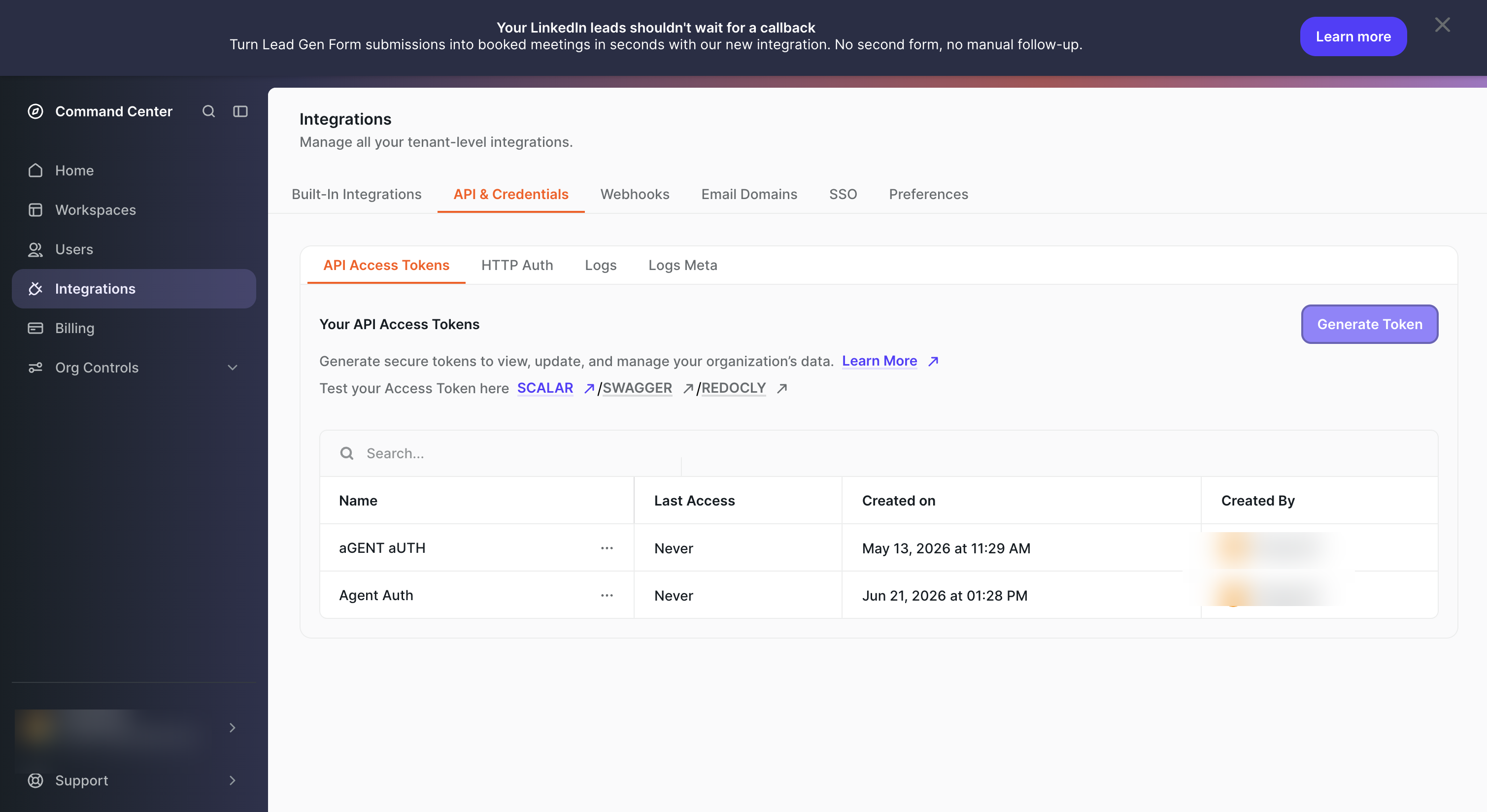
- Sign in to Chili Piper and go to Integrations in the left sidebar.
- Click the API & Credentials tab, then select API Access Tokens.
- Click Generate Token, give it a name (e.g.,
Agent Auth), and copy the token value immediately — it is only shown once.
-
Create a connection in Scalekit
- In Scalekit dashboard, go to AgentKit → Connections → Create Connection. Find ChiliPiper MCP and click Create.
- Note the Connection name — you will use this as
connection_namein your code (e.g.,chilipipermcp). - Click Save.
-
Add a connected account
Connected accounts link a specific user identifier in your system to their Chili Piper API token. Add them via the dashboard for testing, or via the Scalekit API in production.
Via dashboard (for testing)
- Open the connection you created and click the Connected Accounts tab → Add account.
- Fill in:
- Your User’s ID — a unique identifier for this user in your system (e.g.,
user_123) - Token — the Chili Piper API token from step 1
- Your User’s ID — a unique identifier for this user in your system (e.g.,
- Click Create Account.
Via API (for production)
import { Scalekit } from '@scalekit-sdk/node';const scalekit = new Scalekit(process.env.SCALEKIT_ENV_URL,process.env.SCALEKIT_CLIENT_ID,process.env.SCALEKIT_CLIENT_SECRET,);// Never hard-code credentials — read from secure storage or user inputconst chilipiperToken = getUserChilipiperToken(); // retrieve from your secure storeawait scalekit.actions.upsertConnectedAccount({connectionName: 'chilipipermcp',identifier: 'user_123',credentials: {username: chilipiperToken,},});import osfrom scalekit import ScalekitClientscalekit_client = ScalekitClient(env_url=os.environ["SCALEKIT_ENV_URL"],client_id=os.environ["SCALEKIT_CLIENT_ID"],client_secret=os.environ["SCALEKIT_CLIENT_SECRET"],)# Never hard-code credentials — read from secure storage or user inputchilipiper_token = get_user_chilipiper_token() # retrieve from your secure storescalekit_client.actions.upsert_connected_account(connection_name="chilipipermcp",identifier="user_123",credentials={"username": chilipiper_token},)
-
-
Make your first call
Section titled “Make your first call”quickstart.ts import { ScalekitClient } from '@scalekit-sdk/node'import 'dotenv/config'const scalekit = new ScalekitClient(process.env.SCALEKIT_ENV_URL,process.env.SCALEKIT_CLIENT_ID,process.env.SCALEKIT_CLIENT_SECRET,)const actions = scalekit.actionsconst connector = 'chilipipermcp'const identifier = 'user_123'// Make your first callconst result = await actions.executeTool({connector,identifier,toolName: 'chilipipermcp_campaign_list',toolInput: {},})console.log(result)quickstart.py import osfrom scalekit.client import ScalekitClientfrom dotenv import load_dotenvload_dotenv()scalekit_client = ScalekitClient(env_url=os.getenv("SCALEKIT_ENV_URL"),client_id=os.getenv("SCALEKIT_CLIENT_ID"),client_secret=os.getenv("SCALEKIT_CLIENT_SECRET"),)actions = scalekit_client.actionsconnection_name = "chilipipermcp"identifier = "user_123"# Make your first callresult = actions.execute_tool(tool_input={},tool_name="chilipipermcp_campaign_list",connection_name=connection_name,identifier=identifier,)print(result)
What you can do
Section titled “What you can do”Connect this agent connector to let your agent:
- Update webhook, web experience, scheduling link — Toggles a webhook’s enabled state (pause or resume deliveries), matched by its (triggerType, url) identity
- Secret webhook rotate — Generates a new webhook signing secret for the tenant and returns it
- List webhook, web experience, scheduling link — Returns all webhooks configured for the tenant
- Get webhook, web experience, meeting type — Returns the tenant’s webhook signing secret — the single key shared by all of the tenant’s webhooks that signs every delivery
- Delete webhook, web experience, team — Unsubscribes a webhook, matched by its (triggerType, url) identity; deliveries for that subscription stop immediately
- Create webhook, web experience, team — Subscribes a url to a meeting lifecycle event (MeetingCreated | MeetingUpdated | MeetingDeleted); each firing delivers a signed POST to that absolute https url
Tool list
Section titled “Tool list”Use the exact tool names from the Tool list below when you call execute_tool. If you’re not sure which name to use, list the tools available for the current user first.
chilipipermcp_assignment_table_definition_create#Creates the column definition (schema) for an assignment table. This must exist before any rows are written (via assignment-table-upsert). Declare the input columns (variables the rule matches on) and output columns (each fixed to a context: Record for distro, Meeting for concierge/handoff, Conversation for chat). Column keys are generated from names; reference them later when writing rows.
- workspaceId (req): the workspace to create the table in.
- assignmentTableId (req): the id to create the table under (path).
- name (req): human-readable table name.
- inputs (req): at least one input column — {name, required?, typeHint?}. typeHint is one of {type: "StringColumnType"|"NumberColumnType"|"BooleanColumnType"} or {type: "ArrayColumnType", ofType?}.
- outputs (opt): output columns — {name, context, required?}; context is one of "Record"|"Meeting"|"Conversation".
→
{id, name, inputs, outputs, allKeys, metadata: {revision: 1, ...}}
see: assignment-table-upsert (write the rows), assignment-table-definition-replace (change the schema)3 params
Creates the column definition (schema) for an assignment table. This must exist before any rows are written (via assignment-table-upsert). Declare the input columns (variables the rule matches on) and output columns (each fixed to a context: Record for distro, Meeting for concierge/handoff, Conversation for chat). Column keys are generated from names; reference them later when writing rows. - workspaceId (req): the workspace to create the table in. - assignmentTableId (req): the id to create the table under (path). - name (req): human-readable table name. - inputs (req): at least one input column — {name, required?, typeHint?}. typeHint is one of {type: "StringColumnType"|"NumberColumnType"|"BooleanColumnType"} or {type: "ArrayColumnType", ofType?}. - outputs (opt): output columns — {name, context, required?}; context is one of "Record"|"Meeting"|"Conversation". → {id, name, inputs, outputs, allKeys, metadata: {revision: 1, ...}} see: assignment-table-upsert (write the rows), assignment-table-definition-replace (change the schema)
assignmentTableIdstringrequiredNo description.bodyobjectrequiredNo description.workspaceIdstringrequiredNo description.chilipipermcp_assignment_table_definition_delete#Deletes the column definition for an assignment table at the specified revision ONLY. Uses optimistic concurrency: pass the current revision (re-fetch via assignment-table-definition-get right before calling). Any rules that reference this table will no longer resolve an assignment.
- workspaceId (req): the workspace that owns the table.
- assignmentTableId (req): the table's id.
- revision (req): the definition's current revision.
→ empty (204) on success
⚠ irreversible via API; a stale revision causes a conflict — re-fetch and retry
see: assignment-table-definition-get (get a fresh revision immediately before calling)3 params
Deletes the column definition for an assignment table at the specified revision ONLY. Uses optimistic concurrency: pass the current revision (re-fetch via assignment-table-definition-get right before calling). Any rules that reference this table will no longer resolve an assignment. - workspaceId (req): the workspace that owns the table. - assignmentTableId (req): the table's id. - revision (req): the definition's current revision. → empty (204) on success ⚠ irreversible via API; a stale revision causes a conflict — re-fetch and retry see: assignment-table-definition-get (get a fresh revision immediately before calling)
assignmentTableIdstringrequiredNo description.revisionintegerrequiredNo description.workspaceIdstringrequiredNo description.chilipipermcp_assignment_table_definition_get#Fetches one assignment-table definition (column schema) by its assignmentTableId. Use this to read the current column layout and a fresh revision before replacing the definition or patching a column. Use assignment-table-definition-list to browse.
- workspaceId (req): the workspace that owns the table.
- assignmentTableId (req): the table's id.
→
{id, name, inputs: [{key, name, required, typeHint?}], outputs: [{key, name, context, required}], allKeys, metadata: {revision, ...}}
see: assignment-table-definition-list (browse), assignment-table-definition-replace (replace schema), assignment-table-get (read the rows)2 params
Fetches one assignment-table definition (column schema) by its assignmentTableId. Use this to read the current column layout and a fresh revision before replacing the definition or patching a column. Use assignment-table-definition-list to browse. - workspaceId (req): the workspace that owns the table. - assignmentTableId (req): the table's id. → {id, name, inputs: [{key, name, required, typeHint?}], outputs: [{key, name, context, required}], allKeys, metadata: {revision, ...}} see: assignment-table-definition-list (browse), assignment-table-definition-replace (replace schema), assignment-table-get (read the rows)
assignmentTableIdstringrequiredNo description.workspaceIdstringrequiredNo description.chilipipermcp_assignment_table_definition_list#Browses the assignment-table definitions (column schemas) in a workspace so you can discover assignmentTableIds, revisions, and column keys before reading/writing rows. An assignment-table definition describes the table's input columns (the variables a rule matches on) and output columns (each pinned to a Record/Meeting/Conversation context). Paging defaults to page 0 / pageSize 10; optionally filter by name.
- workspaceId (req): the workspace whose definitions to list.
- name (opt): case-sensitive filter on the definition name.
→
{results: [{id, name, inputs: [{key, name, required, typeHint?}], outputs: [{key, name, context, required}], allKeys, metadata: {revision, ...}}], total, page, pageSize}
see: assignment-table-definition-get (fetch one), assignment-table-definition-create (add a definition)3 params
Browses the assignment-table definitions (column schemas) in a workspace so you can discover assignmentTableIds, revisions, and column keys before reading/writing rows. An assignment-table definition describes the table's input columns (the variables a rule matches on) and output columns (each pinned to a Record/Meeting/Conversation context). Paging defaults to page 0 / pageSize 10; optionally filter by name. - workspaceId (req): the workspace whose definitions to list. - name (opt): case-sensitive filter on the definition name. → {results: [{id, name, inputs: [{key, name, required, typeHint?}], outputs: [{key, name, context, required}], allKeys, metadata: {revision, ...}}], total, page, pageSize} see: assignment-table-definition-get (fetch one), assignment-table-definition-create (add a definition)
workspaceIdstringrequiredNo description.namestringoptionalNo description.paginationobjectoptionalNo description.chilipipermcp_assignment_table_definition_patch_column#Renames a single column in an assignment-table definition without replacing the whole schema. Uses optimistic concurrency: pass the current revision (re-fetch via assignment-table-definition-get right before calling). The column is addressed by its stable key, so renaming does not break existing rows.
- workspaceId (req): the workspace that owns the table.
- assignmentTableId (req): the table's id.
- columnKey (req): the stable key of the column to rename (from the definition's allKeys / inputs / outputs).
- revision (req): the definition's current revision.
- newName (opt): the new column name; omit to leave the name unchanged.
→
{id, name, inputs, outputs, allKeys, metadata: {revision, ...}}
⚠ a stale revision causes a conflict — re-fetch and retry
see: assignment-table-definition-replace (replace the whole schema)5 params
Renames a single column in an assignment-table definition without replacing the whole schema. Uses optimistic concurrency: pass the current revision (re-fetch via assignment-table-definition-get right before calling). The column is addressed by its stable key, so renaming does not break existing rows. - workspaceId (req): the workspace that owns the table. - assignmentTableId (req): the table's id. - columnKey (req): the stable key of the column to rename (from the definition's allKeys / inputs / outputs). - revision (req): the definition's current revision. - newName (opt): the new column name; omit to leave the name unchanged. → {id, name, inputs, outputs, allKeys, metadata: {revision, ...}} ⚠ a stale revision causes a conflict — re-fetch and retry see: assignment-table-definition-replace (replace the whole schema)
assignmentTableIdstringrequiredNo description.bodyobjectrequiredNo description.columnKeystringrequiredNo description.revisionintegerrequiredNo description.workspaceIdstringrequiredNo description.chilipipermcp_assignment_table_definition_replace#Replaces the whole column definition for an assignment table. This is a full replace of name+inputs+outputs, not a merge; column ids (keys) are preserved by name so existing rows keep matching where names are unchanged. Uses optimistic concurrency: pass the current revision (re-fetch it via assignment-table-definition-get right before calling). Removing or renaming a column can invalidate existing rows.
- workspaceId (req): the workspace that owns the table.
- assignmentTableId (req): the table's id.
- revision (req): the definition's current revision (from assignment-table-definition-get).
- name / inputs / outputs (req): the new schema (same shape as create).
→
{id, name, inputs, outputs, allKeys, metadata: {revision, ...}}
⚠ full replace; a stale revision causes a conflict — re-fetch and retry
see: assignment-table-definition-patch-column (rename a single column instead), assignment-table-definition-get4 params
Replaces the whole column definition for an assignment table. This is a full replace of name+inputs+outputs, not a merge; column ids (keys) are preserved by name so existing rows keep matching where names are unchanged. Uses optimistic concurrency: pass the current revision (re-fetch it via assignment-table-definition-get right before calling). Removing or renaming a column can invalidate existing rows. - workspaceId (req): the workspace that owns the table. - assignmentTableId (req): the table's id. - revision (req): the definition's current revision (from assignment-table-definition-get). - name / inputs / outputs (req): the new schema (same shape as create). → {id, name, inputs, outputs, allKeys, metadata: {revision, ...}} ⚠ full replace; a stale revision causes a conflict — re-fetch and retry see: assignment-table-definition-patch-column (rename a single column instead), assignment-table-definition-get
assignmentTableIdstringrequiredNo description.bodyobjectrequiredNo description.revisionintegerrequiredNo description.workspaceIdstringrequiredNo description.chilipipermcp_assignment_table_delete#Deletes the rows of an assignment table at the specified revision ONLY (the DEFINITION is left intact — remove it separately via assignment-table-definition-delete). Uses optimistic concurrency: pass the table's current revision (re-fetch via assignment-table-get right before calling).
- workspaceId (req): the workspace that owns the table.
- assignmentTableId (req): the table's id.
- revision (req): the table's current revision.
→ empty (204) on success
⚠ irreversible via API; a stale revision causes a conflict — re-fetch and retry
see: assignment-table-get (get a fresh revision immediately before calling), assignment-table-definition-delete (remove the schema too)3 params
Deletes the rows of an assignment table at the specified revision ONLY (the DEFINITION is left intact — remove it separately via assignment-table-definition-delete). Uses optimistic concurrency: pass the table's current revision (re-fetch via assignment-table-get right before calling). - workspaceId (req): the workspace that owns the table. - assignmentTableId (req): the table's id. - revision (req): the table's current revision. → empty (204) on success ⚠ irreversible via API; a stale revision causes a conflict — re-fetch and retry see: assignment-table-get (get a fresh revision immediately before calling), assignment-table-definition-delete (remove the schema too)
assignmentTableIdstringrequiredNo description.revisionintegerrequiredNo description.workspaceIdstringrequiredNo description.chilipipermcp_assignment_table_get#Fetches the rows (data) of a single assignment table by its id. Each row maps input-column keys to values and output-column keys to a resolved assignment (a user or a distribution). Read the table's DEFINITION first (assignment-table-definition-get) to learn the column keys.
- workspaceId (req): the workspace that owns the table.
- assignmentTableId (req): the table's id.
→
{id, rows: [{inputs: {<columnKey>: <value>}, outputs: {<columnKey>: {tableOutType, value, humanReadableName?, context?}}}], metadata: {revision, ...}}
see: assignment-table-get-by-ids (fetch several at once), assignment-table-upsert (write rows), assignment-table-definition-get (read the schema)2 params
Fetches the rows (data) of a single assignment table by its id. Each row maps input-column keys to values and output-column keys to a resolved assignment (a user or a distribution). Read the table's DEFINITION first (assignment-table-definition-get) to learn the column keys. - workspaceId (req): the workspace that owns the table. - assignmentTableId (req): the table's id. → {id, rows: [{inputs: {<columnKey>: <value>}, outputs: {<columnKey>: {tableOutType, value, humanReadableName?, context?}}}], metadata: {revision, ...}} see: assignment-table-get-by-ids (fetch several at once), assignment-table-upsert (write rows), assignment-table-definition-get (read the schema)
assignmentTableIdstringrequiredNo description.workspaceIdstringrequiredNo description.chilipipermcp_assignment_table_get_by_ids#Fetches the rows of several assignment tables in one call. Ids without a stored table are omitted from the response (no error). Useful to hydrate the tables referenced by a set of assignment rules.
- workspaceId (req): the workspace that owns the tables.
- ids (req): one or more assignmentTableIds.
→
{<assignmentTableId>: {id, rows, metadata}}
Note: ids with no stored table are omitted from the map.
see: assignment-table-get (fetch a single table)2 params
Fetches the rows of several assignment tables in one call. Ids without a stored table are omitted from the response (no error). Useful to hydrate the tables referenced by a set of assignment rules. - workspaceId (req): the workspace that owns the tables. - ids (req): one or more assignmentTableIds. → {<assignmentTableId>: {id, rows, metadata}} Note: ids with no stored table are omitted from the map. see: assignment-table-get (fetch a single table)
workspaceIdstringrequiredNo description.idsarrayoptionalNo description.chilipipermcp_assignment_table_upsert#Creates or replaces ALL rows of an assignment table, validating them against the persisted definition. This is a full replace of the table's rows, not an append. The table's DEFINITION must already exist (assignment-table-definition-create) — send definitionRevision equal to that definition's current revision so a write built against a stale schema is rejected. Optimistic concurrency on the table itself uses revision: omit it on the first upsert, otherwise pass the table's current revision.
- workspaceId (req): the workspace that owns the table.
- assignmentTableId (req): the table's id.
- revision (opt): the table's current revision; omit on the first upsert.
- table (req): {rows: [{inputs, outputs}]} — at least one row. inputs map input-column keys to JSON values; outputs map output-column keys to {tableOutType: "User"|"Distribution", value: {type: "UserAssignment", userId} | {type: "DistributionAssignment", distributionId}, humanReadableName?, context?}.
- definitionRevision (req): revision of the definition the rows were authored against.
→
{id, rows, metadata: {revision, ...}}
⚠ full replace of rows; a stale table or definition revision causes a conflict — re-fetch and retry
see: assignment-table-definition-get (get the definitionRevision), assignment-table-get (get the table revision)4 params
Creates or replaces ALL rows of an assignment table, validating them against the persisted definition. This is a full replace of the table's rows, not an append. The table's DEFINITION must already exist (assignment-table-definition-create) — send definitionRevision equal to that definition's current revision so a write built against a stale schema is rejected. Optimistic concurrency on the table itself uses revision: omit it on the first upsert, otherwise pass the table's current revision. - workspaceId (req): the workspace that owns the table. - assignmentTableId (req): the table's id. - revision (opt): the table's current revision; omit on the first upsert. - table (req): {rows: [{inputs, outputs}]} — at least one row. inputs map input-column keys to JSON values; outputs map output-column keys to {tableOutType: "User"|"Distribution", value: {type: "UserAssignment", userId} | {type: "DistributionAssignment", distributionId}, humanReadableName?, context?}. - definitionRevision (req): revision of the definition the rows were authored against. → {id, rows, metadata: {revision, ...}} ⚠ full replace of rows; a stale table or definition revision causes a conflict — re-fetch and retry see: assignment-table-definition-get (get the definitionRevision), assignment-table-get (get the table revision)
assignmentTableIdstringrequiredNo description.bodyobjectrequiredNo description.workspaceIdstringrequiredNo description.revisionintegeroptionalNo description.chilipipermcp_availability_configured#Batch, side-effect-free check of whether each user has configured their availability. A user is "configured" when they have at least one custom schedule, or their default schedule's working hours / timezone differ from the bootstrap default (9-5, timezone synced from calendar). Users with no persisted schedule (and users not present in the request) are returned as false; reading does not create a default schedule for users that lack one.
- userIds: the users to check.
→
[{userId, availabilityConfigured}]
see: user-find (resolve userIds), availability-slots-v21 param
Batch, side-effect-free check of whether each user has configured their availability. A user is "configured" when they have at least one custom schedule, or their default schedule's working hours / timezone differ from the bootstrap default (9-5, timezone synced from calendar). Users with no persisted schedule (and users not present in the request) are returned as false; reading does not create a default schedule for users that lack one. - userIds: the users to check. → [{userId, availabilityConfigured}] see: user-find (resolve userIds), availability-slots-v2
userIdsarrayoptionalUsers to check; each is returned with whether they have configured their availability.chilipipermcp_availability_slots_v2#Returns bookable start times for a meeting type over a time window, one page at a time, so a wide window never produces a single oversized response. Prefer this over the deprecated availability-slots (which had the same attendee model but no paging); page through wide windows rather than narrowing the interval.
- attendees: non-empty list of who joins the meeting, discriminated by `type`:
{type: "ManuallyAssigned", userId, required: true|false}
{type: "DistributionAssignee", distributionId, required: true|false, userIds (opt): ranked shortlist}
{type: "AssignedViaTeam", userId, teamId, required: true|false}
{type: "AdditionalAttendee", userId, required: true|false}
Note: each attendee's `required` flag is mandatory (omitting it returns 400) and gates the slot — `true` hides slots where that attendee is busy.
- expectedHost: {type: "User", userId} or {type: "AssigneeFromDistribution", distributionId}.
- meetingTypeOverride (opt): inline duration/buffer overrides; omit or pass null to use meeting-type defaults.
- interval: {startsAt: ISO-8601, duration: "7 days"/"P7D"/etc.}.
- pagination (opt): {page (0-indexed, default 0), pageSize (default 100, max 500)}.
→
{results: [{startTime, attendees}], total, page, pageSize}
Note: slots are ordered by startTime; keep requesting page+1 until you have collected `total` slots.
see: distribution-list, user-find6 params
Returns bookable start times for a meeting type over a time window, one page at a time, so a wide window never produces a single oversized response. Prefer this over the deprecated availability-slots (which had the same attendee model but no paging); page through wide windows rather than narrowing the interval. - attendees: non-empty list of who joins the meeting, discriminated by `type`: {type: "ManuallyAssigned", userId, required: true|false} {type: "DistributionAssignee", distributionId, required: true|false, userIds (opt): ranked shortlist} {type: "AssignedViaTeam", userId, teamId, required: true|false} {type: "AdditionalAttendee", userId, required: true|false} Note: each attendee's `required` flag is mandatory (omitting it returns 400) and gates the slot — `true` hides slots where that attendee is busy. - expectedHost: {type: "User", userId} or {type: "AssigneeFromDistribution", distributionId}. - meetingTypeOverride (opt): inline duration/buffer overrides; omit or pass null to use meeting-type defaults. - interval: {startsAt: ISO-8601, duration: "7 days"/"P7D"/etc.}. - pagination (opt): {page (0-indexed, default 0), pageSize (default 100, max 500)}. → {results: [{startTime, attendees}], total, page, pageSize} Note: slots are ordered by startTime; keep requesting page+1 until you have collected `total` slots. see: distribution-list, user-find
attendeesarrayrequiredAttendees to schedule; availability is the intersection of the required ones.expectedHoststringrequiredNo description.intervalobjectrequiredNo description.meetingTypeRefobjectrequiredNo description.meetingTypeOverrideobjectoptionalNo description.paginationobjectoptionalNo description.chilipipermcp_availability-slots#Returns available meeting slots for any attendee mix (round-robin, manual, team-assigned, additional).5 params
Returns available meeting slots for any attendee mix (round-robin, manual, team-assigned, additional).
attendeesarrayrequiredNo description.expectedHoststringrequiredNo description.intervalstringrequiredNo description.meetingTypeRefstringrequiredNo description.meetingTypeOverridestringoptionalNo description.chilipipermcp_campaign_list#Lists Salesforce campaigns for the tenant's connected org so you can find the `campaignId` used by a router's "Add to Campaign" CRM action. Salesforce-only. Use this to browse/paginate the full set; for large orgs prefer campaign-search.
- isActive (opt): filter to active (true) or inactive (false) campaigns; omit for all
- page (opt, default 0), pageSize (opt, default 10)
→
{results: [{id, name, status, startDate, endDate, active}], total, page, pageSize}
Note: `id` is the Salesforce campaign id to drop into the Add-to-Campaign action's campaignId
⚠ Salesforce paginates via SOQL OFFSET, capped at 2000 rows — beyond that use campaign-search
⚠ 4xx if Salesforce is not connected for the tenant
see: campaign-search (full-text search, preferred for large orgs)2 params
Lists Salesforce campaigns for the tenant's connected org so you can find the `campaignId` used by a router's "Add to Campaign" CRM action. Salesforce-only. Use this to browse/paginate the full set; for large orgs prefer campaign-search. - isActive (opt): filter to active (true) or inactive (false) campaigns; omit for all - page (opt, default 0), pageSize (opt, default 10) → {results: [{id, name, status, startDate, endDate, active}], total, page, pageSize} Note: `id` is the Salesforce campaign id to drop into the Add-to-Campaign action's campaignId ⚠ Salesforce paginates via SOQL OFFSET, capped at 2000 rows — beyond that use campaign-search ⚠ 4xx if Salesforce is not connected for the tenant see: campaign-search (full-text search, preferred for large orgs)
isActivebooleanoptionalNo description.paginationobjectoptionalNo description.chilipipermcp_campaign_search#Full-text search of Salesforce campaigns for the tenant's connected org so you can find the `campaignId` used by a router's "Add to Campaign" CRM action. Salesforce-only. Preferred over campaign-list for large orgs.
- searchText (required): text to match against campaign names; must be at least 2 characters
- isActive (opt): filter to active (true) or inactive (false) campaigns; omit for all
- page (opt, default 0), pageSize (opt, default 10)
→
{results: [{id, name, status, startDate, endDate, active}], page, pageSize}
Note: `id` is the Salesforce campaign id to drop into the Add-to-Campaign action's campaignId; search does not return a total
⚠ 4xx if searchText is shorter than 2 characters, or if Salesforce is not connected for the tenant
see: campaign-list (browse all campaigns)3 params
Full-text search of Salesforce campaigns for the tenant's connected org so you can find the `campaignId` used by a router's "Add to Campaign" CRM action. Salesforce-only. Preferred over campaign-list for large orgs. - searchText (required): text to match against campaign names; must be at least 2 characters - isActive (opt): filter to active (true) or inactive (false) campaigns; omit for all - page (opt, default 0), pageSize (opt, default 10) → {results: [{id, name, status, startDate, endDate, active}], page, pageSize} Note: `id` is the Salesforce campaign id to drop into the Add-to-Campaign action's campaignId; search does not return a total ⚠ 4xx if searchText is shorter than 2 characters, or if Salesforce is not connected for the tenant see: campaign-list (browse all campaigns)
searchTextstringrequiredNo description.isActivebooleanoptionalNo description.paginationobjectoptionalNo description.chilipipermcp_chat_logs#Reads a workspace's Chat AI conversation logs over a time window — the read-only audit trail of who chatted, how they were routed, and what got booked. Each entry carries the full bot/guest transcript, the routing outcome, and any meetings booked. Use it to inspect or debug live chat routing after the fact. The start/end window (ISO-8601) spans at most 30 days. Pass playbookId (repeatable) to restrict to specific chat playbooks. Narrow to a specific guest or rule with guestEmail (case-insensitive exact match), guestId (exact match), ruleId (exact match on any routing rule executed in the session; stable across rule renames), and/or ruleName (exact match on any routing rule executed in the session). Pages start at 0; pageSize defaults to 10, max 50.
→
{results: [{guestId, sessionId, playbookId, guestEmail, startedAt, endedAt, ended, targetedUrl, respondedUrl, routingOutcome, ruleId, ruleName, conversationAssigneeId, routedAt, repJoined, chatAiStarted, meetingBooked, meetings: [{assigneeId, origin, scheduledAt}], messages: [{role, content, timestamp}]}], total, page, pageSize}
Note: routingOutcome is one of Routed | NotRouted | Abandoned; role is one of Bot | Guest; meetings[N].origin is one of Journey | Inbox | NoMeeting
see: workspace-list (find workspaceId)10 params
Reads a workspace's Chat AI conversation logs over a time window — the read-only audit trail of who chatted, how they were routed, and what got booked. Each entry carries the full bot/guest transcript, the routing outcome, and any meetings booked. Use it to inspect or debug live chat routing after the fact. The start/end window (ISO-8601) spans at most 30 days. Pass playbookId (repeatable) to restrict to specific chat playbooks. Narrow to a specific guest or rule with guestEmail (case-insensitive exact match), guestId (exact match), ruleId (exact match on any routing rule executed in the session; stable across rule renames), and/or ruleName (exact match on any routing rule executed in the session). Pages start at 0; pageSize defaults to 10, max 50. → {results: [{guestId, sessionId, playbookId, guestEmail, startedAt, endedAt, ended, targetedUrl, respondedUrl, routingOutcome, ruleId, ruleName, conversationAssigneeId, routedAt, repJoined, chatAiStarted, meetingBooked, meetings: [{assigneeId, origin, scheduledAt}], messages: [{role, content, timestamp}]}], total, page, pageSize} Note: routingOutcome is one of Routed | NotRouted | Abandoned; role is one of Bot | Guest; meetings[N].origin is one of Journey | Inbox | NoMeeting see: workspace-list (find workspaceId)
endstringrequiredNo description.startstringrequiredNo description.workspaceIdstringrequiredNo description.guestEmailstringoptionalNo description.guestIdstringoptionalNo description.pageintegeroptionalNo description.pageSizeintegeroptionalNo description.playbookIdsarrayoptionalNo description.ruleIdstringoptionalNo description.ruleNamestringoptionalNo description.chilipipermcp_concierge_call_logs#Lists a Concierge router's phone-call flows over a time window — each flow is one inbound routing that dialed one or more reps, with the per-rep call legs nested underneath. start/end are ISO-8601 and the window may span at most 30 days. Newest flows first.
→
[{flowId, routingId, routerId, routerName, totalCallDuration, createdAt, updatedAt, calls: [{userId, status, twilioCallSid, createdAt, updatedAt}]}]
Note: status is one of MissingPhoneNumber, Queued, Ringing, InProgress, Completed, Busy, Failed, NoAnswer, Canceled
see: concierge-list-routers (find routerId+workspaceId)6 params
Lists a Concierge router's phone-call flows over a time window — each flow is one inbound routing that dialed one or more reps, with the per-rep call legs nested underneath. start/end are ISO-8601 and the window may span at most 30 days. Newest flows first. → [{flowId, routingId, routerId, routerName, totalCallDuration, createdAt, updatedAt, calls: [{userId, status, twilioCallSid, createdAt, updatedAt}]}] Note: status is one of MissingPhoneNumber, Queued, Ringing, InProgress, Completed, Busy, Failed, NoAnswer, Canceled see: concierge-list-routers (find routerId+workspaceId)
endstringrequiredNo description.routerIdstringrequiredNo description.startstringrequiredNo description.workspaceIdstringrequiredNo description.pageintegeroptionalNo description.pageSizeintegeroptionalNo description.chilipipermcp_concierge_router_create#Creates a Concierge router and publishes it live in one step — there is no unpublished-draft state via the API. workspaceId must be a team workspace of this tenant (400 otherwise). The URL slug is derived from name on publish (there is no separate slug field). Triggers are a PRODUCT of optional kinds — set a webform (either form for a Chili-hosted form OR thirdPartyForm for an external form — mutually exclusive), inAppButton, and routerLink in any combination; supplying NONE auto-generates a minimal email-only Chili webform. A routerLink is what gives the router a shareable Router Link URL. branding and localizations are optional.
- routing (req): ordered rules evaluated top-down, plus an optional catch-all fallback. Each row's rule, when it matches, runs that row's `outcome`; the catch-all `outcome` runs when no row matches:
{routes: [{ruleId, outcome}], catchAll?: outcome}
outcome (one of):
{type: "Schedule", assignment, meetingTypeId, timeout?, crmActions?}
{type: "Redirect", url}
Schedule assigns the lead and books a meeting type. assignment is {type: "Distribution", distributionId} (round-robin / ownership / whatever the distribution does) or {type: "User", userId} (a specific host). timeout (opt) {minutes, onTimeout} sets the no-show fallback; onTimeout is {type: "Landing"} or {type: "Url", url}; omit timeout for the default (10 min → Landing). crmActions (opt) is an ordered post-booking chain, each {type: "ConvertLead"}, {type: "Notify", slackChannel?} (omit slackChannel to notify the assigned host instead of a named channel), {type: "AddToCampaign", campaignId, memberStatus} (add the matched Salesforce lead/contact to a campaign with that member status; find campaignId with campaign-list / campaign-search), {type: "SalesforceUpdateFields", contact:[{object,field,value}], lead:[{field,value}]} (write field values onto the matched Salesforce contact/lead), {type: "HubspotUpdateFields", contact:[{object,field,value}]} (write property values onto the matched HubSpot record), {type: "SalesforceUpsertRecord", settings:{noMatch,whenMatch}} (create/update the matched Salesforce lead/contact), or {type: "HubspotUpsertRecord", settings:{noMatch,whenMatch}} (create/update the matched HubSpot contact), {type: "SalesforceUpdateOwnership", contact:[{object,field}], lead:[{field}]} (set the record owner to the booked host), or {type: "HubspotUpdateOwnership", contact:[{object,field}]} (set the record owner to the booked host). Redirect sends the lead to a URL instead of booking. ruleId is required on every row; an always-match route is the catchAll. catchAll is optional — a router with no catch-all simply has no fallback when no row matches. Provide at least one row or a catchAll (an empty matrix with neither is rejected).
- form (opt): the Chili-hosted guest form fields the lead fills in; MUST include the email field (PersonEmail) or the create is rejected. Omit for a default email-only form:
[{dataField, label, description?, required?, hidden?}]
Note: dataField is a CRM data-field reference — a default field name (e.g. PersonEmail, PersonFirstName) or a custom-field UUID; a made-up name is rejected (400). label is the field's display name; required toggles whether the guest must fill it. hidden (opt) is a PREFILLED value (a string) stored on the field but NOT shown to the guest — it is a value, not a show/hide flag; omit it for a normal visible field.
- thirdPartyForm (opt): a THIRD-PARTY (external) webform — a form hosted on the customer's own website (e.g. an embedded HubSpot/Marketo form) that posts to Chili Piper; the mapping from each external form field name to a CP data field. MUST include the email field (PersonEmail). Mutually exclusive with form (a router has a single webform):
[{formFieldName, dataField, label?}]
Note: formFieldName is the external form field's submitted name (e.g. "0-1/email"); dataField is a CRM data-field reference (as for form); label (opt) is a display label for a programmatic field name. A third-party form's enrichment waterfall is not settable via the API (preserved if already configured in the Concierge app).
- inAppButton (opt): an in-app-button trigger — the data fields the button collects; MUST include the email field (PersonEmail):
[{dataField}]
- routerLink (opt): a router-link trigger — gives the router a shareable Router Link URL; the fields its form collects; MUST include the email field (PersonEmail):
[{dataField, label, required?, hidden?}]
Note: dataField/label/required/hidden are as for form. A router-link field's enrichment waterfall is not settable via the API (preserved if already configured in the Concierge app).
- branding (opt): the booking page's cover/heading/language — {coverImage?, headingText?, language?}
- localizations (opt): per-language text overrides — {"<lang-tag>": {"<key>": "<text>"}}
→
{id, workspaceId, name?, slug?, routing: {known, representable, rows: [{ruleId?, ruleType?, outcome}], catchAll?: {outcome}}, form?, thirdPartyForm?, inAppButton?, routerLink?, branding?, localizations?}
Note: the returned routing is the lossy per-row summary (same shape as concierge-router-get), not the matrix you sent; form/thirdPartyForm/inAppButton/routerLink/branding/localizations echo the created config (same shape as concierge-router-get)
⚠ if the final publish step fails the router is left behind as an UNPUBLISHED draft (typed 422); retrying the create mints ANOTHER draft — fix or delete the leftover in the Concierge app
see: concierge-list-routers (find a workspaceId), rule-list (find ruleIds), distribution-list (find distributionIds), user-find (find userIds), meeting-type-list (find meetingTypeIds), concierge-router-update (replace config afterwards)9 params
Creates a Concierge router and publishes it live in one step — there is no unpublished-draft state via the API. workspaceId must be a team workspace of this tenant (400 otherwise). The URL slug is derived from name on publish (there is no separate slug field). Triggers are a PRODUCT of optional kinds — set a webform (either form for a Chili-hosted form OR thirdPartyForm for an external form — mutually exclusive), inAppButton, and routerLink in any combination; supplying NONE auto-generates a minimal email-only Chili webform. A routerLink is what gives the router a shareable Router Link URL. branding and localizations are optional. - routing (req): ordered rules evaluated top-down, plus an optional catch-all fallback. Each row's rule, when it matches, runs that row's `outcome`; the catch-all `outcome` runs when no row matches: {routes: [{ruleId, outcome}], catchAll?: outcome} outcome (one of): {type: "Schedule", assignment, meetingTypeId, timeout?, crmActions?} {type: "Redirect", url} Schedule assigns the lead and books a meeting type. assignment is {type: "Distribution", distributionId} (round-robin / ownership / whatever the distribution does) or {type: "User", userId} (a specific host). timeout (opt) {minutes, onTimeout} sets the no-show fallback; onTimeout is {type: "Landing"} or {type: "Url", url}; omit timeout for the default (10 min → Landing). crmActions (opt) is an ordered post-booking chain, each {type: "ConvertLead"}, {type: "Notify", slackChannel?} (omit slackChannel to notify the assigned host instead of a named channel), {type: "AddToCampaign", campaignId, memberStatus} (add the matched Salesforce lead/contact to a campaign with that member status; find campaignId with campaign-list / campaign-search), {type: "SalesforceUpdateFields", contact:[{object,field,value}], lead:[{field,value}]} (write field values onto the matched Salesforce contact/lead), {type: "HubspotUpdateFields", contact:[{object,field,value}]} (write property values onto the matched HubSpot record), {type: "SalesforceUpsertRecord", settings:{noMatch,whenMatch}} (create/update the matched Salesforce lead/contact), or {type: "HubspotUpsertRecord", settings:{noMatch,whenMatch}} (create/update the matched HubSpot contact), {type: "SalesforceUpdateOwnership", contact:[{object,field}], lead:[{field}]} (set the record owner to the booked host), or {type: "HubspotUpdateOwnership", contact:[{object,field}]} (set the record owner to the booked host). Redirect sends the lead to a URL instead of booking. ruleId is required on every row; an always-match route is the catchAll. catchAll is optional — a router with no catch-all simply has no fallback when no row matches. Provide at least one row or a catchAll (an empty matrix with neither is rejected). - form (opt): the Chili-hosted guest form fields the lead fills in; MUST include the email field (PersonEmail) or the create is rejected. Omit for a default email-only form: [{dataField, label, description?, required?, hidden?}] Note: dataField is a CRM data-field reference — a default field name (e.g. PersonEmail, PersonFirstName) or a custom-field UUID; a made-up name is rejected (400). label is the field's display name; required toggles whether the guest must fill it. hidden (opt) is a PREFILLED value (a string) stored on the field but NOT shown to the guest — it is a value, not a show/hide flag; omit it for a normal visible field. - thirdPartyForm (opt): a THIRD-PARTY (external) webform — a form hosted on the customer's own website (e.g. an embedded HubSpot/Marketo form) that posts to Chili Piper; the mapping from each external form field name to a CP data field. MUST include the email field (PersonEmail). Mutually exclusive with form (a router has a single webform): [{formFieldName, dataField, label?}] Note: formFieldName is the external form field's submitted name (e.g. "0-1/email"); dataField is a CRM data-field reference (as for form); label (opt) is a display label for a programmatic field name. A third-party form's enrichment waterfall is not settable via the API (preserved if already configured in the Concierge app). - inAppButton (opt): an in-app-button trigger — the data fields the button collects; MUST include the email field (PersonEmail): [{dataField}] - routerLink (opt): a router-link trigger — gives the router a shareable Router Link URL; the fields its form collects; MUST include the email field (PersonEmail): [{dataField, label, required?, hidden?}] Note: dataField/label/required/hidden are as for form. A router-link field's enrichment waterfall is not settable via the API (preserved if already configured in the Concierge app). - branding (opt): the booking page's cover/heading/language — {coverImage?, headingText?, language?} - localizations (opt): per-language text overrides — {"<lang-tag>": {"<key>": "<text>"}} → {id, workspaceId, name?, slug?, routing: {known, representable, rows: [{ruleId?, ruleType?, outcome}], catchAll?: {outcome}}, form?, thirdPartyForm?, inAppButton?, routerLink?, branding?, localizations?} Note: the returned routing is the lossy per-row summary (same shape as concierge-router-get), not the matrix you sent; form/thirdPartyForm/inAppButton/routerLink/branding/localizations echo the created config (same shape as concierge-router-get) ⚠ if the final publish step fails the router is left behind as an UNPUBLISHED draft (typed 422); retrying the create mints ANOTHER draft — fix or delete the leftover in the Concierge app see: concierge-list-routers (find a workspaceId), rule-list (find ruleIds), distribution-list (find distributionIds), user-find (find userIds), meeting-type-list (find meetingTypeIds), concierge-router-update (replace config afterwards)
namestringrequiredCustomer-facing router name; the slug is derived from it on publish.routingobjectrequiredNo description.workspaceIdstringrequiredNo description.brandingobjectoptionalCover image, heading and language for the routing page.formarrayoptionalChili webform guest fields; the mapping must include the email field (PersonEmail).inAppButtonarrayoptionalIn-app-button trigger field mappings; the mapping must include the email field (PersonEmail).localizationsobjectoptionalPer-language string overrides for the routing page.routerLinkarrayoptionalRouter-link trigger field mappings (yields a shareable Router Link URL); must include the email field (PersonEmail).thirdPartyFormarrayoptionalThird-party (external) webform field mappings (externalFieldName to dataField); must include PersonEmail. Mutually exclusive with form.chilipipermcp_concierge_router_delete#Deletes a Concierge router by id.
- routerId (req): the router's id (path)
⚠ irreversible via API; any embeds or links pointing at this router stop working
see: concierge-list-routers or concierge-router-get (confirm the id before deleting)1 param
Deletes a Concierge router by id. - routerId (req): the router's id (path) ⚠ irreversible via API; any embeds or links pointing at this router stop working see: concierge-list-routers or concierge-router-get (confirm the id before deleting)
routerIdstringrequiredNo description.chilipipermcp_concierge_router_get#Fetches one Concierge router: its identity, a lossy per-row summary of its routing, and its full-config dimensions (guest form, branding/cover, localizations). Call this before concierge-router-update to check routing.representable (whether a routing replace is accepted) and to see whether the webform is a Chili form (form) or a third-party form (thirdPartyForm).
→
{id, workspaceId, name?, slug?, routing: {known, representable, rows: [{ruleId?, ruleType?, outcome}], catchAll?: {outcome}}, form?, thirdPartyForm?, inAppButton?, routerLink?, branding?, localizations?}
outcome (one of): {type: "Schedule", distributionId?, userId?, meetingTypeId?, crmActions?} | {type: "Redirect", url?} | {type: "OwnerAssign"} | {type: "ContactOptions"} | {type: "CrmAction"} | {type: "Other", kind}
form: {representable, fields: [{dataField, label, description?, required, hidden?}], readOnlyTriggers: [string]}
thirdPartyForm: {fields: [{formFieldName, dataField, label?}]}
inAppButton: {fields: [{dataField}]}
routerLink: {fields: [{dataField, label, required, hidden?}]}
branding: {coverImage?, headingText?, language?}
localizations: {"<lang-tag>": {"<key>": "<text>"}}
Note: on a Schedule, crmActions (when present) is the readable post-booking chain — each {type: "ConvertLead"}, {type: "Notify", slackChannel?}, {type: "AddToCampaign", campaignId, memberStatus}, {type: "SalesforceUpdateFields", contact, lead}, {type: "HubspotUpdateFields", contact}, {type: "SalesforceUpsertRecord", settings}, {type: "HubspotUpsertRecord", settings}, {type: "SalesforceUpdateOwnership", contact, lead}, or {type: "HubspotUpdateOwnership", contact}; it is absent (null) when the chain uses a CRM action Edge can't model (then representable is false)
Note: the routing summary is lossy by design — it NAMES each row's outcome (including ones Edge can't itself produce, e.g. Redirect/CrmAction) so you can see what the router does even when it was built in the app
Note: routing.representable is true only when the current routing — both the draft tree and the published tree — is exactly what Edge's create/update would have produced; when false, an update with a new routing may be rejected (edit it in the Concierge app instead). A router that has no routing tree yet also reports representable=false, but an update setting routing on it is still accepted (nothing is destroyed).
Note: form.representable is true when the router's webform is a Chili form (or absent) and false when it is a third-party form — then form.fields is empty and the mapping is surfaced under thirdPartyForm instead (a list of externalFieldName→dataField). Both a Chili form (via form) and a third-party form (via thirdPartyForm) are editable via concierge-router-update, and supplying either one converts a webform of the other kind. form.readOnlyTriggers is retained for compatibility but is now always empty. inAppButton/routerLink (when present) are the router's in-app-button / router-link triggers and ARE editable. branding/localizations are absent when unset.
see: concierge-list-routers (browse to find a routerId), concierge-router-update (replace routing/form/branding/localizations)1 param
Fetches one Concierge router: its identity, a lossy per-row summary of its routing, and its full-config dimensions (guest form, branding/cover, localizations). Call this before concierge-router-update to check routing.representable (whether a routing replace is accepted) and to see whether the webform is a Chili form (form) or a third-party form (thirdPartyForm). → {id, workspaceId, name?, slug?, routing: {known, representable, rows: [{ruleId?, ruleType?, outcome}], catchAll?: {outcome}}, form?, thirdPartyForm?, inAppButton?, routerLink?, branding?, localizations?} outcome (one of): {type: "Schedule", distributionId?, userId?, meetingTypeId?, crmActions?} | {type: "Redirect", url?} | {type: "OwnerAssign"} | {type: "ContactOptions"} | {type: "CrmAction"} | {type: "Other", kind} form: {representable, fields: [{dataField, label, description?, required, hidden?}], readOnlyTriggers: [string]} thirdPartyForm: {fields: [{formFieldName, dataField, label?}]} inAppButton: {fields: [{dataField}]} routerLink: {fields: [{dataField, label, required, hidden?}]} branding: {coverImage?, headingText?, language?} localizations: {"<lang-tag>": {"<key>": "<text>"}} Note: on a Schedule, crmActions (when present) is the readable post-booking chain — each {type: "ConvertLead"}, {type: "Notify", slackChannel?}, {type: "AddToCampaign", campaignId, memberStatus}, {type: "SalesforceUpdateFields", contact, lead}, {type: "HubspotUpdateFields", contact}, {type: "SalesforceUpsertRecord", settings}, {type: "HubspotUpsertRecord", settings}, {type: "SalesforceUpdateOwnership", contact, lead}, or {type: "HubspotUpdateOwnership", contact}; it is absent (null) when the chain uses a CRM action Edge can't model (then representable is false) Note: the routing summary is lossy by design — it NAMES each row's outcome (including ones Edge can't itself produce, e.g. Redirect/CrmAction) so you can see what the router does even when it was built in the app Note: routing.representable is true only when the current routing — both the draft tree and the published tree — is exactly what Edge's create/update would have produced; when false, an update with a new routing may be rejected (edit it in the Concierge app instead). A router that has no routing tree yet also reports representable=false, but an update setting routing on it is still accepted (nothing is destroyed). Note: form.representable is true when the router's webform is a Chili form (or absent) and false when it is a third-party form — then form.fields is empty and the mapping is surfaced under thirdPartyForm instead (a list of externalFieldName→dataField). Both a Chili form (via form) and a third-party form (via thirdPartyForm) are editable via concierge-router-update, and supplying either one converts a webform of the other kind. form.readOnlyTriggers is retained for compatibility but is now always empty. inAppButton/routerLink (when present) are the router's in-app-button / router-link triggers and ARE editable. branding/localizations are absent when unset. see: concierge-list-routers (browse to find a routerId), concierge-router-update (replace routing/form/branding/localizations)
routerIdstringrequiredNo description.chilipipermcp_concierge_router_update#Edits a Concierge router and republishes it live. Only the fields you supply change; omitted fields (and config dimensions Edge doesn't model, e.g. router-link enrichment waterfalls and CRM-upsert settings) are preserved. Supplying name re-derives the URL slug. Each dimension you send is a full replace, except branding which merges per sub-field (see below). Triggers are a product of optional kinds: a webform (form OR thirdPartyForm — mutually exclusive), inAppButton, and routerLink each replace only their own kind — writing one never destroys the others. Call concierge-router-get first to inspect the current config.
- routing (opt): when present, sets the routing matrix; when omitted, the current routing is kept. Each row's rule, when it matches, runs that row's `outcome`; the catch-all `outcome` runs when no row matches:
{routes: [{ruleId, outcome}], catchAll?: outcome}
outcome (one of):
{type: "Schedule", assignment, meetingTypeId, timeout?, crmActions?}
{type: "Redirect", url}
Schedule assigns the lead and books a meeting type. assignment is {type: "Distribution", distributionId} or {type: "User", userId}. timeout (opt) {minutes, onTimeout} sets the no-show fallback; onTimeout is {type: "Landing"} or {type: "Url", url}; omit timeout for the default (10 min → Landing). crmActions (opt) is an ordered post-booking chain, each {type: "ConvertLead"}, {type: "Notify", slackChannel?} (omit slackChannel to notify the assigned host instead of a named channel), {type: "AddToCampaign", campaignId, memberStatus} (add the matched Salesforce lead/contact to a campaign with that member status; find campaignId with campaign-list / campaign-search), {type: "SalesforceUpdateFields", contact:[{object,field,value}], lead:[{field,value}]} (write field values onto the matched Salesforce contact/lead), {type: "HubspotUpdateFields", contact:[{object,field,value}]} (write property values onto the matched HubSpot record), {type: "SalesforceUpsertRecord", settings:{noMatch,whenMatch}} (create/update the matched Salesforce lead/contact), or {type: "HubspotUpsertRecord", settings:{noMatch,whenMatch}} (create/update the matched HubSpot contact), {type: "SalesforceUpdateOwnership", contact:[{object,field}], lead:[{field}]} (set the record owner to the booked host), or {type: "HubspotUpdateOwnership", contact:[{object,field}]} (set the record owner to the booked host). Redirect sends the lead to a URL instead of booking. ruleId is required on every row; an always-match route is the catchAll. routes may be empty (then only the catchAll applies).
Note: catchAll is OPTIONAL on update — omit it to keep the router's current catch-all unchanged (a targeted edit of the rows only), including keeping a router that has no catch-all catch-all-less. Supply it to replace (or add) the catch-all outcome.
- form (opt): when present, fully REPLACES the webform with a Chili form built from these fields (the in-app-button / router-link triggers, if any, are preserved); MUST include the email field (PersonEmail). If the router's current webform is a third-party form this CONVERTS it to a Chili form. Mutually exclusive with thirdPartyForm. Omit to keep the current webform:
[{dataField, label, description?, required?, hidden?}]
Note: dataField is a CRM data-field reference — a default field name (e.g. PersonEmail, PersonFirstName) or a custom-field UUID; a made-up name is rejected (400). label is the field's display name; required toggles whether the guest must fill it. hidden (opt) is a PREFILLED value (a string) stored on the field but NOT shown to the guest — it is a value, not a show/hide flag; omit it for a normal visible field.
- thirdPartyForm (opt): when present, fully REPLACES the webform with a THIRD-PARTY (external) form — the mapping from each external form field name to a CP data field; MUST include the email field (PersonEmail). If the router's current webform is a Chili form this CONVERTS it to a third-party form. Mutually exclusive with form. Omit to keep the current webform:
[{formFieldName, dataField, label?}]
Note: formFieldName is the external form field's submitted name (e.g. "0-1/email"); dataField/label are as for form. An existing per-field enrichment waterfall is preserved (matched by formFieldName) across the replace, as is the automapped container URL; neither is settable via the API.
- inAppButton (opt): when present, fully REPLACES the in-app-button trigger's fields (the form/router-link triggers, if any, are preserved); MUST include the email field (PersonEmail). Omit to keep the current button:
[{dataField}]
- routerLink (opt): when present, fully REPLACES the router-link trigger's fields (the form/in-app-button triggers, if any, are preserved); MUST include the email field (PersonEmail). Omit to keep the current link:
[{dataField, label, required?, hidden?}]
Note: a router-link field's enrichment waterfall is not settable via the API; an existing one is preserved (matched by dataField) across the replace.
- branding (opt): the cover/heading/language. Merged PER SUB-FIELD: a sub-field you supply is replaced; one you omit is PRESERVED (so a partial {headingText} does not wipe coverImage/language). localizations are preserved. To clear a sub-field entirely, edit the router in the Concierge app. — {coverImage?, headingText?, language?}
- localizations (opt): when present, fully REPLACES the per-language overrides (preserving branding) — {"<lang-tag>": {"<key>": "<text>"}}
→
{id, workspaceId, name?, slug?, routing: {known, representable, rows: [{ruleId?, ruleType?, outcome}], catchAll?: {outcome}}, form?, thirdPartyForm?, inAppButton?, routerLink?, branding?, localizations?}
Note: the returned routing is the lossy per-row summary (same shape as concierge-router-get), not the matrix you sent
⚠ full-replace + publishes live immediately: supplying routing/form/thirdPartyForm/inAppButton/routerLink/localizations replaces that ENTIRE dimension, not a partial merge (branding is the exception — it merges per sub-field, see above)
⚠ routing REJECTED (409) when the router's existing routing — its DRAFT tree or its PUBLISHED tree — isn't representable in this simplified model (advanced routing built in the Concierge app — owner-assign, contact-options / multiple-choice, call-rep, multiple assignees per row, CRM actions beyond convert-lead / Slack-notify, enrichment or spam-check steps, etc.) — to avoid silently destroying it, edit those routers in the Concierge app instead. Check routing.representable via concierge-router-get first.
⚠ form and thirdPartyForm are mutually exclusive (a router has a single webform) — supplying both is rejected (400). Supplying form on a third-party-webform router (or thirdPartyForm on a Chili-webform router) CONVERTS the webform to the supplied kind, replacing the previous mapping. branding/localizations are always accepted. A name-only update always succeeds.
⚠ every update publishes the router's current DRAFT — if the draft carries unpublished edits made in the Concierge app, those go live as a side effect, even on a name-only patch
⚠ if the final publish step fails, the changes are saved on an UNPUBLISHED draft and a typed 422 error is returned — fix or delete the draft in the Concierge app
see: concierge-router-get (check routing.representable / form.representable before replacing), rule-list (find ruleIds), distribution-list (find distributionIds), user-find (find userIds), meeting-type-list (find meetingTypeIds)2 params
Edits a Concierge router and republishes it live. Only the fields you supply change; omitted fields (and config dimensions Edge doesn't model, e.g. router-link enrichment waterfalls and CRM-upsert settings) are preserved. Supplying name re-derives the URL slug. Each dimension you send is a full replace, except branding which merges per sub-field (see below). Triggers are a product of optional kinds: a webform (form OR thirdPartyForm — mutually exclusive), inAppButton, and routerLink each replace only their own kind — writing one never destroys the others. Call concierge-router-get first to inspect the current config. - routing (opt): when present, sets the routing matrix; when omitted, the current routing is kept. Each row's rule, when it matches, runs that row's `outcome`; the catch-all `outcome` runs when no row matches: {routes: [{ruleId, outcome}], catchAll?: outcome} outcome (one of): {type: "Schedule", assignment, meetingTypeId, timeout?, crmActions?} {type: "Redirect", url} Schedule assigns the lead and books a meeting type. assignment is {type: "Distribution", distributionId} or {type: "User", userId}. timeout (opt) {minutes, onTimeout} sets the no-show fallback; onTimeout is {type: "Landing"} or {type: "Url", url}; omit timeout for the default (10 min → Landing). crmActions (opt) is an ordered post-booking chain, each {type: "ConvertLead"}, {type: "Notify", slackChannel?} (omit slackChannel to notify the assigned host instead of a named channel), {type: "AddToCampaign", campaignId, memberStatus} (add the matched Salesforce lead/contact to a campaign with that member status; find campaignId with campaign-list / campaign-search), {type: "SalesforceUpdateFields", contact:[{object,field,value}], lead:[{field,value}]} (write field values onto the matched Salesforce contact/lead), {type: "HubspotUpdateFields", contact:[{object,field,value}]} (write property values onto the matched HubSpot record), {type: "SalesforceUpsertRecord", settings:{noMatch,whenMatch}} (create/update the matched Salesforce lead/contact), or {type: "HubspotUpsertRecord", settings:{noMatch,whenMatch}} (create/update the matched HubSpot contact), {type: "SalesforceUpdateOwnership", contact:[{object,field}], lead:[{field}]} (set the record owner to the booked host), or {type: "HubspotUpdateOwnership", contact:[{object,field}]} (set the record owner to the booked host). Redirect sends the lead to a URL instead of booking. ruleId is required on every row; an always-match route is the catchAll. routes may be empty (then only the catchAll applies). Note: catchAll is OPTIONAL on update — omit it to keep the router's current catch-all unchanged (a targeted edit of the rows only), including keeping a router that has no catch-all catch-all-less. Supply it to replace (or add) the catch-all outcome. - form (opt): when present, fully REPLACES the webform with a Chili form built from these fields (the in-app-button / router-link triggers, if any, are preserved); MUST include the email field (PersonEmail). If the router's current webform is a third-party form this CONVERTS it to a Chili form. Mutually exclusive with thirdPartyForm. Omit to keep the current webform: [{dataField, label, description?, required?, hidden?}] Note: dataField is a CRM data-field reference — a default field name (e.g. PersonEmail, PersonFirstName) or a custom-field UUID; a made-up name is rejected (400). label is the field's display name; required toggles whether the guest must fill it. hidden (opt) is a PREFILLED value (a string) stored on the field but NOT shown to the guest — it is a value, not a show/hide flag; omit it for a normal visible field. - thirdPartyForm (opt): when present, fully REPLACES the webform with a THIRD-PARTY (external) form — the mapping from each external form field name to a CP data field; MUST include the email field (PersonEmail). If the router's current webform is a Chili form this CONVERTS it to a third-party form. Mutually exclusive with form. Omit to keep the current webform: [{formFieldName, dataField, label?}] Note: formFieldName is the external form field's submitted name (e.g. "0-1/email"); dataField/label are as for form. An existing per-field enrichment waterfall is preserved (matched by formFieldName) across the replace, as is the automapped container URL; neither is settable via the API. - inAppButton (opt): when present, fully REPLACES the in-app-button trigger's fields (the form/router-link triggers, if any, are preserved); MUST include the email field (PersonEmail). Omit to keep the current button: [{dataField}] - routerLink (opt): when present, fully REPLACES the router-link trigger's fields (the form/in-app-button triggers, if any, are preserved); MUST include the email field (PersonEmail). Omit to keep the current link: [{dataField, label, required?, hidden?}] Note: a router-link field's enrichment waterfall is not settable via the API; an existing one is preserved (matched by dataField) across the replace. - branding (opt): the cover/heading/language. Merged PER SUB-FIELD: a sub-field you supply is replaced; one you omit is PRESERVED (so a partial {headingText} does not wipe coverImage/language). localizations are preserved. To clear a sub-field entirely, edit the router in the Concierge app. — {coverImage?, headingText?, language?} - localizations (opt): when present, fully REPLACES the per-language overrides (preserving branding) — {"<lang-tag>": {"<key>": "<text>"}} → {id, workspaceId, name?, slug?, routing: {known, representable, rows: [{ruleId?, ruleType?, outcome}], catchAll?: {outcome}}, form?, thirdPartyForm?, inAppButton?, routerLink?, branding?, localizations?} Note: the returned routing is the lossy per-row summary (same shape as concierge-router-get), not the matrix you sent ⚠ full-replace + publishes live immediately: supplying routing/form/thirdPartyForm/inAppButton/routerLink/localizations replaces that ENTIRE dimension, not a partial merge (branding is the exception — it merges per sub-field, see above) ⚠ routing REJECTED (409) when the router's existing routing — its DRAFT tree or its PUBLISHED tree — isn't representable in this simplified model (advanced routing built in the Concierge app — owner-assign, contact-options / multiple-choice, call-rep, multiple assignees per row, CRM actions beyond convert-lead / Slack-notify, enrichment or spam-check steps, etc.) — to avoid silently destroying it, edit those routers in the Concierge app instead. Check routing.representable via concierge-router-get first. ⚠ form and thirdPartyForm are mutually exclusive (a router has a single webform) — supplying both is rejected (400). Supplying form on a third-party-webform router (or thirdPartyForm on a Chili-webform router) CONVERTS the webform to the supplied kind, replacing the previous mapping. branding/localizations are always accepted. A name-only update always succeeds. ⚠ every update publishes the router's current DRAFT — if the draft carries unpublished edits made in the Concierge app, those go live as a side effect, even on a name-only patch ⚠ if the final publish step fails, the changes are saved on an UNPUBLISHED draft and a typed 422 error is returned — fix or delete the draft in the Concierge app see: concierge-router-get (check routing.representable / form.representable before replacing), rule-list (find ruleIds), distribution-list (find distributionIds), user-find (find userIds), meeting-type-list (find meetingTypeIds)
patchobjectrequiredNo description.routerIdstringrequiredNo description.chilipipermcp_concierge-list-routers#Returns all concierge routers in the workspace.1 param
Returns all concierge routers in the workspace.
workspaceIdstringoptionalNo description.chilipipermcp_concierge-logs#Returns logs of concierge routing activity for a given time range.6 params
Returns logs of concierge routing activity for a given time range.
endstringrequiredNo description.routerIdstringrequiredNo description.startstringrequiredNo description.workspaceIdstringrequiredNo description.pageintegeroptionalNo description.pageSizeintegeroptionalNo description.chilipipermcp_concierge-route#Executes routing logic without an explicit router slug — the router is resolved from the request body. Identical to concierge-route-by-slug once resolved; optionally returns available slots when interval is provided.4 params
Executes routing logic without an explicit router slug — the router is resolved from the request body. Identical to concierge-route-by-slug once resolved; optionally returns available slots when interval is provided.
formarrayrequiredChili webform guest fields; the mapping must include the email field (PersonEmail).intervalobjectoptionalNo description.meetingTypeOverrideobjectoptionalNo description.optionsobjectoptionalNo description.chilipipermcp_concierge-route-by-slug#Executes routing logic for a specific router identified by its slug. Optionally returns available slots for scheduling when an interval is provided.2 params
Executes routing logic for a specific router identified by its slug. Optionally returns available slots for scheduling when an interval is provided.
bodyobjectrequiredNo description.routerSlugstringrequiredNo description.chilipipermcp_concierge-schedule#Schedules a meeting through a concierge routing session using the routingId returned by concierge-route or concierge-route-by-slug.2 params
Schedules a meeting through a concierge routing session using the routingId returned by concierge-route or concierge-route-by-slug.
bodyobjectrequiredNo description.routingIdstringrequiredNo description.chilipipermcp_crm_cancel_post#Cancels the Chili Piper meeting linked to a CRM event (v2 POST variant) — the CRM-keyed twin of meeting-cancel-post. Resolves the CRM id (15- or 18-char Salesforce EventId or equivalent) to its meeting, cancels it, and returns the updated meeting record.
→
{meetingId, meetingStatus: "CANCELLED", ...}
⚠ irreversible; may email attendees; 404 if the CRM id has no linked meeting
see: crm-get (verify before/after), meeting-cancel-post (if CP meetingId already known), crm-cancel (v1 GET variant)1 param
Cancels the Chili Piper meeting linked to a CRM event (v2 POST variant) — the CRM-keyed twin of meeting-cancel-post. Resolves the CRM id (15- or 18-char Salesforce EventId or equivalent) to its meeting, cancels it, and returns the updated meeting record. → {meetingId, meetingStatus: "CANCELLED", ...} ⚠ irreversible; may email attendees; 404 if the CRM id has no linked meeting see: crm-get (verify before/after), meeting-cancel-post (if CP meetingId already known), crm-cancel (v1 GET variant)
crmEventIdstringrequiredString representing EventId or HubspotEngagementIdchilipipermcp_crm_noshow_post#Marks the Chili Piper meeting linked to a CRM event as no-show (v2 POST variant) — the CRM-keyed twin of meeting-noshow-post. Resolves the CRM id (15- or 18-char Salesforce EventId or equivalent) to its meeting, marks it as no-show, and returns the updated meeting record.
→
{meetingId, meetingStatus: "NO_SHOW", ...}
⚠ not reversible via API (admin UI only); may trigger CRM/notification workflows; 404 if the CRM id has no linked meeting
see: crm-get (verify before/after), meeting-noshow-post (if CP meetingId already known), crm-noshow (v1 GET variant)1 param
Marks the Chili Piper meeting linked to a CRM event as no-show (v2 POST variant) — the CRM-keyed twin of meeting-noshow-post. Resolves the CRM id (15- or 18-char Salesforce EventId or equivalent) to its meeting, marks it as no-show, and returns the updated meeting record. → {meetingId, meetingStatus: "NO_SHOW", ...} ⚠ not reversible via API (admin UI only); may trigger CRM/notification workflows; 404 if the CRM id has no linked meeting see: crm-get (verify before/after), meeting-noshow-post (if CP meetingId already known), crm-noshow (v1 GET variant)
crmEventIdstringrequiredString representing EventId or HubspotEngagementIdchilipipermcp_crm-activity#Resolves the ChiliPiper meeting linked to a CRM event ID and returns its admin UI deep-link URL. Accepts 15- or 18-character Salesforce IDs.1 param
Resolves the ChiliPiper meeting linked to a CRM event ID and returns its admin UI deep-link URL. Accepts 15- or 18-character Salesforce IDs.
crmEventIdstringrequiredString representing EventId or HubspotEngagementIdchilipipermcp_crm-cancel#Resolves the ChiliPiper meeting linked to a CRM event ID and permanently cancels it. Irreversible — may email attendees. Accepts 15- or 18-character Salesforce IDs.1 param
Resolves the ChiliPiper meeting linked to a CRM event ID and permanently cancels it. Irreversible — may email attendees. Accepts 15- or 18-character Salesforce IDs.
crmEventIdstringrequiredNo description.chilipipermcp_crm-get#Resolves the ChiliPiper meeting linked to a CRM event ID and returns its full record including status, attendees, and scheduled time. Accepts 15- or 18-character Salesforce IDs.1 param
Resolves the ChiliPiper meeting linked to a CRM event ID and returns its full record including status, attendees, and scheduled time. Accepts 15- or 18-character Salesforce IDs.
crmEventIdstringrequiredString representing EventId or HubspotEngagementIdchilipipermcp_crm-noshow#Resolves the ChiliPiper meeting linked to a CRM event ID and marks it as a no-show. Not reversible via API. Accepts 15- or 18-character Salesforce IDs.1 param
Resolves the ChiliPiper meeting linked to a CRM event ID and marks it as a no-show. Not reversible via API. Accepts 15- or 18-character Salesforce IDs.
crmEventIdstringrequiredNo description.chilipipermcp_data_field_create#Creates a new custom data field and publishes it in a single call — the underlying draft/publish steps are handled internally. Request body:
{label, description?, objectType: "Person"|"Company"|"DeanonymizedCompany"|"DeanonymizedPerson", dataType, mappings?: [...]}
→
{reference, objectType, label, dataType, mappings: [...]}
Note: dataType list variants (Picklist/RadioButton/Checkbox) require a non-empty values list.
see: data-field-update (edit it), data-field-list (find references)5 params
Creates a new custom data field and publishes it in a single call — the underlying draft/publish steps are handled internally. Request body: {label, description?, objectType: "Person"|"Company"|"DeanonymizedCompany"|"DeanonymizedPerson", dataType, mappings?: [...]} → {reference, objectType, label, dataType, mappings: [...]} Note: dataType list variants (Picklist/RadioButton/Checkbox) require a non-empty values list. see: data-field-update (edit it), data-field-list (find references)
dataTypestringrequiredNo description.labelstringrequiredHuman-readable name of the data field.objectTypestringrequiredNo description.descriptionstringoptionalOptional free-text description of the data field.mappingsarrayoptionalPer-CRM mappings of the data field to a concrete CRM object/field.chilipipermcp_data_field_delete#Deletes a custom data field by reference. Returns 204 No Content on success. Only custom fields can be deleted — default/internal references are rejected.
→
{}
⚠ irreversible via API
see: data-field-get (confirm the field before deleting)1 param
Deletes a custom data field by reference. Returns 204 No Content on success. Only custom fields can be deleted — default/internal references are rejected. → {} ⚠ irreversible via API see: data-field-get (confirm the field before deleting)
referencestringrequiredNo description.chilipipermcp_data_field_get#Fetches one data field by its reference (a custom field's UUID, or a default/internal field's stable name).
→
{reference, objectType, label, dataType, mappings: [...]}
see: data-field-list (find references)1 param
Fetches one data field by its reference (a custom field's UUID, or a default/internal field's stable name). → {reference, objectType, label, dataType, mappings: [...]} see: data-field-list (find references)
referencestringrequiredNo description.chilipipermcp_data_field_list#Lists every data field of the tenant — custom, default and internal — each with its reference, object type, label, value type and per-CRM mappings.
→
[{reference, objectType: "Person"|"Company"|"DeanonymizedCompany"|"DeanonymizedPerson", label, dataType, mappings: [...]}]
Note: reference is a UUID for custom fields, or a stable name for default/internal fields. Only custom fields can be created, updated or deleted.
see: data-field-get (one by reference), data-field-create (add a custom field)0 params
Lists every data field of the tenant — custom, default and internal — each with its reference, object type, label, value type and per-CRM mappings. → [{reference, objectType: "Person"|"Company"|"DeanonymizedCompany"|"DeanonymizedPerson", label, dataType, mappings: [...]}] Note: reference is a UUID for custom fields, or a stable name for default/internal fields. Only custom fields can be created, updated or deleted. see: data-field-get (one by reference), data-field-create (add a custom field)
chilipipermcp_data_field_update#Patches a custom data field, then republishes it. Every field is optional; send only what you want to change and omitted fields keep their current value. Only custom fields can be updated.
{label?, description?, objectType?, dataType?, mappings?: [...]}
→
{reference, objectType, label, dataType, mappings: [...]}
see: data-field-get (check the current field before patching)2 params
Patches a custom data field, then republishes it. Every field is optional; send only what you want to change and omitted fields keep their current value. Only custom fields can be updated. {label?, description?, objectType?, dataType?, mappings?: [...]} → {reference, objectType, label, dataType, mappings: [...]} see: data-field-get (check the current field before patching)
patchobjectrequiredNo description.referencestringrequiredNo description.chilipipermcp_describe_tools#Fetch the full input schema(s) for one or more edge-fire MCP tools by name. Use after `search-tools` to load only the schemas you actually need before calling a tool. Unknown names are reported back under `notFound`.1 param
Fetch the full input schema(s) for one or more edge-fire MCP tools by name. Use after `search-tools` to load only the schemas you actually need before calling a tool. Unknown names are reported back under `notFound`.
namesarrayrequiredTool names to describe (as returned by `search-tools`).chilipipermcp_distribution_workspace_settings_get#Returns the workspace-level round-robin settings that shape the fairness/leveling equation applied on top of each distribution's per-user weights and calibration. These knobs are shared by every distribution in the workspace, so an analysis skill should read them before reasoning about how assignments are balanced (otherwise it may misassume the leveling rules). Reflects the published (live) settings only. Pass the target `workspaceId` (from workspace-list).
→
{calibrateVacation, creditBackCancelled, creditBackNoShow, orderIfEqualState ("Random"|"AsConfigured"), resetPeriodicity, vacationBuffer: {daysBeforeStart, daysBeforeEnd, recognitionEnabled, freshness ("RealTime"|"Cached")}}
- resetPeriodicity: discriminated by `type`:
{type: "Monthly", timeZone}
{type: "Quarterly", firstMonth (1-3), timeZone}
{type: "Yearly", monthOfYear (1-12), timeZone}
{type: "Never"}
Note: creditBackCancelled / creditBackNoShow move a user back up the queue when a meeting is cancelled / no-showed; calibrateVacation excuses vacationing users from the fairness penalty.
see: distribution-workspace-settings-update (edit these settings), workspace-list (resolve workspaceId), distribution-list-put (per-distribution weights/calibration)1 param
Returns the workspace-level round-robin settings that shape the fairness/leveling equation applied on top of each distribution's per-user weights and calibration. These knobs are shared by every distribution in the workspace, so an analysis skill should read them before reasoning about how assignments are balanced (otherwise it may misassume the leveling rules). Reflects the published (live) settings only. Pass the target `workspaceId` (from workspace-list). → {calibrateVacation, creditBackCancelled, creditBackNoShow, orderIfEqualState ("Random"|"AsConfigured"), resetPeriodicity, vacationBuffer: {daysBeforeStart, daysBeforeEnd, recognitionEnabled, freshness ("RealTime"|"Cached")}} - resetPeriodicity: discriminated by `type`: {type: "Monthly", timeZone} {type: "Quarterly", firstMonth (1-3), timeZone} {type: "Yearly", monthOfYear (1-12), timeZone} {type: "Never"} Note: creditBackCancelled / creditBackNoShow move a user back up the queue when a meeting is cancelled / no-showed; calibrateVacation excuses vacationing users from the fairness penalty. see: distribution-workspace-settings-update (edit these settings), workspace-list (resolve workspaceId), distribution-list-put (per-distribution weights/calibration)
workspaceIdstringrequiredNo description.chilipipermcp_distribution_workspace_settings_update#Updates the workspace-level round-robin settings read by distribution-workspace-settings-get, publishing immediately (they apply to every distribution in the workspace). MERGE semantics, not replace: every field is optional — a field you omit keeps its current value, a field you send is overwritten. `orderIfEqualState` is derived upstream and cannot be set. Returns the full updated settings.
- resetPeriodicity (opt): replaces the whole value; discriminated by `type`:
{type: "Monthly", timeZone}
{type: "Quarterly", firstMonth (1-3), timeZone}
{type: "Yearly", monthOfYear (1-12), timeZone}
{type: "Never"}
- vacationBuffer (opt): replaces the whole value: {daysBeforeStart (>=0), daysBeforeEnd (>=0), recognitionEnabled, freshness ("RealTime"|"Cached")}
→
{calibrateVacation, creditBackCancelled, creditBackNoShow, orderIfEqualState, resetPeriodicity, vacationBuffer}
⚠ applies immediately to all distributions in the workspace
see: distribution-workspace-settings-get (read current), workspace-list (resolve workspaceId)2 params
Updates the workspace-level round-robin settings read by distribution-workspace-settings-get, publishing immediately (they apply to every distribution in the workspace). MERGE semantics, not replace: every field is optional — a field you omit keeps its current value, a field you send is overwritten. `orderIfEqualState` is derived upstream and cannot be set. Returns the full updated settings. - resetPeriodicity (opt): replaces the whole value; discriminated by `type`: {type: "Monthly", timeZone} {type: "Quarterly", firstMonth (1-3), timeZone} {type: "Yearly", monthOfYear (1-12), timeZone} {type: "Never"} - vacationBuffer (opt): replaces the whole value: {daysBeforeStart (>=0), daysBeforeEnd (>=0), recognitionEnabled, freshness ("RealTime"|"Cached")} → {calibrateVacation, creditBackCancelled, creditBackNoShow, orderIfEqualState, resetPeriodicity, vacationBuffer} ⚠ applies immediately to all distributions in the workspace see: distribution-workspace-settings-get (read current), workspace-list (resolve workspaceId)
bodyobjectrequiredNo description.workspaceIdstringrequiredNo description.chilipipermcp_distribution-adjust-v3#Merges adjustments (weights, manual calibration) into an existing distribution and publishes immediately. Uses v3 API — adjustments are additive, not replacements.2 params
Merges adjustments (weights, manual calibration) into an existing distribution and publishes immediately. Uses v3 API — adjustments are additive, not replacements.
bodyobjectrequiredNo description.distributionIdstringrequiredNo description.chilipipermcp_distribution-create#Creates and immediately publishes a new distribution with the specified assignment type, team, and weights.7 params
Creates and immediately publishes a new distribution with the specified assignment type, team, and weights.
assignmentTypeConfigobjectrequiredNo description.namestringrequiredNo description.teamIdstringrequiredNo description.workspaceIdstringrequiredNo description.cappingobjectoptionalNo description.manualCalibrationarrayoptionalNo description.weightsarrayoptionalNo description.chilipipermcp_distribution-delete#Permanently deletes a distribution by its ID.1 param
Permanently deletes a distribution by its ID.
distributionIdstringrequiredNo description.chilipipermcp_distribution-list-put#Returns a paginated list of distributions with optional filters.4 params
Returns a paginated list of distributions with optional filters.
assignmentTypestringoptionalNo description.namestringoptionalNo description.paginationobjectoptionalNo description.workspaceIdsarrayoptionalNo description.chilipipermcp_distribution-update-v3#Replaces an existing distribution configuration by its ID and publishes immediately. Uses v3 API.2 params
Replaces an existing distribution configuration by its ID and publishes immediately. Uses v3 API.
bodyobjectrequiredNo description.distributionIdstringrequiredNo description.chilipipermcp_distro_list_routers#Browses every Distro router in the org to discover routerIds, activation status, and triggers. A Distro router routes CRM records (leads) to users via distributions, driven by a trigger.
→
{routers: [{id, name, status, trigger: {objectType, eventTypes: [{type, ...}], evaluation, delay}}]}
Note: status is the router's activation state — one of {type:"Active"} | {type:"Inactive"} | {type:"Activating"} | {type:"Deactivating"} | {type:"Error", message}. A router created via the API is Inactive until distro-router-activate is called.
Note: when an entry of trigger.eventTypes has type=Scheduled it carries schedulerId — that is the resourceSchedulerId expected by resource-scheduler-run.
see: resource-scheduler-run (run a scheduled router on demand using schedulerId from a Scheduled trigger), distro-router-activate / distro-router-deactivate (toggle a router's status)0 params
Browses every Distro router in the org to discover routerIds, activation status, and triggers. A Distro router routes CRM records (leads) to users via distributions, driven by a trigger. → {routers: [{id, name, status, trigger: {objectType, eventTypes: [{type, ...}], evaluation, delay}}]} Note: status is the router's activation state — one of {type:"Active"} | {type:"Inactive"} | {type:"Activating"} | {type:"Deactivating"} | {type:"Error", message}. A router created via the API is Inactive until distro-router-activate is called. Note: when an entry of trigger.eventTypes has type=Scheduled it carries schedulerId — that is the resourceSchedulerId expected by resource-scheduler-run. see: resource-scheduler-run (run a scheduled router on demand using schedulerId from a Scheduled trigger), distro-router-activate / distro-router-deactivate (toggle a router's status)
chilipipermcp_distro_log_get#Drills into a single Distro log to explain a routing decision — the per-record evaluation trace that answers "why did this record route here / why didn't it route". Use after distro-logs to debug a specific record; take logId and routerId from the log entry.
→
{log: {id, workspaceId, routerId, status, assignments, trigger?, createdAt, updatedAt}, events: [{stage, status, trigger?, triggerValidation?, changeEvaluation?, entryRule?, route?, slaRules, enrichments, assignments, error?, createdAt, updatedAt}]}
Note: stage is the internal processing-stage name of the event (e.g. "ActionsSuccessful", "RuleEvalFailedV2"); entryRule, route.rules and slaRules entries are rule evaluations: {ruleId?, ruleName?, matched, logic?, conditions: [{index, conditionId?, kind, field?, recordId?, resolvedValue?, operator?, expectedValue?, expectedField?, matched, owners, error?}]}.
Note: each condition shows the data-source field as source.object.field with the rule-builder source code (e.g. "SF.Lead.Email" for Salesforce), the resolved record id and value, the expected value(s) and whether it matched; logic combines condition indexes, e.g. "(1 and 2) or 3". Enrichment steps list per-field existing vs enriched values; route.matchers and route.duplicateMatches cover path matching and duplicate-match ownership.
see: distro-logs (list logs to obtain logId and routerId)2 params
Drills into a single Distro log to explain a routing decision — the per-record evaluation trace that answers "why did this record route here / why didn't it route". Use after distro-logs to debug a specific record; take logId and routerId from the log entry. → {log: {id, workspaceId, routerId, status, assignments, trigger?, createdAt, updatedAt}, events: [{stage, status, trigger?, triggerValidation?, changeEvaluation?, entryRule?, route?, slaRules, enrichments, assignments, error?, createdAt, updatedAt}]} Note: stage is the internal processing-stage name of the event (e.g. "ActionsSuccessful", "RuleEvalFailedV2"); entryRule, route.rules and slaRules entries are rule evaluations: {ruleId?, ruleName?, matched, logic?, conditions: [{index, conditionId?, kind, field?, recordId?, resolvedValue?, operator?, expectedValue?, expectedField?, matched, owners, error?}]}. Note: each condition shows the data-source field as source.object.field with the rule-builder source code (e.g. "SF.Lead.Email" for Salesforce), the resolved record id and value, the expected value(s) and whether it matched; logic combines condition indexes, e.g. "(1 and 2) or 3". Enrichment steps list per-field existing vs enriched values; route.matchers and route.duplicateMatches cover path matching and duplicate-match ownership. see: distro-logs (list logs to obtain logId and routerId)
logIdstringrequiredNo description.routerIdstringrequiredNo description.chilipipermcp_distro_logs#Audits a workspace's Distro router runs — a paginated, record-level trail of which records were routed, to whom, and how. Use distro-log-get afterwards to drill into why a single record routed the way it did. Paging defaults to page 0 / pageSize 10.
- body (req; send `{}` for no filtering): filter with optional fields:
- userIds (opt): filter by assignee user IDs
- status (opt): flow lifecycle outcome; one of: "NotTriggered" | "NotMatchedEntryRule" | "DelayInProgress" | "WorkingHours" | "SlaInProgress" | "NotRouted" | "Finished" | "SlaFinished" | "Error"
- distributionMethod (opt): how the user was picked (a distribution-level decision, not a distro-level state); one of: "FromOwnershipArs" | "RoundRobinEvaluationSuccess" | "EvaluatedFromRoundRobinArs" | "FallbackTeam" | "FallbackUser" | "DuplicateMatchOwner" | "AssignmentTable" | "NoDistribution" | "NoUserAvailable" | "ClientError"
- search (opt): text search
- from (opt): start time (ISO8601 with zone, e.g. "2024-01-01T00:00:00Z")
- to (opt): end time (ISO8601 with zone)
→
{results: [{log: {id, workspaceId, routerId, status, assignments: [{userId, distributionId?, method}], trigger?: {entityId, entityType, eventType}, createdAt, updatedAt}, router: {id, name, workspaceId}}], total, page, pageSize}
see: distro-list-routers (find routers), distro-router-get (find a router's workspaceId)3 params
Audits a workspace's Distro router runs — a paginated, record-level trail of which records were routed, to whom, and how. Use distro-log-get afterwards to drill into why a single record routed the way it did. Paging defaults to page 0 / pageSize 10. - body (req; send `{}` for no filtering): filter with optional fields: - userIds (opt): filter by assignee user IDs - status (opt): flow lifecycle outcome; one of: "NotTriggered" | "NotMatchedEntryRule" | "DelayInProgress" | "WorkingHours" | "SlaInProgress" | "NotRouted" | "Finished" | "SlaFinished" | "Error" - distributionMethod (opt): how the user was picked (a distribution-level decision, not a distro-level state); one of: "FromOwnershipArs" | "RoundRobinEvaluationSuccess" | "EvaluatedFromRoundRobinArs" | "FallbackTeam" | "FallbackUser" | "DuplicateMatchOwner" | "AssignmentTable" | "NoDistribution" | "NoUserAvailable" | "ClientError" - search (opt): text search - from (opt): start time (ISO8601 with zone, e.g. "2024-01-01T00:00:00Z") - to (opt): end time (ISO8601 with zone) → {results: [{log: {id, workspaceId, routerId, status, assignments: [{userId, distributionId?, method}], trigger?: {entityId, entityType, eventType}, createdAt, updatedAt}, router: {id, name, workspaceId}}], total, page, pageSize} see: distro-list-routers (find routers), distro-router-get (find a router's workspaceId)
workspaceIdstringrequiredNo description.bodyobjectoptionalNo description.paginationobjectoptionalNo description.chilipipermcp_distro_router_activate#Turns a Distro router on (inactive → active) so it starts routing records. This is the step that makes a distro-router-create'd router (published but INACTIVE) live. Idempotent — activating an already-active router is a no-op.
→
{id, workspaceId, name?, description?, status, routing: {known, representable, rows, catchAll?, routingSteps}}
Note: status is one of {type:"Active"} | {type:"Inactive"} | {type:"Activating"} | {type:"Deactivating"} | {type:"Error", message}; activation completes asynchronously, so status may read Activating until the backend settles it to Active
⚠ activation is REJECTED (422) if the backend validation fails (e.g. the trigger object type is not enabled for the workspace) — the router stays inactive; fix the cause and retry
see: distro-router-create (creates a router inactive), distro-router-deactivate (turn it off), distro-router-get (check status)1 param
Turns a Distro router on (inactive → active) so it starts routing records. This is the step that makes a distro-router-create'd router (published but INACTIVE) live. Idempotent — activating an already-active router is a no-op. → {id, workspaceId, name?, description?, status, routing: {known, representable, rows, catchAll?, routingSteps}} Note: status is one of {type:"Active"} | {type:"Inactive"} | {type:"Activating"} | {type:"Deactivating"} | {type:"Error", message}; activation completes asynchronously, so status may read Activating until the backend settles it to Active ⚠ activation is REJECTED (422) if the backend validation fails (e.g. the trigger object type is not enabled for the workspace) — the router stays inactive; fix the cause and retry see: distro-router-create (creates a router inactive), distro-router-deactivate (turn it off), distro-router-get (check status)
routerIdstringrequiredNo description.chilipipermcp_distro_router_create#Creates a Distro router and publishes it, but leaves it INACTIVE — it routes nothing until you call distro-router-activate. Publish is implicit; activation is a deliberate separate step. Distro routes CRM records (leads), so a router needs a trigger and its routes carry NO meeting type. workspaceId must be a team workspace of this tenant (400 otherwise).
- routing (req): the lead-routing matrix — a trigger, ordered rules evaluated top-down, a mandatory catch-all, plus optional pre-distribution routing steps. Each route/catch-all carries a distribution (who) AND CRM actions (what — at least one is required to publish):
{trigger: {objectType, eventTypes: [{type, ...}], evaluation?, delay?}, routes: [{ruleId, distributionId, actions: [action]}], catchAll: {distributionId, actions: [action]}, routingSteps?: [routingStep]}
action (one of): {type: "ReassignRecord"} | {type: "UpdateOwnership", respectWorkingHours?, sendSlackNotification?, sendEmailNotification?, matchBy?} | {type: "UpdateField", field, value?, objectType?} | {type: "UpdateFieldDynamic", field, value: dynamicValue, objectType?} | {type: "SendSlackToAssignee"} | {type: "SendEmailReminderToAssignee"}
dynamicValue (one of): {type: "RelativeDate", unit: "Day"|"Week"|"Month"|"Quarter"|"Year", offset?, timeZone?} | {type: "TemplateText", text} | {type: "VariableField", variableId, field, relation?}
routingStep (one of): {type: "Enrichment", id?, fieldMappings: [{variableId, field, waterfallId, overwriteExisting?, relation?}]} | {type: "SpamCheck", id?, salesforceWrite: {type: "Off"} | {type: "Enabled", scoreField?, otherFields: [{objectType, field, value?}]}}
trigger.objectType is the CRM object (Lead, Contact, Account, Opportunity, …); trigger.eventTypes is a non-empty list of trigger events (e.g. {type:"NewRecord"}, {type:"UpdateField", expression}, {type:"Signal"}, {type:"Scheduled", schedulerId}). Each route row: if its rule matches, route the record via that distribution and run its actions. ruleId is required on every row; an always-match route is the catchAll (used when no row matches). routes may be empty (then only the catchAll applies). No meeting type anywhere — Distro routes leads, it does not book meetings. trigger.evaluation (opt) is a ruleId used as the router's entry rule (records that fail it are not routed); trigger.delay (opt) delays evaluation — {type:"AfterRecordEval"|"BeforeRecordEval", duration}.
The distribution picks WHO gets the record; actions decide WHAT happens to the chosen assignee. Distro requires at least one action per route AND on the catch-all — an actionless route fails to publish. ReassignRecord (and UpdateOwnership, with optional working-hours / notification / Id-vs-Email match controls) assign the record's owner to the distributed user; UpdateField sets a CRM field to a static value (objectType defaults to the trigger object, omit value to clear it); UpdateFieldDynamic sets a field to a value resolved at routing time — a relative date ({type:"RelativeDate", unit, offset}), {!variable.Field} template text, or a variable-field reference; SendSlackToAssignee / SendEmailReminderToAssignee notify the chosen assignee.
routingSteps (opt, default empty) run before the rows: Enrichment writes data-waterfall output to CRM fields (its variableId / waterfallId reference the router's variables & configured waterfalls — passed through, not validated here); SpamCheck scores the record and, when Enabled, writes the score to scoreField plus any otherFields. Supply a step id to keep it stable; omit it to mint a fresh one.
→
{id, workspaceId, name?, description?, status, routing: {known, representable, rows: [{ruleId?, outcome}], catchAll?: outcome, routingSteps: [routingStep]}}
Note: the created router's status is Inactive — it does NOT route records until you call distro-router-activate. The returned routing is the per-row summary (same shape as distro-router-get) — representable rows echo back the distribution + actions, and routingSteps echo back, not necessarily the exact matrix object you sent
⚠ create is all-or-nothing: if any step (configure or publish — e.g. an invalid routing matrix) fails, the partially-created router is rolled back (force-deleted) and a typed 422 error is returned — nothing is left behind, so resolve the cause and retry
see: distro-router-activate (make the new router live), workspace-list (find a workspaceId), rule-list (find ruleIds), distribution-list (find distributionIds), distro-router-update (replace config afterwards)3 params
Creates a Distro router and publishes it, but leaves it INACTIVE — it routes nothing until you call distro-router-activate. Publish is implicit; activation is a deliberate separate step. Distro routes CRM records (leads), so a router needs a trigger and its routes carry NO meeting type. workspaceId must be a team workspace of this tenant (400 otherwise). - routing (req): the lead-routing matrix — a trigger, ordered rules evaluated top-down, a mandatory catch-all, plus optional pre-distribution routing steps. Each route/catch-all carries a distribution (who) AND CRM actions (what — at least one is required to publish): {trigger: {objectType, eventTypes: [{type, ...}], evaluation?, delay?}, routes: [{ruleId, distributionId, actions: [action]}], catchAll: {distributionId, actions: [action]}, routingSteps?: [routingStep]} action (one of): {type: "ReassignRecord"} | {type: "UpdateOwnership", respectWorkingHours?, sendSlackNotification?, sendEmailNotification?, matchBy?} | {type: "UpdateField", field, value?, objectType?} | {type: "UpdateFieldDynamic", field, value: dynamicValue, objectType?} | {type: "SendSlackToAssignee"} | {type: "SendEmailReminderToAssignee"} dynamicValue (one of): {type: "RelativeDate", unit: "Day"|"Week"|"Month"|"Quarter"|"Year", offset?, timeZone?} | {type: "TemplateText", text} | {type: "VariableField", variableId, field, relation?} routingStep (one of): {type: "Enrichment", id?, fieldMappings: [{variableId, field, waterfallId, overwriteExisting?, relation?}]} | {type: "SpamCheck", id?, salesforceWrite: {type: "Off"} | {type: "Enabled", scoreField?, otherFields: [{objectType, field, value?}]}} trigger.objectType is the CRM object (Lead, Contact, Account, Opportunity, …); trigger.eventTypes is a non-empty list of trigger events (e.g. {type:"NewRecord"}, {type:"UpdateField", expression}, {type:"Signal"}, {type:"Scheduled", schedulerId}). Each route row: if its rule matches, route the record via that distribution and run its actions. ruleId is required on every row; an always-match route is the catchAll (used when no row matches). routes may be empty (then only the catchAll applies). No meeting type anywhere — Distro routes leads, it does not book meetings. trigger.evaluation (opt) is a ruleId used as the router's entry rule (records that fail it are not routed); trigger.delay (opt) delays evaluation — {type:"AfterRecordEval"|"BeforeRecordEval", duration}. The distribution picks WHO gets the record; actions decide WHAT happens to the chosen assignee. Distro requires at least one action per route AND on the catch-all — an actionless route fails to publish. ReassignRecord (and UpdateOwnership, with optional working-hours / notification / Id-vs-Email match controls) assign the record's owner to the distributed user; UpdateField sets a CRM field to a static value (objectType defaults to the trigger object, omit value to clear it); UpdateFieldDynamic sets a field to a value resolved at routing time — a relative date ({type:"RelativeDate", unit, offset}), {!variable.Field} template text, or a variable-field reference; SendSlackToAssignee / SendEmailReminderToAssignee notify the chosen assignee. routingSteps (opt, default empty) run before the rows: Enrichment writes data-waterfall output to CRM fields (its variableId / waterfallId reference the router's variables & configured waterfalls — passed through, not validated here); SpamCheck scores the record and, when Enabled, writes the score to scoreField plus any otherFields. Supply a step id to keep it stable; omit it to mint a fresh one. → {id, workspaceId, name?, description?, status, routing: {known, representable, rows: [{ruleId?, outcome}], catchAll?: outcome, routingSteps: [routingStep]}} Note: the created router's status is Inactive — it does NOT route records until you call distro-router-activate. The returned routing is the per-row summary (same shape as distro-router-get) — representable rows echo back the distribution + actions, and routingSteps echo back, not necessarily the exact matrix object you sent ⚠ create is all-or-nothing: if any step (configure or publish — e.g. an invalid routing matrix) fails, the partially-created router is rolled back (force-deleted) and a typed 422 error is returned — nothing is left behind, so resolve the cause and retry see: distro-router-activate (make the new router live), workspace-list (find a workspaceId), rule-list (find ruleIds), distribution-list (find distributionIds), distro-router-update (replace config afterwards)
namestringrequiredRouter display name.routingobjectrequiredNo description.workspaceIdstringrequiredWorkspace to create the router in.chilipipermcp_distro_router_deactivate#Turns a Distro router off (active → inactive) so it stops routing records. Also the prerequisite for deletion: an active router cannot be deleted, so deactivate and wait for Inactive before distro-router-delete. Idempotent — deactivating an already-inactive router is a no-op. Set force=true to deactivate even when the router's revision is stale.
→
{id, workspaceId, name?, description?, status, routing: {known, representable, rows, catchAll?, routingSteps}}
Note: deactivation completes asynchronously, so status typically reads {type:"Deactivating"} on return and settles to {type:"Inactive"} shortly after — poll distro-router-get until Inactive before calling distro-router-delete
see: distro-router-activate (turn it back on), distro-router-delete (delete once inactive), distro-router-get (check status)2 params
Turns a Distro router off (active → inactive) so it stops routing records. Also the prerequisite for deletion: an active router cannot be deleted, so deactivate and wait for Inactive before distro-router-delete. Idempotent — deactivating an already-inactive router is a no-op. Set force=true to deactivate even when the router's revision is stale. → {id, workspaceId, name?, description?, status, routing: {known, representable, rows, catchAll?, routingSteps}} Note: deactivation completes asynchronously, so status typically reads {type:"Deactivating"} on return and settles to {type:"Inactive"} shortly after — poll distro-router-get until Inactive before calling distro-router-delete see: distro-router-activate (turn it back on), distro-router-delete (delete once inactive), distro-router-get (check status)
routerIdstringrequiredNo description.forcebooleanoptionalNo description.chilipipermcp_distro_router_delete#Permanently deletes a Distro router. The router must be INACTIVE first — deactivate it via distro-router-deactivate and wait until distro-router-get shows Inactive before deleting.
⚠ REJECTED (409) when the router is still active (or mid-transition) — deactivate it first via distro-router-deactivate, then delete once distro-router-get shows status inactive
⚠ irreversible via API; any triggers or links pointing at this router stop working
see: distro-router-deactivate (deactivate before deleting), distro-list-routers or distro-router-get (confirm the id and status before deleting)1 param
Permanently deletes a Distro router. The router must be INACTIVE first — deactivate it via distro-router-deactivate and wait until distro-router-get shows Inactive before deleting. ⚠ REJECTED (409) when the router is still active (or mid-transition) — deactivate it first via distro-router-deactivate, then delete once distro-router-get shows status inactive ⚠ irreversible via API; any triggers or links pointing at this router stop working see: distro-router-deactivate (deactivate before deleting), distro-list-routers or distro-router-get (confirm the id and status before deleting)
routerIdstringrequiredNo description.chilipipermcp_distro_router_get#Fetches one Distro router: its identity, activation status, and a lossy per-row summary of its lead-routing. Call this before distro-router-update to read back the current routing (update overlays your changes onto it — matching rows by ruleId — and preserves advanced config it can't show you) and to check status. (Implemented by filtering the router list — there is no internal get-by-id endpoint.)
→
{id, workspaceId, name?, description?, status, routing: {known, representable, rows: [{ruleId?, outcome}], catchAll?: outcome, routingSteps: [routingStep]}}
status (one of): {type: "Active"} | {type: "Inactive"} | {type: "Activating"} | {type: "Deactivating"} | {type: "Error", message}
outcome (one of): {type: "Route", distributionId?, actions: [action]} | {type: "Unrepresentable", kind}
action (one of): {type: "ReassignRecord"} | {type: "UpdateOwnership", respectWorkingHours?, sendSlackNotification?, sendEmailNotification?, matchBy?} | {type: "UpdateField", field, value?, objectType?} | {type: "UpdateFieldDynamic", field, value: dynamicValue, objectType?} | {type: "SendSlackToAssignee"} | {type: "SendEmailReminderToAssignee"}
dynamicValue (one of): {type: "RelativeDate", unit: "Day"|"Week"|"Month"|"Quarter"|"Year", offset?, timeZone?} | {type: "TemplateText", text} | {type: "VariableField", variableId, field, relation?}
routingStep (one of): {type: "Enrichment", id?, fieldMappings: [{variableId, field, waterfallId, overwriteExisting?, relation?}]} | {type: "SpamCheck", id?, salesforceWrite: {type: "Off"} | {type: "Enabled", scoreField?, otherFields: [{objectType, field, value?}]}} | {type: "Unrepresentable", kind}
Note: a Route outcome carries the distribution (who) and the CRM actions performed on the chosen assignee (what); it round-trips into distro-router-update. Unrepresentable rows use app-only features (SLAs, matchers, non-round-robin distributions, app-only actions) and carry a short kind, not the detail — but an update still edits them safely: the overlay changes only the distribution + actions you send for a matched ruleId and leaves that advanced config untouched
Note: routingSteps are the pre-distribution steps (enrichment, spam-check) the router runs before the rows; they round-trip into distro-router-update. A routing step Edge cannot model reads back as {type:"Unrepresentable", kind}
Note: routing.representable indicates only whether this lossy summary round-trips EXACTLY (every row, the catch-all AND every routing step representable); it is advisory — an update is accepted either way, because the overlay preserves advanced config rather than replacing it
Note: status is the router's activation state; a router created via the API is Inactive until distro-router-activate is called, and must be Inactive to be deleted
see: distro-list-routers (browse to find a routerId), distro-router-update (overlay routing), distro-router-activate / distro-router-deactivate (toggle status)1 param
Fetches one Distro router: its identity, activation status, and a lossy per-row summary of its lead-routing. Call this before distro-router-update to read back the current routing (update overlays your changes onto it — matching rows by ruleId — and preserves advanced config it can't show you) and to check status. (Implemented by filtering the router list — there is no internal get-by-id endpoint.) → {id, workspaceId, name?, description?, status, routing: {known, representable, rows: [{ruleId?, outcome}], catchAll?: outcome, routingSteps: [routingStep]}} status (one of): {type: "Active"} | {type: "Inactive"} | {type: "Activating"} | {type: "Deactivating"} | {type: "Error", message} outcome (one of): {type: "Route", distributionId?, actions: [action]} | {type: "Unrepresentable", kind} action (one of): {type: "ReassignRecord"} | {type: "UpdateOwnership", respectWorkingHours?, sendSlackNotification?, sendEmailNotification?, matchBy?} | {type: "UpdateField", field, value?, objectType?} | {type: "UpdateFieldDynamic", field, value: dynamicValue, objectType?} | {type: "SendSlackToAssignee"} | {type: "SendEmailReminderToAssignee"} dynamicValue (one of): {type: "RelativeDate", unit: "Day"|"Week"|"Month"|"Quarter"|"Year", offset?, timeZone?} | {type: "TemplateText", text} | {type: "VariableField", variableId, field, relation?} routingStep (one of): {type: "Enrichment", id?, fieldMappings: [{variableId, field, waterfallId, overwriteExisting?, relation?}]} | {type: "SpamCheck", id?, salesforceWrite: {type: "Off"} | {type: "Enabled", scoreField?, otherFields: [{objectType, field, value?}]}} | {type: "Unrepresentable", kind} Note: a Route outcome carries the distribution (who) and the CRM actions performed on the chosen assignee (what); it round-trips into distro-router-update. Unrepresentable rows use app-only features (SLAs, matchers, non-round-robin distributions, app-only actions) and carry a short kind, not the detail — but an update still edits them safely: the overlay changes only the distribution + actions you send for a matched ruleId and leaves that advanced config untouched Note: routingSteps are the pre-distribution steps (enrichment, spam-check) the router runs before the rows; they round-trip into distro-router-update. A routing step Edge cannot model reads back as {type:"Unrepresentable", kind} Note: routing.representable indicates only whether this lossy summary round-trips EXACTLY (every row, the catch-all AND every routing step representable); it is advisory — an update is accepted either way, because the overlay preserves advanced config rather than replacing it Note: status is the router's activation state; a router created via the API is Inactive until distro-router-activate is called, and must be Inactive to be deleted see: distro-list-routers (browse to find a routerId), distro-router-update (overlay routing), distro-router-activate / distro-router-deactivate (toggle status)
routerIdstringrequiredNo description.chilipipermcp_distro_router_update#Edits a Distro router and republishes it, preserving its activation — an active router stays active with the new config live immediately, an inactive one stays inactive (use distro-router-activate / distro-router-deactivate to change activation deliberately). routing is REQUIRED; it is OVERLAID onto the router's current routing (routes matched by ruleId), NOT a blind full-replace — advanced config Edge can't model (SLAs, matchers, duplicate-matching, non-round-robin distributions, app-only actions) is preserved, so ANY router can be edited (there is no longer a not-representable rejection). To change only name/description, resend the current routing (from distro-router-get) alongside them.
- name (opt): new display name
- description (opt): new description
- routing (req): the lead-routing matrix, applied as an OVERLAY. The trigger and routing steps are replaced from what you send; each route/catch-all is matched to the router's existing routing by ruleId (catch-all to catch-all) and only its distribution (who) + CRM actions (what) are swapped in — matchers, SLAs, campaign addition, lead-to-contact conversion, send-to-routers, duplicate-matching and any app-only actions on that route are PRESERVED. A row whose ruleId matches nothing is appended as a new route. Distro still requires at least one action per route AND on the catch-all to publish (a matched route keeps its existing actions, so supply actions only where you change them or on new rows):
{trigger: {objectType, eventTypes: [{type, ...}], evaluation?, delay?}, routes: [{ruleId, distributionId, actions: [action]}], catchAll: {distributionId, actions: [action]}, routingSteps?: [routingStep]}
action (one of): {type: "ReassignRecord"} | {type: "UpdateOwnership", respectWorkingHours?, sendSlackNotification?, sendEmailNotification?, matchBy?} | {type: "UpdateField", field, value?, objectType?} | {type: "UpdateFieldDynamic", field, value: dynamicValue, objectType?} | {type: "SendSlackToAssignee"} | {type: "SendEmailReminderToAssignee"}
dynamicValue (one of): {type: "RelativeDate", unit: "Day"|"Week"|"Month"|"Quarter"|"Year", offset?, timeZone?} | {type: "TemplateText", text} | {type: "VariableField", variableId, field, relation?}
routingStep (one of): {type: "Enrichment", id?, fieldMappings: [{variableId, field, waterfallId, overwriteExisting?, relation?}]} | {type: "SpamCheck", id?, salesforceWrite: {type: "Off"} | {type: "Enabled", scoreField?, otherFields: [{objectType, field, value?}]}}
trigger.objectType is the CRM object (Lead, Contact, Account, Opportunity, …); trigger.eventTypes is a non-empty list of trigger events ({type:"NewRecord"}, {type:"UpdateField", expression}, {type:"Signal"}, {type:"Scheduled", schedulerId}). Each route row: if its rule matches, route via that distribution and run its actions. ruleId is required on every row; an always-match route is the catchAll. routes may be empty (then only the catchAll applies). No meeting type — Distro routes leads. trigger.evaluation (opt) is a ruleId used as the router's entry rule (records that fail it are not routed); trigger.delay (opt) delays evaluation — {type:"AfterRecordEval"|"BeforeRecordEval", duration}.
The distribution picks WHO; actions decide WHAT (assign owner, set a field, notify the assignee). At least one action per route AND on the catch-all is required — an actionless route fails to publish. See distro-router-create for the action and routing-step catalogue.
routingSteps (opt) within routing REPLACE the router's pre-distribution steps (enrichment, spam-check); an empty/absent list within routing CLEARS them, so to keep existing steps read them from distro-router-get first and send them back. Carry each step's id to keep it (and any variables that reference it) stable.
→
{id, workspaceId, name?, description?, status, routing: {known, representable, rows: [{ruleId?, outcome}], catchAll?: outcome, routingSteps: [routingStep]}}
Note: status reflects the PRESERVED activation (an update never silently flips it); the returned routing is the per-row summary (same shape as distro-router-get) — representable rows echo back the distribution + actions and the routing steps, not necessarily the exact matrix object you sent
⚠ routing is REQUIRED (it is how you address rows to overlay, matched by ruleId) — an update without routing is REJECTED (400). The trigger and routing steps ARE replaced from what you send (an empty/absent routingSteps list CLEARS them), while per-route distribution + actions overlay onto existing rows; to change only name/description, resend the current routing (from distro-router-get) alongside them.
⚠ every update overlays onto and republishes the router's current editable DRAFT (Distro resolves the draft, or materializes one from the published router) — unpublished edits made in the Distro app are the base of the overlay (preserved), and the overlaid result goes live on publish
⚠ unlike create, a failed update is NOT rolled back (the router already existed): if the publish step fails the changes are saved on an UNPUBLISHED draft and the prior config stays live; if the router was active and the re-activation fails the new config is published but the router is left INACTIVE — a typed 422 error is returned in both cases; fix or activate the router in the Distro app
see: distro-router-get (read current routing and status before overlaying), distro-router-activate / distro-router-deactivate (change activation), rule-list (find ruleIds), distribution-list (find distributionIds)2 params
Edits a Distro router and republishes it, preserving its activation — an active router stays active with the new config live immediately, an inactive one stays inactive (use distro-router-activate / distro-router-deactivate to change activation deliberately). routing is REQUIRED; it is OVERLAID onto the router's current routing (routes matched by ruleId), NOT a blind full-replace — advanced config Edge can't model (SLAs, matchers, duplicate-matching, non-round-robin distributions, app-only actions) is preserved, so ANY router can be edited (there is no longer a not-representable rejection). To change only name/description, resend the current routing (from distro-router-get) alongside them. - name (opt): new display name - description (opt): new description - routing (req): the lead-routing matrix, applied as an OVERLAY. The trigger and routing steps are replaced from what you send; each route/catch-all is matched to the router's existing routing by ruleId (catch-all to catch-all) and only its distribution (who) + CRM actions (what) are swapped in — matchers, SLAs, campaign addition, lead-to-contact conversion, send-to-routers, duplicate-matching and any app-only actions on that route are PRESERVED. A row whose ruleId matches nothing is appended as a new route. Distro still requires at least one action per route AND on the catch-all to publish (a matched route keeps its existing actions, so supply actions only where you change them or on new rows): {trigger: {objectType, eventTypes: [{type, ...}], evaluation?, delay?}, routes: [{ruleId, distributionId, actions: [action]}], catchAll: {distributionId, actions: [action]}, routingSteps?: [routingStep]} action (one of): {type: "ReassignRecord"} | {type: "UpdateOwnership", respectWorkingHours?, sendSlackNotification?, sendEmailNotification?, matchBy?} | {type: "UpdateField", field, value?, objectType?} | {type: "UpdateFieldDynamic", field, value: dynamicValue, objectType?} | {type: "SendSlackToAssignee"} | {type: "SendEmailReminderToAssignee"} dynamicValue (one of): {type: "RelativeDate", unit: "Day"|"Week"|"Month"|"Quarter"|"Year", offset?, timeZone?} | {type: "TemplateText", text} | {type: "VariableField", variableId, field, relation?} routingStep (one of): {type: "Enrichment", id?, fieldMappings: [{variableId, field, waterfallId, overwriteExisting?, relation?}]} | {type: "SpamCheck", id?, salesforceWrite: {type: "Off"} | {type: "Enabled", scoreField?, otherFields: [{objectType, field, value?}]}} trigger.objectType is the CRM object (Lead, Contact, Account, Opportunity, …); trigger.eventTypes is a non-empty list of trigger events ({type:"NewRecord"}, {type:"UpdateField", expression}, {type:"Signal"}, {type:"Scheduled", schedulerId}). Each route row: if its rule matches, route via that distribution and run its actions. ruleId is required on every row; an always-match route is the catchAll. routes may be empty (then only the catchAll applies). No meeting type — Distro routes leads. trigger.evaluation (opt) is a ruleId used as the router's entry rule (records that fail it are not routed); trigger.delay (opt) delays evaluation — {type:"AfterRecordEval"|"BeforeRecordEval", duration}. The distribution picks WHO; actions decide WHAT (assign owner, set a field, notify the assignee). At least one action per route AND on the catch-all is required — an actionless route fails to publish. See distro-router-create for the action and routing-step catalogue. routingSteps (opt) within routing REPLACE the router's pre-distribution steps (enrichment, spam-check); an empty/absent list within routing CLEARS them, so to keep existing steps read them from distro-router-get first and send them back. Carry each step's id to keep it (and any variables that reference it) stable. → {id, workspaceId, name?, description?, status, routing: {known, representable, rows: [{ruleId?, outcome}], catchAll?: outcome, routingSteps: [routingStep]}} Note: status reflects the PRESERVED activation (an update never silently flips it); the returned routing is the per-row summary (same shape as distro-router-get) — representable rows echo back the distribution + actions and the routing steps, not necessarily the exact matrix object you sent ⚠ routing is REQUIRED (it is how you address rows to overlay, matched by ruleId) — an update without routing is REJECTED (400). The trigger and routing steps ARE replaced from what you send (an empty/absent routingSteps list CLEARS them), while per-route distribution + actions overlay onto existing rows; to change only name/description, resend the current routing (from distro-router-get) alongside them. ⚠ every update overlays onto and republishes the router's current editable DRAFT (Distro resolves the draft, or materializes one from the published router) — unpublished edits made in the Distro app are the base of the overlay (preserved), and the overlaid result goes live on publish ⚠ unlike create, a failed update is NOT rolled back (the router already existed): if the publish step fails the changes are saved on an UNPUBLISHED draft and the prior config stays live; if the router was active and the re-activation fails the new config is published but the router is left INACTIVE — a typed 422 error is returned in both cases; fix or activate the router in the Distro app see: distro-router-get (read current routing and status before overlaying), distro-router-activate / distro-router-deactivate (change activation), rule-list (find ruleIds), distribution-list (find distributionIds)
patchobjectrequiredNo description.routerIdstringrequiredNo description.chilipipermcp_handoff_router_create#Creates a Handoff router and publishes it live in one step — there is no unpublished-draft state via the API. workspaceId must be a team workspace of this tenant (400 otherwise). The routing matrix is a list of ordered rules evaluated top-down plus an optional catch-all fallback:
- routing (req): ordered rules evaluated top-down, plus an optional catch-all fallback. Each row's rule, when it matches, runs that row's `outcome`; the catch-all `outcome` runs when no row matches:
{routes: [{ruleId, outcome}], catchAll?: outcome}
outcome:
{type: "Schedule", assignment, meetingTypeId, crmActions?}
Schedule assigns the lead and books a meeting type. assignment is {type: "Distribution", distributionId} (round-robin / ownership / whatever the distribution does) or {type: "User", userId} (a specific host). crmActions (opt) is an ordered post-booking chain, each {type: "ConvertLead"}, {type: "AddToCampaign", campaignId, memberStatus} (add the matched Salesforce lead/contact to a campaign with that member status; find campaignId with campaign-list / campaign-search), {type: "SalesforceUpdateFields", contact:[{object,field,value}], lead:[{field,value}]} (write field values onto the matched Salesforce contact/lead), {type: "HubspotUpdateFields", contact:[{object,field,value}]} (write property values onto the matched HubSpot record), {type: "SalesforceUpdateOwnership", contact:[{object,field}], lead:[{field}]} (set the record owner to the booked host), or {type: "HubspotUpdateOwnership", contact:[{object,field}]} (set the record owner to the booked host). ruleId is required on every row; an always-match route is the catchAll. catchAll is optional — a router with no catch-all simply has no fallback when no row matches. Provide at least one row or a catchAll (an empty matrix with neither is rejected).
Note: handoff routers support only the Schedule outcome — Redirect outcomes, no-show timeouts, Notify (Slack), and the SalesforceUpsertRecord / HubspotUpsertRecord create-record CRM actions are concierge-only and are not part of the handoff schema (ConvertLead / AddToCampaign / SalesforceUpdateFields / HubspotUpdateFields / SalesforceUpdateOwnership / HubspotUpdateOwnership are the only CRM actions here).
→
{id, workspaceId, name?, routing: {known, representable, rows: [{ruleId?, ruleType?, outcome}], catchAll?: {outcome}}}
Note: the returned routing is the lossy per-row summary (same shape as handoff-router-get), not the matrix you sent
⚠ if the final publish step fails the router is left behind as an UNPUBLISHED draft (typed 422); retrying the create mints ANOTHER draft — fix or delete the leftover in the Handoff app
see: handoff-router-list (find a workspaceId), rule-list (find ruleIds), distribution-list (find distributionIds), user-find (find userIds), meeting-type-list (find meetingTypeIds), handoff-router-update (replace config afterwards)3 params
Creates a Handoff router and publishes it live in one step — there is no unpublished-draft state via the API. workspaceId must be a team workspace of this tenant (400 otherwise). The routing matrix is a list of ordered rules evaluated top-down plus an optional catch-all fallback: - routing (req): ordered rules evaluated top-down, plus an optional catch-all fallback. Each row's rule, when it matches, runs that row's `outcome`; the catch-all `outcome` runs when no row matches: {routes: [{ruleId, outcome}], catchAll?: outcome} outcome: {type: "Schedule", assignment, meetingTypeId, crmActions?} Schedule assigns the lead and books a meeting type. assignment is {type: "Distribution", distributionId} (round-robin / ownership / whatever the distribution does) or {type: "User", userId} (a specific host). crmActions (opt) is an ordered post-booking chain, each {type: "ConvertLead"}, {type: "AddToCampaign", campaignId, memberStatus} (add the matched Salesforce lead/contact to a campaign with that member status; find campaignId with campaign-list / campaign-search), {type: "SalesforceUpdateFields", contact:[{object,field,value}], lead:[{field,value}]} (write field values onto the matched Salesforce contact/lead), {type: "HubspotUpdateFields", contact:[{object,field,value}]} (write property values onto the matched HubSpot record), {type: "SalesforceUpdateOwnership", contact:[{object,field}], lead:[{field}]} (set the record owner to the booked host), or {type: "HubspotUpdateOwnership", contact:[{object,field}]} (set the record owner to the booked host). ruleId is required on every row; an always-match route is the catchAll. catchAll is optional — a router with no catch-all simply has no fallback when no row matches. Provide at least one row or a catchAll (an empty matrix with neither is rejected). Note: handoff routers support only the Schedule outcome — Redirect outcomes, no-show timeouts, Notify (Slack), and the SalesforceUpsertRecord / HubspotUpsertRecord create-record CRM actions are concierge-only and are not part of the handoff schema (ConvertLead / AddToCampaign / SalesforceUpdateFields / HubspotUpdateFields / SalesforceUpdateOwnership / HubspotUpdateOwnership are the only CRM actions here). → {id, workspaceId, name?, routing: {known, representable, rows: [{ruleId?, ruleType?, outcome}], catchAll?: {outcome}}} Note: the returned routing is the lossy per-row summary (same shape as handoff-router-get), not the matrix you sent ⚠ if the final publish step fails the router is left behind as an UNPUBLISHED draft (typed 422); retrying the create mints ANOTHER draft — fix or delete the leftover in the Handoff app see: handoff-router-list (find a workspaceId), rule-list (find ruleIds), distribution-list (find distributionIds), user-find (find userIds), meeting-type-list (find meetingTypeIds), handoff-router-update (replace config afterwards)
namestringrequiredCustomer-facing router name; the slug is derived from it on publish.routingobjectrequiredNo description.workspaceIdstringrequiredNo description.chilipipermcp_handoff_router_delete#Permanently deletes a Handoff router.
⚠ irreversible via API; any links or integrations pointing at this router stop working
see: handoff-router-list or handoff-router-get (confirm the id before deleting)1 param
Permanently deletes a Handoff router. ⚠ irreversible via API; any links or integrations pointing at this router stop working see: handoff-router-list or handoff-router-get (confirm the id before deleting)
routerIdstringrequiredNo description.chilipipermcp_handoff_router_get#Fetches one Handoff router: its identity plus a lossy per-row summary of what its routing does. Call this before handoff-router-update to check whether the router's routing is representable (safe to replace via the API).
→
{id, workspaceId, name?, routing: {known, representable, rows: [{ruleId?, ruleType?, outcome}], catchAll?: {outcome}}}
outcome (one of): {type: "Schedule", distributionId?, userId?, meetingTypeId?, crmActions?} | {type: "Redirect", url?} | {type: "OwnerAssign"} | {type: "ContactOptions"} | {type: "CrmAction"} | {type: "Other", kind}
Note: on a Schedule, crmActions (when present) is the readable post-booking chain — each {type: "ConvertLead"}, {type: "AddToCampaign", campaignId, memberStatus}, {type: "SalesforceUpdateFields", contact, lead}, {type: "HubspotUpdateFields", contact}, {type: "SalesforceUpdateOwnership", contact, lead}, or {type: "HubspotUpdateOwnership", contact}; it is absent (null) when the chain uses a CRM action Edge can't model (then representable is false)
Note: the summary is lossy by design — it NAMES each row's outcome (including ones Edge can't itself produce) so you can see what the router does even when it was built in the app
Note: routing.representable is true only when the current routing — both the draft tree and the published tree — is exactly what Edge's create/update would have produced; when false, an update with a new routing may be rejected (edit it in the Handoff app instead). A router that has no routing tree yet also reports representable=false, but an update setting routing on it is still accepted (nothing is destroyed).
see: handoff-router-list (browse to find a routerId), handoff-router-update (replace routing if representable)1 param
Fetches one Handoff router: its identity plus a lossy per-row summary of what its routing does. Call this before handoff-router-update to check whether the router's routing is representable (safe to replace via the API). → {id, workspaceId, name?, routing: {known, representable, rows: [{ruleId?, ruleType?, outcome}], catchAll?: {outcome}}} outcome (one of): {type: "Schedule", distributionId?, userId?, meetingTypeId?, crmActions?} | {type: "Redirect", url?} | {type: "OwnerAssign"} | {type: "ContactOptions"} | {type: "CrmAction"} | {type: "Other", kind} Note: on a Schedule, crmActions (when present) is the readable post-booking chain — each {type: "ConvertLead"}, {type: "AddToCampaign", campaignId, memberStatus}, {type: "SalesforceUpdateFields", contact, lead}, {type: "HubspotUpdateFields", contact}, {type: "SalesforceUpdateOwnership", contact, lead}, or {type: "HubspotUpdateOwnership", contact}; it is absent (null) when the chain uses a CRM action Edge can't model (then representable is false) Note: the summary is lossy by design — it NAMES each row's outcome (including ones Edge can't itself produce) so you can see what the router does even when it was built in the app Note: routing.representable is true only when the current routing — both the draft tree and the published tree — is exactly what Edge's create/update would have produced; when false, an update with a new routing may be rejected (edit it in the Handoff app instead). A router that has no routing tree yet also reports representable=false, but an update setting routing on it is still accepted (nothing is destroyed). see: handoff-router-list (browse to find a routerId), handoff-router-update (replace routing if representable)
routerIdstringrequiredNo description.chilipipermcp_handoff_router_list#Browses Handoff routers to discover routerIds and see what each one routes. A Handoff router routes SDR-to-AE handoffs to teams/users via rules. Each entry carries the router's identity plus a lossy per-row summary of its routing. Pass workspaceId to restrict to one workspace (must belong to this tenant); omit it to fan out across all workspaces.
→
[{id, workspaceId, name?, routing: {known, representable, rows: [{ruleId?, ruleType?, outcome}], catchAll?: {outcome}}}]
Note: the routing summary is fully populated and has the same lossy-by-design shape as handoff-router-get
see: workspace-list (find a workspaceId), handoff-router-get (fetch one), handoff-router-update (replace config)1 param
Browses Handoff routers to discover routerIds and see what each one routes. A Handoff router routes SDR-to-AE handoffs to teams/users via rules. Each entry carries the router's identity plus a lossy per-row summary of its routing. Pass workspaceId to restrict to one workspace (must belong to this tenant); omit it to fan out across all workspaces. → [{id, workspaceId, name?, routing: {known, representable, rows: [{ruleId?, ruleType?, outcome}], catchAll?: {outcome}}}] Note: the routing summary is fully populated and has the same lossy-by-design shape as handoff-router-get see: workspace-list (find a workspaceId), handoff-router-get (fetch one), handoff-router-update (replace config)
workspaceIdstringoptionalNo description.chilipipermcp_handoff_router_update#Edits a Handoff router and republishes it live. Only the fields you supply change; omitted fields are preserved. Use handoff-router-get first to confirm the routing is representable before replacing it.
- routing (opt): when present, sets the routing matrix; when omitted, the current routing is kept. Each row's rule, when it matches, runs that row's `outcome`; the catch-all `outcome` runs when no row matches:
{routes: [{ruleId, outcome}], catchAll?: outcome}
outcome:
{type: "Schedule", assignment, meetingTypeId, crmActions?}
Schedule assigns the lead and books a meeting type. assignment is {type: "Distribution", distributionId} or {type: "User", userId}. crmActions (opt) is an ordered post-booking chain, each {type: "ConvertLead"}, {type: "AddToCampaign", campaignId, memberStatus} (add the matched Salesforce lead/contact to a campaign with that member status; find campaignId with campaign-list / campaign-search), {type: "SalesforceUpdateFields", contact:[{object,field,value}], lead:[{field,value}]} (write field values onto the matched Salesforce contact/lead), {type: "HubspotUpdateFields", contact:[{object,field,value}]} (write property values onto the matched HubSpot record), {type: "SalesforceUpdateOwnership", contact:[{object,field}], lead:[{field}]} (set the record owner to the booked host), or {type: "HubspotUpdateOwnership", contact:[{object,field}]} (set the record owner to the booked host). ruleId is required on every row; an always-match route is the catchAll. routes may be empty (then only the catchAll applies).
Note: catchAll is OPTIONAL on update — omit it to keep the router's current catch-all unchanged (a targeted edit of the rows only), including keeping a router that has no catch-all catch-all-less. Supply it to replace (or add) the catch-all outcome.
Note: handoff routers support only the Schedule outcome — Redirect outcomes, no-show timeouts, Notify (Slack), and the SalesforceUpsertRecord / HubspotUpsertRecord create-record CRM actions are concierge-only and are not part of the handoff schema (ConvertLead / AddToCampaign / SalesforceUpdateFields / HubspotUpdateFields / SalesforceUpdateOwnership / HubspotUpdateOwnership are the only CRM actions here).
→
{id, workspaceId, name?, routing: {known, representable, rows: [{ruleId?, ruleType?, outcome}], catchAll?: {outcome}}}
Note: the returned routing is the lossy per-row summary (same shape as handoff-router-get), not the matrix you sent
⚠ publishes live immediately. For a representable router, routing replaces the whole matrix; for an app-built (non-representable) router, your rows are OVERLAID onto the existing tree by ruleId — the modeled dimensions (assignment, meeting type, CRM chain, and catch-all when supplied) are replaced in place and every app-only feature is preserved. Check routing.representable via handoff-router-get first.
⚠ every update publishes the router's current DRAFT — if the draft carries unpublished edits made in the Handoff app, those go live as a side effect, even on a name-only patch
⚠ if the final publish step fails, the changes are saved on an UNPUBLISHED draft and a typed 422 error is returned — fix or delete the draft in the Handoff app
see: handoff-router-get (check routing.representable before replacing), rule-list (find ruleIds), distribution-list (find distributionIds), user-find (find userIds), meeting-type-list (find meetingTypeIds)2 params
Edits a Handoff router and republishes it live. Only the fields you supply change; omitted fields are preserved. Use handoff-router-get first to confirm the routing is representable before replacing it. - routing (opt): when present, sets the routing matrix; when omitted, the current routing is kept. Each row's rule, when it matches, runs that row's `outcome`; the catch-all `outcome` runs when no row matches: {routes: [{ruleId, outcome}], catchAll?: outcome} outcome: {type: "Schedule", assignment, meetingTypeId, crmActions?} Schedule assigns the lead and books a meeting type. assignment is {type: "Distribution", distributionId} or {type: "User", userId}. crmActions (opt) is an ordered post-booking chain, each {type: "ConvertLead"}, {type: "AddToCampaign", campaignId, memberStatus} (add the matched Salesforce lead/contact to a campaign with that member status; find campaignId with campaign-list / campaign-search), {type: "SalesforceUpdateFields", contact:[{object,field,value}], lead:[{field,value}]} (write field values onto the matched Salesforce contact/lead), {type: "HubspotUpdateFields", contact:[{object,field,value}]} (write property values onto the matched HubSpot record), {type: "SalesforceUpdateOwnership", contact:[{object,field}], lead:[{field}]} (set the record owner to the booked host), or {type: "HubspotUpdateOwnership", contact:[{object,field}]} (set the record owner to the booked host). ruleId is required on every row; an always-match route is the catchAll. routes may be empty (then only the catchAll applies). Note: catchAll is OPTIONAL on update — omit it to keep the router's current catch-all unchanged (a targeted edit of the rows only), including keeping a router that has no catch-all catch-all-less. Supply it to replace (or add) the catch-all outcome. Note: handoff routers support only the Schedule outcome — Redirect outcomes, no-show timeouts, Notify (Slack), and the SalesforceUpsertRecord / HubspotUpsertRecord create-record CRM actions are concierge-only and are not part of the handoff schema (ConvertLead / AddToCampaign / SalesforceUpdateFields / HubspotUpdateFields / SalesforceUpdateOwnership / HubspotUpdateOwnership are the only CRM actions here). → {id, workspaceId, name?, routing: {known, representable, rows: [{ruleId?, ruleType?, outcome}], catchAll?: {outcome}}} Note: the returned routing is the lossy per-row summary (same shape as handoff-router-get), not the matrix you sent ⚠ publishes live immediately. For a representable router, routing replaces the whole matrix; for an app-built (non-representable) router, your rows are OVERLAID onto the existing tree by ruleId — the modeled dimensions (assignment, meeting type, CRM chain, and catch-all when supplied) are replaced in place and every app-only feature is preserved. Check routing.representable via handoff-router-get first. ⚠ every update publishes the router's current DRAFT — if the draft carries unpublished edits made in the Handoff app, those go live as a side effect, even on a name-only patch ⚠ if the final publish step fails, the changes are saved on an UNPUBLISHED draft and a typed 422 error is returned — fix or delete the draft in the Handoff app see: handoff-router-get (check routing.representable before replacing), rule-list (find ruleIds), distribution-list (find distributionIds), user-find (find userIds), meeting-type-list (find meetingTypeIds)
patchobjectrequiredNo description.routerIdstringrequiredNo description.chilipipermcp_handoff_select_simple#Downstream of handoff-init: for a chosen (routerId, pathId), generates booking artifacts (a suggested-times widget and/or a single-use scheduling link) to hand to the guest, without booking anything. Reuses the path's start times persisted by handoff-init, so it makes no extra availability call. Use this instead of handoff-schedule when you want the guest to pick the slot rather than booking one yourself.
- body (req): SelectSimpleRequest — {outputs: [{type:"SuggestedTimes", slotCount?, slots?} | {type:"SingleUseLink"}], guestTimezone?}
→
{suggestedTimesWidget?: {html, slotIds}, singleUseLink?: {url}}
see: handoff-init (mandatory prerequisite), handoff-schedule (to book a specific slot)4 params
Downstream of handoff-init: for a chosen (routerId, pathId), generates booking artifacts (a suggested-times widget and/or a single-use scheduling link) to hand to the guest, without booking anything. Reuses the path's start times persisted by handoff-init, so it makes no extra availability call. Use this instead of handoff-schedule when you want the guest to pick the slot rather than booking one yourself. - body (req): SelectSimpleRequest — {outputs: [{type:"SuggestedTimes", slotCount?, slots?} | {type:"SingleUseLink"}], guestTimezone?} → {suggestedTimesWidget?: {html, slotIds}, singleUseLink?: {url}} see: handoff-init (mandatory prerequisite), handoff-schedule (to book a specific slot)
bodyobjectrequiredNo description.pathIdstringrequiredNo description.routerIdstringrequiredNo description.routingIdstringrequiredNo description.chilipipermcp_handoff-init#Phase 1 of 2: initializes a handoff flow — launches workspace routers, evaluates assignee availability, and returns routing paths with available slots. Must be followed by handoff-schedule to complete booking.3 params
Phase 1 of 2: initializes a handoff flow — launches workspace routers, evaluates assignee availability, and returns routing paths with available slots. Must be followed by handoff-schedule to complete booking.
bodyobjectrequiredNo description.userIdstringrequiredNo description.workspaceIdstringrequiredNo description.chilipipermcp_handoff-schedule#Phase 2 of 2: completes a handoff by booking a meeting on a chosen path and slot. Creates calendar events, sends confirmations, and requires the routingId and pathId returned by handoff-init.5 params
Phase 2 of 2: completes a handoff by booking a meeting on a chosen path and slot. Creates calendar events, sends confirmations, and requires the routingId and pathId returned by handoff-init.
bodyobjectrequiredNo description.pathIdstringrequiredNo description.routerIdstringrequiredNo description.routingIdstringrequiredNo description.userIdstringrequiredNo description.chilipipermcp_health-ping#Verifies API key is valid and service is reachable. Call first in a session — if this fails, all other calls will too.
→ "ok"
⚠ 401 if key is missing/revoked; 5xx if service unavailable0 params
Verifies API key is valid and service is reachable. Call first in a session — if this fails, all other calls will too. → "ok" ⚠ 401 if key is missing/revoked; 5xx if service unavailable
chilipipermcp_integration_connection#Returns the org-wide (tenant-level) connection status for a single integration. Uniform and CRM-agnostic (status only, no CRM-specific metadata); the org-level connection is the right surface for "is this integration connected" — not the per-user find-users view. Consistent with the in-app integrations UI: org-credential integrations (Salesforce, Hubspot, Slack, Gong, Outreach) report the single org connection read from the backing service directly; every other (per-user) integration is the roll-up of its per-user statuses — Connected when every connected user is Connected, otherwise the most-severe status among them.
- integration (required): integration service name (e.g. "Salesforce", "Hubspot", "Google")
→
{integration, status}
Note: status is one of Connected, InTrouble, Disconnected, NeverConnected; for a per-user integration NeverConnected means no user has a connection, for an org-credential integration it means the org has never connected it
see: integration-find-users (per-user connection status)1 param
Returns the org-wide (tenant-level) connection status for a single integration. Uniform and CRM-agnostic (status only, no CRM-specific metadata); the org-level connection is the right surface for "is this integration connected" — not the per-user find-users view. Consistent with the in-app integrations UI: org-credential integrations (Salesforce, Hubspot, Slack, Gong, Outreach) report the single org connection read from the backing service directly; every other (per-user) integration is the roll-up of its per-user statuses — Connected when every connected user is Connected, otherwise the most-severe status among them. - integration (required): integration service name (e.g. "Salesforce", "Hubspot", "Google") → {integration, status} Note: status is one of Connected, InTrouble, Disconnected, NeverConnected; for a per-user integration NeverConnected means no user has a connection, for an org-credential integration it means the org has never connected it see: integration-find-users (per-user connection status)
integrationstringrequiredNo description.chilipipermcp_integration_find_users#Returns a paginated list of users with, per integration service, their connection status and CRM user-mapping status. Use this to audit who is disconnected, in trouble, or unmapped for a given integration (Salesforce, HubSpot, Google, etc.). Both maps come from the same aggregated source the in-app UI uses, for consistency.
- integrations (opt): list of integration service names to include in the response (e.g. ["Salesforce","Google"]); omit to return all known connections/mappings for each user
Note: when specified, users with no record for an integration are returned with connection status "NeverConnected" and mapping status "Unmapped"
Note: "PhoneVerified" is a special dialer integration — its connection status reports whether the user has a verified outgoing caller id (Connected = can accept live calls, else NeverConnected). It is sourced from the dialer service, has no mapping status, and is only resolved when explicitly listed in `integrations` (never appears when `integrations` is omitted)
- statuses (opt): filter to users who have at least one matching status across the requested integrations; supported values: Connected, InTrouble, Disconnected, NeverConnected (default: all)
Note: NeverConnected requires `integrations` to be specified (returns 400 otherwise, since without a list of integrations there is no defined set to check against)
- page (opt, default 0), pageSize (opt, default 10)
→
{results: [{userId, email, name, connections: {IntegrationService: status}, mappings: {IntegrationService: status}, notifiedAt}], total, page, pageSize}
Note: `connections` maps integration service name to connection status (e.g. `{"Salesforce":"Disconnected","Google":"Connected"}`); `mappings` maps integration service name to CRM user-mapping status (Mapped or Unmapped); `notifiedAt` lists the last-notified time per integration if the user received a disconnection notification
⚠ in-memory filtering: the backend fetches up to 5000 users per call; tenants with more than 5000 users may receive incomplete results
see: user-find-by-filter (general-purpose user search), user-read (full user profile by id)3 params
Returns a paginated list of users with, per integration service, their connection status and CRM user-mapping status. Use this to audit who is disconnected, in trouble, or unmapped for a given integration (Salesforce, HubSpot, Google, etc.). Both maps come from the same aggregated source the in-app UI uses, for consistency. - integrations (opt): list of integration service names to include in the response (e.g. ["Salesforce","Google"]); omit to return all known connections/mappings for each user Note: when specified, users with no record for an integration are returned with connection status "NeverConnected" and mapping status "Unmapped" Note: "PhoneVerified" is a special dialer integration — its connection status reports whether the user has a verified outgoing caller id (Connected = can accept live calls, else NeverConnected). It is sourced from the dialer service, has no mapping status, and is only resolved when explicitly listed in `integrations` (never appears when `integrations` is omitted) - statuses (opt): filter to users who have at least one matching status across the requested integrations; supported values: Connected, InTrouble, Disconnected, NeverConnected (default: all) Note: NeverConnected requires `integrations` to be specified (returns 400 otherwise, since without a list of integrations there is no defined set to check against) - page (opt, default 0), pageSize (opt, default 10) → {results: [{userId, email, name, connections: {IntegrationService: status}, mappings: {IntegrationService: status}, notifiedAt}], total, page, pageSize} Note: `connections` maps integration service name to connection status (e.g. `{"Salesforce":"Disconnected","Google":"Connected"}`); `mappings` maps integration service name to CRM user-mapping status (Mapped or Unmapped); `notifiedAt` lists the last-notified time per integration if the user received a disconnection notification ⚠ in-memory filtering: the backend fetches up to 5000 users per call; tenants with more than 5000 users may receive incomplete results see: user-find-by-filter (general-purpose user search), user-read (full user profile by id)
integrationsarrayoptionalNo description.paginationobjectoptionalNo description.statusesarrayoptionalNo description.chilipipermcp_integration_gong_set_mappings#Replaces the ENTIRE set of Chili Piper ↔ Gong user mappings for the tenant with the submitted map. This is a strict full-replace, not a merge: any CP user NOT present in the map is left unmapped, and an empty map clears ALL Gong mappings for the tenant. Gong-only; use integration-salesforce-set-mappings / integration-hubspot-set-mappings for the CRMs.
- body: a JSON object keyed by Chili Piper user id, whose value is the Gong user's email to map that CP user to (e.g. `{"<cpUserId>": "rep@example.com"}`); send `{}` to clear all mappings
Note: Gong identifies users by email — the value is the Gong user's email, not a numeric id
⚠ atomic: if ANY submitted email does not resolve to a real Gong user, the WHOLE request is rejected (422) and nothing is changed
→
{UserId: {email}}
Note: response echoes the resulting full mapping set (the same shape as integration-gong-users), so the caller sees exactly what is now mapped
see: integration-gong-users (read current mappings)1 param
Replaces the ENTIRE set of Chili Piper ↔ Gong user mappings for the tenant with the submitted map. This is a strict full-replace, not a merge: any CP user NOT present in the map is left unmapped, and an empty map clears ALL Gong mappings for the tenant. Gong-only; use integration-salesforce-set-mappings / integration-hubspot-set-mappings for the CRMs. - body: a JSON object keyed by Chili Piper user id, whose value is the Gong user's email to map that CP user to (e.g. `{"<cpUserId>": "rep@example.com"}`); send `{}` to clear all mappings Note: Gong identifies users by email — the value is the Gong user's email, not a numeric id ⚠ atomic: if ANY submitted email does not resolve to a real Gong user, the WHOLE request is rejected (422) and nothing is changed → {UserId: {email}} Note: response echoes the resulting full mapping set (the same shape as integration-gong-users), so the caller sees exactly what is now mapped see: integration-gong-users (read current mappings)
mappingsobjectrequiredNo description.chilipipermcp_integration_gong_users#Resolves the given Chili Piper user ids to their mapped Gong users. Gong identifies users by email, so each mapped user is just the Gong email. Gong-only; use integration-salesforce-users / integration-hubspot-users for the CRMs.
- userIds: Chili Piper user ids to resolve
→
{UserId: {email}}
Note: response is a JSON object keyed by Chili Piper user id; unmapped users are omitted
see: integration-find-users (CRM-agnostic mapping status), integration-gong-set-mappings (replace mappings)1 param
Resolves the given Chili Piper user ids to their mapped Gong users. Gong identifies users by email, so each mapped user is just the Gong email. Gong-only; use integration-salesforce-users / integration-hubspot-users for the CRMs. - userIds: Chili Piper user ids to resolve → {UserId: {email}} Note: response is a JSON object keyed by Chili Piper user id; unmapped users are omitted see: integration-find-users (CRM-agnostic mapping status), integration-gong-set-mappings (replace mappings)
userIdsarrayoptionalNo description.chilipipermcp_integration_hubspot_set_mappings#Replaces the ENTIRE set of Chili Piper ↔ HubSpot user mappings for the tenant with the submitted map. This is a strict full-replace, not a merge: any CP user NOT present in the map is left unmapped, and an empty map clears ALL HubSpot mappings for the tenant. HubSpot-only; use integration-salesforce-set-mappings for Salesforce.
- body: a JSON object keyed by Chili Piper user id, whose value is the bare HubSpot user id to map that CP user to (e.g. `{"<cpUserId>": 12345678}`); send `{}` to clear all mappings
Note: only the bare HubSpot id is required — edge resolves each id against live HubSpot to fill in owner id, internal user id, and email
⚠ atomic: if ANY submitted HubSpot id does not resolve to a real HubSpot user (or the resolved user has no email), the WHOLE request is rejected (422) and nothing is changed
→
{UserId: {id, email}}
Note: response echoes the resulting full mapping set (the same shape as integration-hubspot-users), so the caller sees exactly what is now mapped
see: integration-hubspot-users (read current mappings), integration-salesforce-set-mappings (Salesforce equivalent)1 param
Replaces the ENTIRE set of Chili Piper ↔ HubSpot user mappings for the tenant with the submitted map. This is a strict full-replace, not a merge: any CP user NOT present in the map is left unmapped, and an empty map clears ALL HubSpot mappings for the tenant. HubSpot-only; use integration-salesforce-set-mappings for Salesforce. - body: a JSON object keyed by Chili Piper user id, whose value is the bare HubSpot user id to map that CP user to (e.g. `{"<cpUserId>": 12345678}`); send `{}` to clear all mappings Note: only the bare HubSpot id is required — edge resolves each id against live HubSpot to fill in owner id, internal user id, and email ⚠ atomic: if ANY submitted HubSpot id does not resolve to a real HubSpot user (or the resolved user has no email), the WHOLE request is rejected (422) and nothing is changed → {UserId: {id, email}} Note: response echoes the resulting full mapping set (the same shape as integration-hubspot-users), so the caller sees exactly what is now mapped see: integration-hubspot-users (read current mappings), integration-salesforce-set-mappings (Salesforce equivalent)
mappingsobjectrequiredNo description.chilipipermcp_integration_hubspot_tenant#Fetches HubSpot-specific account configuration for the authenticated tenant — the connected account's portal id, UI domain, and account type. The tenant is inferred from the API key, so there are no inputs. HubSpot-only; use integration-salesforce-tenant for Salesforce.
→
{portalId, uiDomain, accountType}
see: integration-find-users (CRM-agnostic connection status), integration-salesforce-tenant (Salesforce equivalent)0 params
Fetches HubSpot-specific account configuration for the authenticated tenant — the connected account's portal id, UI domain, and account type. The tenant is inferred from the API key, so there are no inputs. HubSpot-only; use integration-salesforce-tenant for Salesforce. → {portalId, uiDomain, accountType} see: integration-find-users (CRM-agnostic connection status), integration-salesforce-tenant (Salesforce equivalent)
chilipipermcp_integration_hubspot_users#Resolves the given Chili Piper user ids to their mapped HubSpot users (HubSpot id and email). HubSpot does not expose name or active status. HubSpot-only; use integration-salesforce-users for Salesforce.
- userIds: Chili Piper user ids to resolve
→
{UserId: {id, email}}
Note: response is a JSON object keyed by Chili Piper user id; unmapped users are omitted
see: integration-find-users (CRM-agnostic mapping status), integration-salesforce-users (Salesforce equivalent)1 param
Resolves the given Chili Piper user ids to their mapped HubSpot users (HubSpot id and email). HubSpot does not expose name or active status. HubSpot-only; use integration-salesforce-users for Salesforce. - userIds: Chili Piper user ids to resolve → {UserId: {id, email}} Note: response is a JSON object keyed by Chili Piper user id; unmapped users are omitted see: integration-find-users (CRM-agnostic mapping status), integration-salesforce-users (Salesforce equivalent)
userIdsarrayoptionalNo description.chilipipermcp_integration_salesforce_set_mappings#Replaces the ENTIRE set of Chili Piper ↔ Salesforce user mappings for the tenant with the submitted map. This is a strict full-replace, not a merge: any CP user NOT present in the map is left unmapped, and an empty map clears ALL Salesforce mappings for the tenant. Salesforce-only; use integration-hubspot-set-mappings for HubSpot.
- body: a JSON object keyed by Chili Piper user id, whose value is the bare Salesforce user id to map that CP user to (e.g. `{"<cpUserId>": "0055g00000AbCdEfGh"}`); send `{}` to clear all mappings
Note: only the bare Salesforce id is required — edge resolves each id against live Salesforce to fill in email, name, and active flag
⚠ atomic: if ANY submitted Salesforce id does not resolve to a real Salesforce user, the WHOLE request is rejected (422) and nothing is changed
→
{UserId: {id, email, name, active}}
Note: response echoes the resulting full mapping set (the same shape as integration-salesforce-users), so the caller sees exactly what is now mapped
see: integration-salesforce-users (read current mappings), integration-hubspot-set-mappings (HubSpot equivalent)1 param
Replaces the ENTIRE set of Chili Piper ↔ Salesforce user mappings for the tenant with the submitted map. This is a strict full-replace, not a merge: any CP user NOT present in the map is left unmapped, and an empty map clears ALL Salesforce mappings for the tenant. Salesforce-only; use integration-hubspot-set-mappings for HubSpot. - body: a JSON object keyed by Chili Piper user id, whose value is the bare Salesforce user id to map that CP user to (e.g. `{"<cpUserId>": "0055g00000AbCdEfGh"}`); send `{}` to clear all mappings Note: only the bare Salesforce id is required — edge resolves each id against live Salesforce to fill in email, name, and active flag ⚠ atomic: if ANY submitted Salesforce id does not resolve to a real Salesforce user, the WHOLE request is rejected (422) and nothing is changed → {UserId: {id, email, name, active}} Note: response echoes the resulting full mapping set (the same shape as integration-salesforce-users), so the caller sees exactly what is now mapped see: integration-salesforce-users (read current mappings), integration-hubspot-set-mappings (HubSpot equivalent)
mappingsobjectrequiredNo description.chilipipermcp_integration_salesforce_tenant#Fetches Salesforce-specific org configuration for the authenticated tenant — the connected org's instance URL, organization id, and whether it is a sandbox. The tenant is inferred from the API key, so there are no inputs. Salesforce-only; use integration-hubspot-tenant for HubSpot.
→
{instanceUrl, organizationId, isSandbox}
see: integration-find-users (CRM-agnostic connection status), integration-hubspot-tenant (HubSpot equivalent)0 params
Fetches Salesforce-specific org configuration for the authenticated tenant — the connected org's instance URL, organization id, and whether it is a sandbox. The tenant is inferred from the API key, so there are no inputs. Salesforce-only; use integration-hubspot-tenant for HubSpot. → {instanceUrl, organizationId, isSandbox} see: integration-find-users (CRM-agnostic connection status), integration-hubspot-tenant (HubSpot equivalent)
chilipipermcp_integration_salesforce_users#Resolves the given Chili Piper user ids to their mapped Salesforce users, including the Salesforce id, email, display name, and active flag. Use it to spot deactivated Salesforce users behind CP mappings. Salesforce-only; use integration-hubspot-users for HubSpot.
- userIds: Chili Piper user ids to resolve
→
{UserId: {id, email, name, active}}
Note: response is a JSON object keyed by Chili Piper user id; unmapped users are omitted
see: integration-find-users (CRM-agnostic mapping status), integration-hubspot-users (HubSpot equivalent)1 param
Resolves the given Chili Piper user ids to their mapped Salesforce users, including the Salesforce id, email, display name, and active flag. Use it to spot deactivated Salesforce users behind CP mappings. Salesforce-only; use integration-hubspot-users for HubSpot. - userIds: Chili Piper user ids to resolve → {UserId: {id, email, name, active}} Note: response is a JSON object keyed by Chili Piper user id; unmapped users are omitted see: integration-find-users (CRM-agnostic mapping status), integration-hubspot-users (HubSpot equivalent)
userIdsarrayoptionalNo description.chilipipermcp_integration_slack_set_mappings#Replaces the ENTIRE set of Chili Piper ↔ Slack user mappings for the tenant with the submitted map. This is a strict full-replace, not a merge: any CP user NOT present in the map is left unmapped, and an empty map clears ALL Slack mappings for the tenant. Slack-only; use integration-salesforce-set-mappings / integration-hubspot-set-mappings for the CRMs.
- body: a JSON object keyed by Chili Piper user id, whose value is the Slack user id to map that CP user to (e.g. `{"<cpUserId>": "U01ABC2DE3F"}`); send `{}` to clear all mappings
Note: only the bare Slack user id is required — edge validates it against the tenant's Slack users and fills in email and display name
⚠ atomic: if ANY submitted Slack user id is not a real Slack user for the tenant, the WHOLE request is rejected (422) and nothing is changed
→
{UserId: {id, email, name}}
Note: response echoes the resulting full mapping set (the same shape as integration-slack-users), so the caller sees exactly what is now mapped
see: integration-slack-users (read current mappings)1 param
Replaces the ENTIRE set of Chili Piper ↔ Slack user mappings for the tenant with the submitted map. This is a strict full-replace, not a merge: any CP user NOT present in the map is left unmapped, and an empty map clears ALL Slack mappings for the tenant. Slack-only; use integration-salesforce-set-mappings / integration-hubspot-set-mappings for the CRMs. - body: a JSON object keyed by Chili Piper user id, whose value is the Slack user id to map that CP user to (e.g. `{"<cpUserId>": "U01ABC2DE3F"}`); send `{}` to clear all mappings Note: only the bare Slack user id is required — edge validates it against the tenant's Slack users and fills in email and display name ⚠ atomic: if ANY submitted Slack user id is not a real Slack user for the tenant, the WHOLE request is rejected (422) and nothing is changed → {UserId: {id, email, name}} Note: response echoes the resulting full mapping set (the same shape as integration-slack-users), so the caller sees exactly what is now mapped see: integration-slack-users (read current mappings)
mappingsobjectrequiredNo description.chilipipermcp_integration_slack_users#Resolves the given Chili Piper user ids to their mapped Slack users — the linked Slack user id plus best-effort email and display name. Slack-only; use integration-salesforce-users / integration-hubspot-users for the CRMs.
- userIds: Chili Piper user ids to resolve
→
{UserId: {id, email, name}}
Note: response is a JSON object keyed by Chili Piper user id; unmapped users are omitted
see: integration-find-users (CRM-agnostic mapping status), integration-slack-set-mappings (replace mappings)1 param
Resolves the given Chili Piper user ids to their mapped Slack users — the linked Slack user id plus best-effort email and display name. Slack-only; use integration-salesforce-users / integration-hubspot-users for the CRMs. - userIds: Chili Piper user ids to resolve → {UserId: {id, email, name}} Note: response is a JSON object keyed by Chili Piper user id; unmapped users are omitted see: integration-find-users (CRM-agnostic mapping status), integration-slack-set-mappings (replace mappings)
userIdsarrayoptionalNo description.chilipipermcp_integration_teams_set_mappings#Replaces the ENTIRE set of Chili Piper ↔ Microsoft Teams user mappings for the tenant with the submitted map. This is a strict full-replace, not a merge: any CP user NOT present in the map is left unmapped, and an empty map clears ALL Teams mappings for the tenant. Teams-only; use integration-salesforce-set-mappings / integration-hubspot-set-mappings for the CRMs.
- body: a JSON object keyed by Chili Piper user id, whose value is the Entra object id (aadObjectId) of the Teams user to map that CP user to (e.g. `{"<cpUserId>": "8b0f1c2d-3e4f-5a6b-7c8d-9e0f1a2b3c4d"}`); send `{}` to clear all mappings
Note: only the bare Entra object id is required — edge validates it against the tenant's Microsoft directory and fills in email and display name
⚠ atomic: if ANY submitted object id is not a real Microsoft directory user, the WHOLE request is rejected (422) and nothing is changed
→
{UserId: {id, email, name}}
Note: response echoes the resulting full mapping set (the same shape as integration-teams-users), so the caller sees exactly what is now mapped
see: integration-teams-users (read current mappings)1 param
Replaces the ENTIRE set of Chili Piper ↔ Microsoft Teams user mappings for the tenant with the submitted map. This is a strict full-replace, not a merge: any CP user NOT present in the map is left unmapped, and an empty map clears ALL Teams mappings for the tenant. Teams-only; use integration-salesforce-set-mappings / integration-hubspot-set-mappings for the CRMs. - body: a JSON object keyed by Chili Piper user id, whose value is the Entra object id (aadObjectId) of the Teams user to map that CP user to (e.g. `{"<cpUserId>": "8b0f1c2d-3e4f-5a6b-7c8d-9e0f1a2b3c4d"}`); send `{}` to clear all mappings Note: only the bare Entra object id is required — edge validates it against the tenant's Microsoft directory and fills in email and display name ⚠ atomic: if ANY submitted object id is not a real Microsoft directory user, the WHOLE request is rejected (422) and nothing is changed → {UserId: {id, email, name}} Note: response echoes the resulting full mapping set (the same shape as integration-teams-users), so the caller sees exactly what is now mapped see: integration-teams-users (read current mappings)
mappingsobjectrequiredNo description.chilipipermcp_integration_teams_users#Resolves the given Chili Piper user ids to their mapped Microsoft Teams users — the linked Entra object id (aadObjectId) plus best-effort email and display name. Teams-only; use integration-salesforce-users / integration-hubspot-users for the CRMs.
- userIds: Chili Piper user ids to resolve
→
{UserId: {id, email, name}}
Note: response is a JSON object keyed by Chili Piper user id; unmapped users are omitted
see: integration-find-users (CRM-agnostic mapping status), integration-teams-set-mappings (replace mappings)1 param
Resolves the given Chili Piper user ids to their mapped Microsoft Teams users — the linked Entra object id (aadObjectId) plus best-effort email and display name. Teams-only; use integration-salesforce-users / integration-hubspot-users for the CRMs. - userIds: Chili Piper user ids to resolve → {UserId: {id, email, name}} Note: response is a JSON object keyed by Chili Piper user id; unmapped users are omitted see: integration-find-users (CRM-agnostic mapping status), integration-teams-set-mappings (replace mappings)
userIdsarrayoptionalNo description.chilipipermcp_list_tool_categories#List every edge-fire MCP tool category with the number of tools in each. Use this to orient before drilling in with `search-tools` (pass a `category` there to list a category's tools).0 params
List every edge-fire MCP tool category with the number of tools in each. Use this to orient before drilling in with `search-tools` (pass a `category` there to list a category's tools).
chilipipermcp_meeting_cancel_post#Permanently cancels a meeting (v2 POST variant). Preferred for programmatic API consumers over the v1 GET cancel — same effect, but uses POST semantics: no redirect parameters, returns the updated meeting record on success.
→
{meetingId, meetingStatus: "CANCELLED", ...}
⚠ irreversible; may email attendees
see: meeting-get (verify status before/after), meeting-cancel (v1 GET variant for browser redirect flows), crm-cancel-post (cancel by CRM id instead)1 param
Permanently cancels a meeting (v2 POST variant). Preferred for programmatic API consumers over the v1 GET cancel — same effect, but uses POST semantics: no redirect parameters, returns the updated meeting record on success. → {meetingId, meetingStatus: "CANCELLED", ...} ⚠ irreversible; may email attendees see: meeting-get (verify status before/after), meeting-cancel (v1 GET variant for browser redirect flows), crm-cancel-post (cancel by CRM id instead)
meetingIdstringrequiredNo description.chilipipermcp_meeting_get_meeting_prep#Fetches the AI-generated meeting prep brief for a given meeting. The brief is generated asynchronously before the meeting; this endpoint returns the current state of that generation.
→
{status: "InProgress"|"Ready"|"Failed"|"Skipped"|"Cancelled", content: "<brief text>", reason: "<skip/fail/cancel reason>", inviteTitle: "<calendar event title>"}
Note: `content` is present only when status is `Ready`. `reason` is present for `Failed`, `Skipped`, and `Cancelled`. `inviteTitle` is the calendar event title used when the brief was delivered.
see: meeting-get (fetch the meeting record)1 param
Fetches the AI-generated meeting prep brief for a given meeting. The brief is generated asynchronously before the meeting; this endpoint returns the current state of that generation. → {status: "InProgress"|"Ready"|"Failed"|"Skipped"|"Cancelled", content: "<brief text>", reason: "<skip/fail/cancel reason>", inviteTitle: "<calendar event title>"} Note: `content` is present only when status is `Ready`. `reason` is present for `Failed`, `Skipped`, and `Cancelled`. `inviteTitle` is the calendar event title used when the brief was delivered. see: meeting-get (fetch the meeting record)
meetingIdstringrequiredNo description.chilipipermcp_meeting_noshow_post#Marks a meeting as a no-show (v2 POST variant). Preferred for programmatic API consumers over the v1 GET noshow — same effect, but uses POST semantics: no redirect parameters, returns the updated meeting record on success. Status becomes NO_SHOW and can update the CRM record and trigger no-show automations.
→
{meetingId, meetingStatus: "NO_SHOW", ...}
⚠ not reversible via API (admin UI only); may trigger CRM/notification workflows
see: meeting-get (verify before/after), meeting-noshow (v1 GET variant for browser redirect flows), crm-noshow-post (mark no-show by CRM id instead)1 param
Marks a meeting as a no-show (v2 POST variant). Preferred for programmatic API consumers over the v1 GET noshow — same effect, but uses POST semantics: no redirect parameters, returns the updated meeting record on success. Status becomes NO_SHOW and can update the CRM record and trigger no-show automations. → {meetingId, meetingStatus: "NO_SHOW", ...} ⚠ not reversible via API (admin UI only); may trigger CRM/notification workflows see: meeting-get (verify before/after), meeting-noshow (v1 GET variant for browser redirect flows), crm-noshow-post (mark no-show by CRM id instead)
meetingIdstringrequiredNo description.chilipipermcp_meeting_patch#Reschedules or edits a booked meeting. Every field is optional — send only what you want to change. Setting `startTime` reschedules it (availability is re-checked and the new slot reserved before the change applies). `assignees` and `additionalGuests` are full replacements, not merges: send the complete desired list, `[]` to clear it, or omit to leave it untouched (`additionalGuests` only affects external guests, never internal attendees or the primary guest).
→ updated meeting object
⚠ triggers calendar event updates, CRM activity updates, distribution counter adjustments, and notification emails
see: meeting-get (verify before/after), availability-slots (check open times before rescheduling)5 params
Reschedules or edits a booked meeting. Every field is optional — send only what you want to change. Setting `startTime` reschedules it (availability is re-checked and the new slot reserved before the change applies). `assignees` and `additionalGuests` are full replacements, not merges: send the complete desired list, `[]` to clear it, or omit to leave it untouched (`additionalGuests` only affects external guests, never internal attendees or the primary guest). → updated meeting object ⚠ triggers calendar event updates, CRM activity updates, distribution counter adjustments, and notification emails see: meeting-get (verify before/after), availability-slots (check open times before rescheduling)
meetingIdstringrequiredNo description.additionalGuestsarrayoptionalNo description.assigneesarrayoptionalNo description.hostIdstringoptionalNo description.startTimestringoptionalNo description.chilipipermcp_meeting_type_attach_reminder#Links an existing reminder to a team meeting type so it starts sending it, and returns the updated meeting type. The reminder must live in the same workspace (create one with meeting-type-reminder-create). Idempotent: re-attaching an already-attached reminder is a no-op.
→
{id, workspaceId, name, description?, inviteTitle, inviteDescription, status, isActive, duration, location: {default: {type, index, host?, value?}, others: [{type, index, host?, value?}]}, buffers: {before?, after?}, meetingLimit?: {limitBy: "Email"|"Domain", timeframe: "Hourly"|"Daily"|"Weekly"|"Monthly"|"Yearly", count}, sharedWith?: {type: "Workspace"}|{type: "Teams", teamIds}, reminders: [{id, workspaceId, channel, trigger: {kind, offset?}, name, title?, body}]}
⚠ takes effect immediately
see: meeting-type-reminder-create (make a reminder first), meeting-type-get (confirm the association), meeting-type-detach-reminder (remove it)2 params
Links an existing reminder to a team meeting type so it starts sending it, and returns the updated meeting type. The reminder must live in the same workspace (create one with meeting-type-reminder-create). Idempotent: re-attaching an already-attached reminder is a no-op. → {id, workspaceId, name, description?, inviteTitle, inviteDescription, status, isActive, duration, location: {default: {type, index, host?, value?}, others: [{type, index, host?, value?}]}, buffers: {before?, after?}, meetingLimit?: {limitBy: "Email"|"Domain", timeframe: "Hourly"|"Daily"|"Weekly"|"Monthly"|"Yearly", count}, sharedWith?: {type: "Workspace"}|{type: "Teams", teamIds}, reminders: [{id, workspaceId, channel, trigger: {kind, offset?}, name, title?, body}]} ⚠ takes effect immediately see: meeting-type-reminder-create (make a reminder first), meeting-type-get (confirm the association), meeting-type-detach-reminder (remove it)
meetingTypeIdstringrequiredNo description.reminderIdstringrequiredNo description.chilipipermcp_meeting_type_create#Creates a reusable team meeting type; the backend fills in product defaults for anything you omit. Only name, duration ("30 minutes") and the default location are set by the create call itself — description, inviteTitle, inviteDescription, location alternatives, and the admin scheduling link that carries sharedWith are applied by FURTHER calls immediately after. `description` is internal (never shown to guests); to set the guest-facing calendar invite use inviteTitle/inviteDescription, both of which accept {CP.*} merge tags. `sharedWith` is {type: "Workspace"} or {type: "Teams", teamIds}; supplying it provisions the admin (one-on-one) scheduling link that carries the scope — omit it and sharing can only be set later by managing that link directly.
Note: creation is NOT atomic — if a follow-up call fails the meeting type exists without those fields, and re-creating duplicates it; fix with meeting-type-update instead.
- location (opt): {default: <Location>, others: [<Location>]}; omit to keep the workspace default. Each <Location> is one of:
{type: "ZoomOneTimeLink"|"TeamsMeetingLink"|"GongLink"|"GoToMeetingLink"|"RingCentralLink"|"WebexLink"|"HostsDefaultConferenceDetails"|"HostsDefaultPhysicalLocation", index, host: "Host"|"AssigneeIfExists"|"BookerIfExists"}
{type: "CalendarPlatformConference", index}
{type: "AskTheGuest", index}
{type: "DefinedInMeetingType", index, value?}
→
{id, workspaceId, name, description?, inviteTitle, inviteDescription, status, isActive, duration, location: {default: {type, index, host?, value?}, others: [{type, index, host?, value?}]}, buffers: {before?, after?}, meetingLimit?: {limitBy: "Email"|"Domain", timeframe: "Hourly"|"Daily"|"Weekly"|"Monthly"|"Yearly", count}, sharedWith?: {type: "Workspace"}|{type: "Teams", teamIds}, reminders: [{id, workspaceId, channel, trigger: {kind, offset?}, name, title?, body}]}
see: meeting-type-list (find a workspaceId), meeting-type-update (edit afterwards)8 params
Creates a reusable team meeting type; the backend fills in product defaults for anything you omit. Only name, duration ("30 minutes") and the default location are set by the create call itself — description, inviteTitle, inviteDescription, location alternatives, and the admin scheduling link that carries sharedWith are applied by FURTHER calls immediately after. `description` is internal (never shown to guests); to set the guest-facing calendar invite use inviteTitle/inviteDescription, both of which accept {CP.*} merge tags. `sharedWith` is {type: "Workspace"} or {type: "Teams", teamIds}; supplying it provisions the admin (one-on-one) scheduling link that carries the scope — omit it and sharing can only be set later by managing that link directly. Note: creation is NOT atomic — if a follow-up call fails the meeting type exists without those fields, and re-creating duplicates it; fix with meeting-type-update instead. - location (opt): {default: <Location>, others: [<Location>]}; omit to keep the workspace default. Each <Location> is one of: {type: "ZoomOneTimeLink"|"TeamsMeetingLink"|"GongLink"|"GoToMeetingLink"|"RingCentralLink"|"WebexLink"|"HostsDefaultConferenceDetails"|"HostsDefaultPhysicalLocation", index, host: "Host"|"AssigneeIfExists"|"BookerIfExists"} {type: "CalendarPlatformConference", index} {type: "AskTheGuest", index} {type: "DefinedInMeetingType", index, value?} → {id, workspaceId, name, description?, inviteTitle, inviteDescription, status, isActive, duration, location: {default: {type, index, host?, value?}, others: [{type, index, host?, value?}]}, buffers: {before?, after?}, meetingLimit?: {limitBy: "Email"|"Domain", timeframe: "Hourly"|"Daily"|"Weekly"|"Monthly"|"Yearly", count}, sharedWith?: {type: "Workspace"}|{type: "Teams", teamIds}, reminders: [{id, workspaceId, channel, trigger: {kind, offset?}, name, title?, body}]} see: meeting-type-list (find a workspaceId), meeting-type-update (edit afterwards)
durationstringrequiredMeeting length.namestringrequiredInternal meeting-type name.workspaceIdstringrequiredWorkspace to create the meeting type in.descriptionstringoptionalInternal description; a product default is used when omitted.inviteDescriptionstringoptionalCalendar-invite body; supports {CP.*} merge tags.inviteTitlestringoptionalCalendar-invite subject; defaults to the name when omitted.locationobjectoptionalNo description.sharedWithstringoptionalNo description.chilipipermcp_meeting_type_delete#Deletes a team meeting type by id.
⚠ irreversible via API; any scheduling links or routers referencing this meeting type stop working
see: meeting-type-list or meeting-type-get (confirm the id before deleting)1 param
Deletes a team meeting type by id. ⚠ irreversible via API; any scheduling links or routers referencing this meeting type stop working see: meeting-type-list or meeting-type-get (confirm the id before deleting)
meetingTypeIdstringrequiredNo description.chilipipermcp_meeting_type_detach_reminder#Unlinks a reminder from a team meeting type (it stops sending it), and returns the updated meeting type. The reminder itself is NOT deleted — it stays available to re-attach or to use elsewhere; delete it entirely with meeting-type-reminder-delete. Idempotent: detaching a reminder that is not attached is a no-op.
→
{id, workspaceId, name, description?, inviteTitle, inviteDescription, status, isActive, duration, location: {default: {type, index, host?, value?}, others: [{type, index, host?, value?}]}, buffers: {before?, after?}, meetingLimit?: {limitBy: "Email"|"Domain", timeframe: "Hourly"|"Daily"|"Weekly"|"Monthly"|"Yearly", count}, sharedWith?: {type: "Workspace"}|{type: "Teams", teamIds}, reminders: [{id, workspaceId, channel, trigger: {kind, offset?}, name, title?, body}]}
⚠ takes effect immediately
see: meeting-type-get (confirm), meeting-type-attach-reminder (re-attach), meeting-type-reminder-delete (delete the reminder entirely)2 params
Unlinks a reminder from a team meeting type (it stops sending it), and returns the updated meeting type. The reminder itself is NOT deleted — it stays available to re-attach or to use elsewhere; delete it entirely with meeting-type-reminder-delete. Idempotent: detaching a reminder that is not attached is a no-op. → {id, workspaceId, name, description?, inviteTitle, inviteDescription, status, isActive, duration, location: {default: {type, index, host?, value?}, others: [{type, index, host?, value?}]}, buffers: {before?, after?}, meetingLimit?: {limitBy: "Email"|"Domain", timeframe: "Hourly"|"Daily"|"Weekly"|"Monthly"|"Yearly", count}, sharedWith?: {type: "Workspace"}|{type: "Teams", teamIds}, reminders: [{id, workspaceId, channel, trigger: {kind, offset?}, name, title?, body}]} ⚠ takes effect immediately see: meeting-type-get (confirm), meeting-type-attach-reminder (re-attach), meeting-type-reminder-delete (delete the reminder entirely)
meetingTypeIdstringrequiredNo description.reminderIdstringrequiredNo description.chilipipermcp_meeting_type_get#Fetches one team meeting type by id, including its attached reminders (unlike meeting-type-list, which leaves reminders null). Use it before editing to read current state, or once you already know the id instead of browsing the list.
→
{id, workspaceId, name, description?, inviteTitle, inviteDescription, status, isActive, duration, location: {default: {type, index, host?, value?}, others: [{type, index, host?, value?}]}, buffers: {before?, after?}, meetingLimit?: {limitBy: "Email"|"Domain", timeframe: "Hourly"|"Daily"|"Weekly"|"Monthly"|"Yearly", count}, sharedWith?: {type: "Workspace"}|{type: "Teams", teamIds}, reminders: [{id, workspaceId, channel, trigger: {kind, offset?}, name, title?, body}]}
Note: meetingLimit.timeframe is approximate — the backend's reset schedule (e.g. every-2-weeks) is summarised to the nearest timeframe; finer reset details (every-N, anchor day) are not surfaced.
Note: sharedWith (the sharing scope: whole workspace vs specific teams) is read from the meeting type's admin (one-on-one) scheduling link; it is null when no such link, or more than one, is found — null means "indeterminate", not "workspace".
⚠ personal meeting types are not manageable here and return an error
see: meeting-type-list (browse to find an id), meeting-type-update (edit), meeting-type-delete (remove)1 param
Fetches one team meeting type by id, including its attached reminders (unlike meeting-type-list, which leaves reminders null). Use it before editing to read current state, or once you already know the id instead of browsing the list. → {id, workspaceId, name, description?, inviteTitle, inviteDescription, status, isActive, duration, location: {default: {type, index, host?, value?}, others: [{type, index, host?, value?}]}, buffers: {before?, after?}, meetingLimit?: {limitBy: "Email"|"Domain", timeframe: "Hourly"|"Daily"|"Weekly"|"Monthly"|"Yearly", count}, sharedWith?: {type: "Workspace"}|{type: "Teams", teamIds}, reminders: [{id, workspaceId, channel, trigger: {kind, offset?}, name, title?, body}]} Note: meetingLimit.timeframe is approximate — the backend's reset schedule (e.g. every-2-weeks) is summarised to the nearest timeframe; finer reset details (every-N, anchor day) are not surfaced. Note: sharedWith (the sharing scope: whole workspace vs specific teams) is read from the meeting type's admin (one-on-one) scheduling link; it is null when no such link, or more than one, is found — null means "indeterminate", not "workspace". ⚠ personal meeting types are not manageable here and return an error see: meeting-type-list (browse to find an id), meeting-type-update (edit), meeting-type-delete (remove)
meetingTypeIdstringrequiredNo description.chilipipermcp_meeting_type_list#Browses the tenant's reusable team meeting types — the templates that scheduling links and routers reference. Personal meeting types are excluded. Omit workspaceId to fan out across every workspace; pass it to scope to one.
→
[{id, workspaceId, name, description?, inviteTitle, inviteDescription, status, isActive, duration, location: {default: {type, index, host?, value?}, others: [{type, index, host?, value?}]}, buffers: {before?, after?}, meetingLimit?: {limitBy: "Email"|"Domain", timeframe: "Hourly"|"Daily"|"Weekly"|"Monthly"|"Yearly", count}, sharedWith?: {type: "Workspace"}|{type: "Teams", teamIds}, reminders?: [{id, workspaceId, channel, trigger: {kind, offset?}, name, title?, body}]}]
Note: reminders are not fetched on list (the field is null) — use meeting-type-get to read a meeting type's reminders; null means "not fetched", never "no reminders".
Note: meetingLimit.timeframe is approximate — the backend's reset schedule (e.g. every-2-weeks) is summarised to the nearest timeframe; finer reset details (every-N, anchor day) are not surfaced.
Note: sharedWith (the sharing scope: whole workspace vs specific teams) is read from the meeting type's admin (one-on-one) scheduling link; it is null when no such link, or more than one, is found — null means "indeterminate", not "workspace".
see: meeting-type-get (fetch a single meeting type), meeting-type-create (add one), meeting-type-update (edit one)1 param
Browses the tenant's reusable team meeting types — the templates that scheduling links and routers reference. Personal meeting types are excluded. Omit workspaceId to fan out across every workspace; pass it to scope to one. → [{id, workspaceId, name, description?, inviteTitle, inviteDescription, status, isActive, duration, location: {default: {type, index, host?, value?}, others: [{type, index, host?, value?}]}, buffers: {before?, after?}, meetingLimit?: {limitBy: "Email"|"Domain", timeframe: "Hourly"|"Daily"|"Weekly"|"Monthly"|"Yearly", count}, sharedWith?: {type: "Workspace"}|{type: "Teams", teamIds}, reminders?: [{id, workspaceId, channel, trigger: {kind, offset?}, name, title?, body}]}] Note: reminders are not fetched on list (the field is null) — use meeting-type-get to read a meeting type's reminders; null means "not fetched", never "no reminders". Note: meetingLimit.timeframe is approximate — the backend's reset schedule (e.g. every-2-weeks) is summarised to the nearest timeframe; finer reset details (every-N, anchor day) are not surfaced. Note: sharedWith (the sharing scope: whole workspace vs specific teams) is read from the meeting type's admin (one-on-one) scheduling link; it is null when no such link, or more than one, is found — null means "indeterminate", not "workspace". see: meeting-type-get (fetch a single meeting type), meeting-type-create (add one), meeting-type-update (edit one)
workspaceIdstringoptionalNo description.chilipipermcp_meeting_type_reminder_create#Creates a reminder in a workspace; attach it to a meeting type afterwards with meeting-type-attach-reminder. The backend fills in defaults for advanced send behaviours. `trigger` is {kind, offset?}: offset (e.g. "1 hour") is required for the timed kinds "BeforeMeeting"/"BeforeMeetingNoResponse"/"AfterMeeting" and must be omitted for "MeetingBooked". `title` is the email subject (Email only; ignored for Sms).
→
{id, workspaceId, channel: "Email"|"Sms", trigger: {kind, offset?}, name, title?, body}
Note: reminders are lean — advanced send-restrictions and email/sms behaviours are backend-defaulted and not settable here.
see: meeting-type-reminder-list (find a workspaceId), meeting-type-reminder-update (edit afterwards)6 params
Creates a reminder in a workspace; attach it to a meeting type afterwards with meeting-type-attach-reminder. The backend fills in defaults for advanced send behaviours. `trigger` is {kind, offset?}: offset (e.g. "1 hour") is required for the timed kinds "BeforeMeeting"/"BeforeMeetingNoResponse"/"AfterMeeting" and must be omitted for "MeetingBooked". `title` is the email subject (Email only; ignored for Sms). → {id, workspaceId, channel: "Email"|"Sms", trigger: {kind, offset?}, name, title?, body} Note: reminders are lean — advanced send-restrictions and email/sms behaviours are backend-defaulted and not settable here. see: meeting-type-reminder-list (find a workspaceId), meeting-type-reminder-update (edit afterwards)
bodystringrequiredReminder message content delivered to the recipient.channelstringrequiredNo description.namestringrequiredInternal reminder name; not shown to recipients.triggerobjectrequiredNo description.workspaceIdstringrequiredWorkspace to create the reminder in.titlestringoptionalOptional subject line (used by the email channel).chilipipermcp_meeting_type_reminder_delete#Deletes a reminder entirely. To stop one meeting type sending it while keeping the reminder, use meeting-type-detach-reminder instead.
→
{}
Note: an unknown reminder id (or one in another workspace) returns a typed 404, not a silent success — the id is verified in the workspace before deletion.
⚠ irreversible via API; any meeting types referencing this reminder stop sending it
see: meeting-type-reminder-list (confirm the reminderId and workspaceId before deleting)2 params
Deletes a reminder entirely. To stop one meeting type sending it while keeping the reminder, use meeting-type-detach-reminder instead. → {} Note: an unknown reminder id (or one in another workspace) returns a typed 404, not a silent success — the id is verified in the workspace before deletion. ⚠ irreversible via API; any meeting types referencing this reminder stop sending it see: meeting-type-reminder-list (confirm the reminderId and workspaceId before deleting)
reminderIdstringrequiredNo description.workspaceIdstringrequiredNo description.chilipipermcp_meeting_type_reminder_list#Browses the tenant's reminders — workspace-scoped Email/Sms notifications that meeting types attach to fire before, after, or on booking. Omit workspaceId to fan out across every workspace; pass it to scope to one.
→
[{id, workspaceId, channel: "Email"|"Sms", trigger: {kind: "BeforeMeeting"|"BeforeMeetingNoResponse"|"MeetingBooked"|"AfterMeeting", offset?}, name, title?, body}]
Note: reminders are lean here — advanced send-restrictions and email/sms behaviours are managed by the backend and not exposed.
see: meeting-type-reminder-create (add one), meeting-type-reminder-update (edit one), meeting-type-reminder-delete (remove one)1 param
Browses the tenant's reminders — workspace-scoped Email/Sms notifications that meeting types attach to fire before, after, or on booking. Omit workspaceId to fan out across every workspace; pass it to scope to one. → [{id, workspaceId, channel: "Email"|"Sms", trigger: {kind: "BeforeMeeting"|"BeforeMeetingNoResponse"|"MeetingBooked"|"AfterMeeting", offset?}, name, title?, body}] Note: reminders are lean here — advanced send-restrictions and email/sms behaviours are managed by the backend and not exposed. see: meeting-type-reminder-create (add one), meeting-type-reminder-update (edit one), meeting-type-reminder-delete (remove one)
workspaceIdstringoptionalNo description.chilipipermcp_meeting_type_reminder_update#Edits a reminder in place — attached meeting types pick up the change automatically. Send only the fields you want to change; the channel is fixed and cannot switch between Email and Sms. `trigger` is {kind, offset?} (offset required for the timed kinds, omitted for "MeetingBooked").
→
{id, workspaceId, channel: "Email"|"Sms", trigger: {kind, offset?}, name, title?, body}
Note: advanced send-restrictions and email/sms behaviours are preserved unchanged.
⚠ takes effect immediately
see: meeting-type-reminder-list (find the reminderId and workspaceId before editing)3 params
Edits a reminder in place — attached meeting types pick up the change automatically. Send only the fields you want to change; the channel is fixed and cannot switch between Email and Sms. `trigger` is {kind, offset?} (offset required for the timed kinds, omitted for "MeetingBooked"). → {id, workspaceId, channel: "Email"|"Sms", trigger: {kind, offset?}, name, title?, body} Note: advanced send-restrictions and email/sms behaviours are preserved unchanged. ⚠ takes effect immediately see: meeting-type-reminder-list (find the reminderId and workspaceId before editing)
patchobjectrequiredNo description.reminderIdstringrequiredNo description.workspaceIdstringrequiredNo description.chilipipermcp_meeting_type_update#Edits a team meeting type. Every field is optional — send only what you want to change; omitted fields keep their current value. `description` is internal; change the guest-facing invite via inviteTitle/inviteDescription ({CP.*} merge tags). `location` is a full replacement of the conferencing config, not a merge. `meetingLimit` caps bookings per limitBy per timeframe. Prefer reading current state with meeting-type-get first.
- status (opt): "Active" or "Inactive"
- location (opt): replaces the full config — {default: <Location>, others: [<Location>]}; omit to leave unchanged. Each <Location> is one of:
{type: "ZoomOneTimeLink"|"TeamsMeetingLink"|"GongLink"|"GoToMeetingLink"|"RingCentralLink"|"WebexLink"|"HostsDefaultConferenceDetails"|"HostsDefaultPhysicalLocation", index, host: "Host"|"AssigneeIfExists"|"BookerIfExists"}
{type: "CalendarPlatformConference", index}
{type: "AskTheGuest", index}
{type: "DefinedInMeetingType", index, value?}
- meetingLimit (opt): {limitBy: "Email"|"Domain", timeframe: "Hourly"|"Daily"|"Weekly"|"Monthly"|"Yearly", count}
- sharedWith (opt): new scope — {type: "Workspace"} or {type: "Teams", teamIds}; applied to the admin (one-on-one) scheduling link, which must exist as exactly one (409 if none — set sharedWith at create time first — or more than one).
Note: sharedWith is applied AFTER the other changes commit — a 409 here means those are already persisted (re-run without sharedWith, then fix the admin link directly).
→
{id, workspaceId, name, description?, inviteTitle, inviteDescription, status, isActive, duration, location: {default: {type, index, host?, value?}, others: [{type, index, host?, value?}]}, buffers: {before?, after?}, meetingLimit?: {limitBy: "Email"|"Domain", timeframe: "Hourly"|"Daily"|"Weekly"|"Monthly"|"Yearly", count}, sharedWith?: {type: "Workspace"}|{type: "Teams", teamIds}, reminders: [{id, workspaceId, channel, trigger: {kind, offset?}, name, title?, body}]}
⚠ takes effect immediately
see: meeting-type-get (fetch current state before editing)2 params
Edits a team meeting type. Every field is optional — send only what you want to change; omitted fields keep their current value. `description` is internal; change the guest-facing invite via inviteTitle/inviteDescription ({CP.*} merge tags). `location` is a full replacement of the conferencing config, not a merge. `meetingLimit` caps bookings per limitBy per timeframe. Prefer reading current state with meeting-type-get first. - status (opt): "Active" or "Inactive" - location (opt): replaces the full config — {default: <Location>, others: [<Location>]}; omit to leave unchanged. Each <Location> is one of: {type: "ZoomOneTimeLink"|"TeamsMeetingLink"|"GongLink"|"GoToMeetingLink"|"RingCentralLink"|"WebexLink"|"HostsDefaultConferenceDetails"|"HostsDefaultPhysicalLocation", index, host: "Host"|"AssigneeIfExists"|"BookerIfExists"} {type: "CalendarPlatformConference", index} {type: "AskTheGuest", index} {type: "DefinedInMeetingType", index, value?} - meetingLimit (opt): {limitBy: "Email"|"Domain", timeframe: "Hourly"|"Daily"|"Weekly"|"Monthly"|"Yearly", count} - sharedWith (opt): new scope — {type: "Workspace"} or {type: "Teams", teamIds}; applied to the admin (one-on-one) scheduling link, which must exist as exactly one (409 if none — set sharedWith at create time first — or more than one). Note: sharedWith is applied AFTER the other changes commit — a 409 here means those are already persisted (re-run without sharedWith, then fix the admin link directly). → {id, workspaceId, name, description?, inviteTitle, inviteDescription, status, isActive, duration, location: {default: {type, index, host?, value?}, others: [{type, index, host?, value?}]}, buffers: {before?, after?}, meetingLimit?: {limitBy: "Email"|"Domain", timeframe: "Hourly"|"Daily"|"Weekly"|"Monthly"|"Yearly", count}, sharedWith?: {type: "Workspace"}|{type: "Teams", teamIds}, reminders: [{id, workspaceId, channel, trigger: {kind, offset?}, name, title?, body}]} ⚠ takes effect immediately see: meeting-type-get (fetch current state before editing)
meetingTypeIdstringrequiredNo description.patchobjectrequiredNo description.chilipipermcp_meeting-activity#Returns the admin UI deep-link URL for a meeting's activity page.1 param
Returns the admin UI deep-link URL for a meeting's activity page.
meetingIdstringrequiredNo description.chilipipermcp_meeting-cancel#Permanently cancels a meeting by its ID. Irreversible — may update calendar/CRM and email attendees.1 param
Permanently cancels a meeting by its ID. Irreversible — may update calendar/CRM and email attendees.
meetingIdstringrequiredNo description.chilipipermcp_meeting-export-v2-put#Exports meetings in a time range with optional filters.8 params
Exports meetings in a time range with optional filters.
endstringrequiredNo description.startstringrequiredNo description.assigneeIdsarrayoptionalNo description.bookerIdsarrayoptionalNo description.hostIdsarrayoptionalNo description.meetingTypeIdsarrayoptionalNo description.statusarrayoptionalNo description.workspaceIdsarrayoptionalNo description.chilipipermcp_meeting-get#Returns details of a meeting by its ID.1 param
Returns details of a meeting by its ID.
meetingIdstringrequiredNo description.chilipipermcp_meeting-list-put#Returns paginated meetings in a time range with optional filters.9 params
Returns paginated meetings in a time range with optional filters.
endstringrequiredNo description.startstringrequiredNo description.assigneeIdsarrayoptionalNo description.guestEmailstringoptionalNo description.hostIdsarrayoptionalNo description.meetingTypeIdsarrayoptionalNo description.paginationobjectoptionalNo description.statusarrayoptionalNo description.workspaceIdsarrayoptionalNo description.chilipipermcp_meeting-noshow#Marks a meeting as a no-show by its ID. May trigger CRM and notification workflows.1 param
Marks a meeting as a no-show by its ID. May trigger CRM and notification workflows.
meetingIdstringrequiredNo description.chilipipermcp_resource-scheduler-run#Runs a resource scheduler on demand: executes its configured query and dispatches matched records to the linked executing flow.1 param
Runs a resource scheduler on demand: executes its configured query and dispatches matched records to the linked executing flow.
resourceSchedulerIdstringrequiredNo description.chilipipermcp_rule-create#Creates a reusable routing rule so routers can reference it. It is live immediately (revision=1). Choose the dto variant matching the rule kind — ownership rules (which resolve a record owner) use CreateOwnershipRuleRequest and may carry a teamId; assignment-table rules (which resolve the assignee from an assignment table on match) use CreateAssignmentTableRuleRequest and carry an assignmentTableId; all others use CreateRuleRequest. Omit ruleId to auto-assign a UUID, or supply one to force it. The fastest safe path is to copy conditions (and workspaceId) from a rule-list result, since those already carry the required discriminators.
- dto (req): rule definition — choose ONE variant:
Non-ownership: {type: "CreateRuleRequest", workspaceId, name, conditions}
Ownership: {type: "CreateOwnershipRuleRequest", workspaceId, name, conditions, teamId?}
Assignment table: {type: "CreateAssignmentTableRuleRequest", workspaceId, name, assignmentTableId, conditions}
- conditions: EVERY conditions object requires a "type" discriminator field. Example structure:
{type: "ConditionGroup", id: "<any-string>", operator: "and"|"or", conditions: [
{type: "StaticValueCondition", conditionId: "<any-string>",
dataReference: {source: "SF"|"DF"|"CP"|"HS"|"MK", object: "<CrmObject>", field: "<FieldName>"},
operator: ">"|"<"|">="|"<="|"equal"|"notEqual"|"isAnyOf"|"isNotAnyOf"|"contains"|"doesNotContain"|
"containsAnyOf"|"containsNoneOf"|"startsWith"|"endsWith"|"startsWithAnyOf"|"endsWithAnyOf",
value: <any JSON value>}
{type: "SingleParameterCondition", conditionId: "<any-string>",
dataReference: {source, object, field}, operator: "notEmpty"|"empty"}
]}
→
{type, id, workspaceId, name, conditions, ruleBuilderVersion, metadata: {revision: 1, ...}}
⚠ live immediately with no dry-run — a misconfigured rule may misroute leads in every router that references it
see: rule-list (get workspaceId and copy conditions from an existing rule)1 param
Creates a reusable routing rule so routers can reference it. It is live immediately (revision=1). Choose the dto variant matching the rule kind — ownership rules (which resolve a record owner) use CreateOwnershipRuleRequest and may carry a teamId; assignment-table rules (which resolve the assignee from an assignment table on match) use CreateAssignmentTableRuleRequest and carry an assignmentTableId; all others use CreateRuleRequest. Omit ruleId to auto-assign a UUID, or supply one to force it. The fastest safe path is to copy conditions (and workspaceId) from a rule-list result, since those already carry the required discriminators. - dto (req): rule definition — choose ONE variant: Non-ownership: {type: "CreateRuleRequest", workspaceId, name, conditions} Ownership: {type: "CreateOwnershipRuleRequest", workspaceId, name, conditions, teamId?} Assignment table: {type: "CreateAssignmentTableRuleRequest", workspaceId, name, assignmentTableId, conditions} - conditions: EVERY conditions object requires a "type" discriminator field. Example structure: {type: "ConditionGroup", id: "<any-string>", operator: "and"|"or", conditions: [ {type: "StaticValueCondition", conditionId: "<any-string>", dataReference: {source: "SF"|"DF"|"CP"|"HS"|"MK", object: "<CrmObject>", field: "<FieldName>"}, operator: ">"|"<"|">="|"<="|"equal"|"notEqual"|"isAnyOf"|"isNotAnyOf"|"contains"|"doesNotContain"| "containsAnyOf"|"containsNoneOf"|"startsWith"|"endsWith"|"startsWithAnyOf"|"endsWithAnyOf", value: <any JSON value>} {type: "SingleParameterCondition", conditionId: "<any-string>", dataReference: {source, object, field}, operator: "notEmpty"|"empty"} ]} → {type, id, workspaceId, name, conditions, ruleBuilderVersion, metadata: {revision: 1, ...}} ⚠ live immediately with no dry-run — a misconfigured rule may misroute leads in every router that references it see: rule-list (get workspaceId and copy conditions from an existing rule)
dtostringrequiredNo description.chilipipermcp_rule-delete#Deletes a routing rule by its ID and revision.2 params
Deletes a routing rule by its ID and revision.
revisionintegerrequiredNo description.ruleIdstringrequiredNo description.chilipipermcp_rule-get#Returns details of a routing rule by its ID.1 param
Returns details of a routing rule by its ID.
ruleIdstringrequiredNo description.chilipipermcp_rule-list#Returns a paginated list of routing rules with optional filters.2 params
Returns a paginated list of routing rules with optional filters.
filterobjectoptionalNo description.paginationobjectoptionalNo description.chilipipermcp_rule-modify#Modifies an existing routing rule by its ID. Requires the current revision for optimistic locking.3 params
Modifies an existing routing rule by its ID. Requires the current revision for optimistic locking.
dtostringrequiredNo description.revisionintegerrequiredNo description.ruleIdstringrequiredNo description.chilipipermcp_scheduling_link_create_admin_one_on_one#Creates an admin (one-on-one) scheduling link — each booking gets a single fixed host, drawn from the sharedWith scope.
- slug: URL slug (lowercase letters, digits, hyphens, underscores).
- sharedWith (opt): who can host, {type: "Workspace"} (default) or {type: "Teams", teamIds}.
→
{workspaceId, linkId, name, slug, meetingTypeIds, bookingUrl}
see: scheduling-link-list-admin-one-on-one (browse existing)5 params
Creates an admin (one-on-one) scheduling link — each booking gets a single fixed host, drawn from the sharedWith scope. - slug: URL slug (lowercase letters, digits, hyphens, underscores). - sharedWith (opt): who can host, {type: "Workspace"} (default) or {type: "Teams", teamIds}. → {workspaceId, linkId, name, slug, meetingTypeIds, bookingUrl} see: scheduling-link-list-admin-one-on-one (browse existing)
meetingTypeIdsarrayrequiredMeeting types offered on this link.namestringrequiredNo description.slugstringrequiredURL slug for the link's public booking page; must be unique within the workspace.workspaceIdstringrequiredNo description.sharedWithstringoptionalNo description.chilipipermcp_scheduling_link_create_group#Creates a group scheduling link — a meeting with a fixed host plus additional members. Offered slots are the intersection of the host and required members' availability; optional members are invited but do not gate availability.
- slug: URL slug (lowercase letters, digits, hyphens, underscores).
- hostUserId: the host user; use user-find.
- sharedWith (opt): sharing scope, {type: "Workspace"} (default) or {type: "Teams", teamIds}.
→
{workspaceId, linkId, name, slug, meetingTypeIds, bookingUrl}
see: user-find (resolve user ids), scheduling-link-list-group (browse existing)8 params
Creates a group scheduling link — a meeting with a fixed host plus additional members. Offered slots are the intersection of the host and required members' availability; optional members are invited but do not gate availability. - slug: URL slug (lowercase letters, digits, hyphens, underscores). - hostUserId: the host user; use user-find. - sharedWith (opt): sharing scope, {type: "Workspace"} (default) or {type: "Teams", teamIds}. → {workspaceId, linkId, name, slug, meetingTypeIds, bookingUrl} see: user-find (resolve user ids), scheduling-link-list-group (browse existing)
hostUserIdstringrequiredFixed host of every meeting booked through this link.meetingTypeIdsarrayrequiredMeeting types offered on this link.namestringrequiredNo description.slugstringrequiredURL slug for the link's public booking page; must be unique within the workspace.workspaceIdstringrequiredNo description.optionalMemberIdsarrayoptionalUsers invited but not required for availability.requiredMemberIdsarrayoptionalUsers who must attend; availability is the intersection of all required members.sharedWithstringoptionalNo description.chilipipermcp_scheduling_link_create_ownership#Creates an ownership scheduling link — routes each booking to the guest's CRM account owner, with a distribution-backed round-robin fallback when no owner matches.
- slug: URL slug (lowercase letters, digits, hyphens, underscores).
- ownership: owner-routing config, {ownershipSettings, host, bookerInvitation, alwaysInvitedUsers}.
- distribution: round-robin fallback config, {assignments: [{distributionId, required}], host, bookerInvitation, alwaysInvitedUsers}.
- pageConfig (opt): {title?}. sharedWith (opt): {type: "Workspace"} (default) or {type: "Teams", teamIds}.
Note: the ownership/distribution shapes mirror the scheduling-link-list-ownership response, except assignments here are lean {distributionId, required} — do not send the read-side members field (members are resolved from the distribution by the backend).
→
{workspaceId, linkId, name, slug, meetingTypeIds, ownership, distribution, pageConfig, sharedWith, bookingUrl}
see: scheduling-link-list-ownership (browse existing for the exact ownership/distribution shape), distribution-list (find distributionIds)8 params
Creates an ownership scheduling link — routes each booking to the guest's CRM account owner, with a distribution-backed round-robin fallback when no owner matches. - slug: URL slug (lowercase letters, digits, hyphens, underscores). - ownership: owner-routing config, {ownershipSettings, host, bookerInvitation, alwaysInvitedUsers}. - distribution: round-robin fallback config, {assignments: [{distributionId, required}], host, bookerInvitation, alwaysInvitedUsers}. - pageConfig (opt): {title?}. sharedWith (opt): {type: "Workspace"} (default) or {type: "Teams", teamIds}. Note: the ownership/distribution shapes mirror the scheduling-link-list-ownership response, except assignments here are lean {distributionId, required} — do not send the read-side members field (members are resolved from the distribution by the backend). → {workspaceId, linkId, name, slug, meetingTypeIds, ownership, distribution, pageConfig, sharedWith, bookingUrl} see: scheduling-link-list-ownership (browse existing for the exact ownership/distribution shape), distribution-list (find distributionIds)
distributionobjectrequiredFallback distribution-based routing used when ownership routing yields no assignee.meetingTypeIdsarrayrequiredMeeting types offered on this link.namestringrequiredNo description.ownershipobjectrequiredPrimary ownership-based routing configuration.slugstringrequiredURL slug for the link's public booking page; must be unique within the workspace.workspaceIdstringrequiredNo description.pageConfigobjectoptionalOptional custom settings for the public booking page.sharedWithstringoptionalNo description.chilipipermcp_scheduling_link_create_round_robin#Creates a round-robin scheduling link — bookings are distributed across the backing distributions' members. Each distribution is a required assignee and the first one supplies the host.
- slug: URL slug (lowercase letters, digits, hyphens, underscores).
- distributionIds: one or more distributions; use distribution-list.
- sharedWith (opt): sharing scope, {type: "Workspace"} (default) or {type: "Teams", teamIds}.
→
{workspaceId, linkId, name, slug, meetingTypeIds, assignments, bookingUrl}
see: distribution-list (find distributionIds), scheduling-link-list-round-robin (browse existing)6 params
Creates a round-robin scheduling link — bookings are distributed across the backing distributions' members. Each distribution is a required assignee and the first one supplies the host. - slug: URL slug (lowercase letters, digits, hyphens, underscores). - distributionIds: one or more distributions; use distribution-list. - sharedWith (opt): sharing scope, {type: "Workspace"} (default) or {type: "Teams", teamIds}. → {workspaceId, linkId, name, slug, meetingTypeIds, assignments, bookingUrl} see: distribution-list (find distributionIds), scheduling-link-list-round-robin (browse existing)
distributionIdsarrayrequiredDistributions across which bookings are round-robined; the first listed is used as the round-robin host.meetingTypeIdsarrayrequiredMeeting types offered on this link.namestringrequiredNo description.slugstringrequiredURL slug for the link's public booking page; must be unique within the workspace.workspaceIdstringrequiredNo description.sharedWithstringoptionalNo description.chilipipermcp_scheduling_link_delete_admin_one_on_one#Deletes an admin (one-on-one) scheduling link by id.
- linkId (req): the admin link's id
⚠ irreversible via API; the booking URL stops working immediately
see: scheduling-link-list-admin-one-on-one (confirm the id before deleting)1 param
Deletes an admin (one-on-one) scheduling link by id. - linkId (req): the admin link's id ⚠ irreversible via API; the booking URL stops working immediately see: scheduling-link-list-admin-one-on-one (confirm the id before deleting)
linkIdstringrequiredNo description.chilipipermcp_scheduling_link_delete_group#Deletes a group scheduling link by id.
- linkId (req): the group link's id
⚠ irreversible via API; the booking URL stops working immediately
see: scheduling-link-list-group (confirm the id before deleting)1 param
Deletes a group scheduling link by id. - linkId (req): the group link's id ⚠ irreversible via API; the booking URL stops working immediately see: scheduling-link-list-group (confirm the id before deleting)
linkIdstringrequiredNo description.chilipipermcp_scheduling_link_delete_ownership#Deletes an ownership scheduling link by id.
- linkId (req): the ownership link's id
⚠ irreversible via API; the booking URL stops working immediately
see: scheduling-link-list-ownership (confirm the id before deleting)1 param
Deletes an ownership scheduling link by id. - linkId (req): the ownership link's id ⚠ irreversible via API; the booking URL stops working immediately see: scheduling-link-list-ownership (confirm the id before deleting)
linkIdstringrequiredNo description.chilipipermcp_scheduling_link_delete_round_robin#Deletes a round-robin scheduling link by id.
- linkId (req): the round-robin link's id
⚠ irreversible via API; the booking URL stops working immediately
see: scheduling-link-list-round-robin (confirm the id before deleting)1 param
Deletes a round-robin scheduling link by id. - linkId (req): the round-robin link's id ⚠ irreversible via API; the booking URL stops working immediately see: scheduling-link-list-round-robin (confirm the id before deleting)
linkIdstringrequiredNo description.chilipipermcp_scheduling_link_list_personal_v2#Lists a user's own personal scheduling links (their individual booking URLs, not team/distribution-backed ones). Use scheduling-link-list-round-robin and the other list-* tools for team links.
→
{links: [{slug, meetingTypeId, meetingTypeName, bookingUrl}]}
see: user-find (resolve userId), scheduling-link-list-round-robin (team/distribution-backed links)1 param
Lists a user's own personal scheduling links (their individual booking URLs, not team/distribution-backed ones). Use scheduling-link-list-round-robin and the other list-* tools for team links. → {links: [{slug, meetingTypeId, meetingTypeName, bookingUrl}]} see: user-find (resolve userId), scheduling-link-list-round-robin (team/distribution-backed links)
userIdstringrequiredNo description.chilipipermcp_scheduling_link_update_admin_one_on_one#Patches an admin (one-on-one) scheduling link. Send only the fields you want to change; omitted fields keep their current value.
→
{workspaceId, linkId, name, slug, meetingTypeIds, bookingUrl}
⚠ takes effect immediately
see: scheduling-link-list-admin-one-on-one (find a linkId)2 params
Patches an admin (one-on-one) scheduling link. Send only the fields you want to change; omitted fields keep their current value. → {workspaceId, linkId, name, slug, meetingTypeIds, bookingUrl} ⚠ takes effect immediately see: scheduling-link-list-admin-one-on-one (find a linkId)
linkIdstringrequiredNo description.patchobjectrequiredNo description.chilipipermcp_scheduling_link_update_group#Patches a group scheduling link. Send only the fields you want to change; omitted fields keep their current value. Passing requiredMemberIds or optionalMemberIds replaces that member list wholesale.
→
{workspaceId, linkId, name, slug, meetingTypeIds, bookingUrl}
⚠ takes effect immediately
see: user-find (resolve user ids), scheduling-link-list-group (find a linkId)2 params
Patches a group scheduling link. Send only the fields you want to change; omitted fields keep their current value. Passing requiredMemberIds or optionalMemberIds replaces that member list wholesale. → {workspaceId, linkId, name, slug, meetingTypeIds, bookingUrl} ⚠ takes effect immediately see: user-find (resolve user ids), scheduling-link-list-group (find a linkId)
linkIdstringrequiredNo description.patchobjectrequiredNo description.chilipipermcp_scheduling_link_update_ownership#Patches an ownership scheduling link. Send only the fields you want to change; omitted fields keep their current value. Passing ownership or distribution replaces that whole config block. As on create, distribution assignments are lean {distributionId, required} — no members field.
→
{workspaceId, linkId, name, slug, meetingTypeIds, ownership, distribution, pageConfig, sharedWith, bookingUrl}
⚠ takes effect immediately
see: scheduling-link-list-ownership (find a linkId and inspect current config)2 params
Patches an ownership scheduling link. Send only the fields you want to change; omitted fields keep their current value. Passing ownership or distribution replaces that whole config block. As on create, distribution assignments are lean {distributionId, required} — no members field. → {workspaceId, linkId, name, slug, meetingTypeIds, ownership, distribution, pageConfig, sharedWith, bookingUrl} ⚠ takes effect immediately see: scheduling-link-list-ownership (find a linkId and inspect current config)
linkIdstringrequiredNo description.patchobjectrequiredNo description.chilipipermcp_scheduling_link_update_round_robin#Patches a round-robin scheduling link. Send only the fields you want to change; omitted fields keep their current value. Passing distributionIds replaces the backing distributions (the first becomes the host).
→
{workspaceId, linkId, name, slug, meetingTypeIds, assignments, bookingUrl}
⚠ takes effect immediately
see: scheduling-link-list-round-robin (find a linkId)2 params
Patches a round-robin scheduling link. Send only the fields you want to change; omitted fields keep their current value. Passing distributionIds replaces the backing distributions (the first becomes the host). → {workspaceId, linkId, name, slug, meetingTypeIds, assignments, bookingUrl} ⚠ takes effect immediately see: scheduling-link-list-round-robin (find a linkId)
linkIdstringrequiredNo description.patchobjectrequiredNo description.chilipipermcp_scheduling-link-init#Phase 1 of 2: initializes a scheduling session from a link — fetches link metadata, queries attendee availability, and returns available slots. Must be followed by scheduling-link-schedule.8 params
Phase 1 of 2: initializes a scheduling session from a link — fetches link metadata, queries attendee availability, and returns available slots. Must be followed by scheduling-link-schedule.
linkstringrequiredNo description.bookerIdstringoptionalNo description.guestEmailstringoptionalNo description.guestTimezonestringoptionalNo description.intervalobjectoptionalNo description.meetingTypeIdstringoptionalNo description.meetingTypeOverrideobjectoptionalNo description.outputsarrayoptionalNo description.chilipipermcp_scheduling-link-list-admin-one-on-one#Returns all admin one-on-one scheduling links.3 params
Returns all admin one-on-one scheduling links.
filterLinkSlugsarrayoptionalNo description.filterMeetingTypeIdarrayoptionalNo description.filterWorkspaceIdsarrayoptionalNo description.chilipipermcp_scheduling-link-list-group#Returns all group scheduling links.3 params
Returns all group scheduling links.
filterLinkSlugsarrayoptionalNo description.filterMeetingTypeIdarrayoptionalNo description.filterWorkspaceIdsarrayoptionalNo description.chilipipermcp_scheduling-link-list-ownership#Returns scheduling links owned by the current user.4 params
Returns scheduling links owned by the current user.
filterDistributionIdsarrayoptionalNo description.filterLinkSlugsarrayoptionalNo description.filterMeetingTypeIdarrayoptionalNo description.filterWorkspaceIdsarrayoptionalNo description.chilipipermcp_scheduling-link-list-personal#Returns personal scheduling links for a given user.1 param
Returns personal scheduling links for a given user.
userIdstringrequiredNo description.chilipipermcp_scheduling-link-list-round-robin#Returns all round-robin scheduling links.4 params
Returns all round-robin scheduling links.
filterDistributionIdsarrayoptionalNo description.filterLinkSlugsarrayoptionalNo description.filterMeetingTypeIdarrayoptionalNo description.filterWorkspaceIdsarrayoptionalNo description.chilipipermcp_scheduling-link-schedule#Phase 2 of 2: books a meeting on a chosen slot from a scheduling link session. Requires the routeId returned by scheduling-link-init.2 params
Phase 2 of 2: books a meeting on a chosen slot from a scheduling link session. Requires the routeId returned by scheduling-link-init.
bodyobjectrequiredNo description.routeIdstringrequiredNo description.chilipipermcp_search_tools#Discover edge-fire MCP tools without loading their full input schemas. Returns each tool's name, one-line summary, standard MCP safety `annotations` (readOnlyHint/destructiveHint), and a `_meta` block with its category (`chilipiper.com/category`) and the approximate token cost of its full schema (`chilipiper.com/schemaTokens`) so you can weigh whether fetching it is worth it — ranked by relevance to a keyword `query` and/or filtered by `category` (omit both to list the whole catalog). Matching is fuzzy (exact/prefix/substring/subsequence) across tool names, categories, subcommands and summaries. Use this first to find the right tool, then call `describe-tools` to fetch its full input schema. Available categories: assignment-table, assignment-table-definition, availability, campaign, chat, concierge, crm, data-field, distribution, distro, handoff, health, integration, meeting, meeting-type, meeting-type-reminder, resource-scheduler, rule, scheduling-link, team, tenant, user, web-experience, webhook, workspace.3 params
Discover edge-fire MCP tools without loading their full input schemas. Returns each tool's name, one-line summary, standard MCP safety `annotations` (readOnlyHint/destructiveHint), and a `_meta` block with its category (`chilipiper.com/category`) and the approximate token cost of its full schema (`chilipiper.com/schemaTokens`) so you can weigh whether fetching it is worth it — ranked by relevance to a keyword `query` and/or filtered by `category` (omit both to list the whole catalog). Matching is fuzzy (exact/prefix/substring/subsequence) across tool names, categories, subcommands and summaries. Use this first to find the right tool, then call `describe-tools` to fetch its full input schema. Available categories: assignment-table, assignment-table-definition, availability, campaign, chat, concierge, crm, data-field, distribution, distro, handoff, health, integration, meeting, meeting-type, meeting-type-reminder, resource-scheduler, rule, scheduling-link, team, tenant, user, web-experience, webhook, workspace.
categorystringoptionalRestrict results to a single category (see the list in this tool's description).limitintegeroptionalMaximum number of ranked results to return (default 25).querystringoptionalCase-insensitive keyword(s) fuzzy-matched against tool names, categories, subcommands and summaries; results are ranked.chilipipermcp_team_create#Creates a team inside a workspace to serve as a routing target for distributions. Optionally seed it with initial members (userIds); add more later with team-add-users.
→
{id, workspaceId, name, members, metadata}
see: workspace-list (resolve workspaceId), user-find (resolve emails to member userIds), team-add-users (add more members later)3 params
Creates a team inside a workspace to serve as a routing target for distributions. Optionally seed it with initial members (userIds); add more later with team-add-users. → {id, workspaceId, name, members, metadata} see: workspace-list (resolve workspaceId), user-find (resolve emails to member userIds), team-add-users (add more members later)
namestringrequiredThe new team's display name.workspaceIdstringrequiredWorkspace to create the team in.membersarrayoptionalUser ids to add as initial members. Omit to create an empty team.chilipipermcp_team_delete#Permanently deletes a team. Fails while any active distribution still references it — reassign those with distribution-update-v3 first. Members stay in the workspace; only the team grouping is removed.
→
{id, workspaceId, name, members, metadata} — the deleted team record
⚠ irreversible; does not remove members from the workspace
see: team-list (find teamId), distribution-update-v3 (reassign before deleting)1 param
Permanently deletes a team. Fails while any active distribution still references it — reassign those with distribution-update-v3 first. Members stay in the workspace; only the team grouping is removed. → {id, workspaceId, name, members, metadata} — the deleted team record ⚠ irreversible; does not remove members from the workspace see: team-list (find teamId), distribution-update-v3 (reassign before deleting)
teamIdstringrequiredNo description.chilipipermcp_team-add-users#Adds one or more users to a team.2 params
Adds one or more users to a team.
teamIdstringrequiredNo description.userIdsarrayrequiredNo description.chilipipermcp_team-list-put#Returns a paginated list of teams.4 params
Returns a paginated list of teams.
memberstringoptionalNo description.namestringoptionalNo description.paginationobjectoptionalNo description.workspaceIdsarrayoptionalNo description.chilipipermcp_team-remove-users#Removes one or more users from a specific team.2 params
Removes one or more users from a specific team.
teamIdstringrequiredNo description.userIdsarrayrequiredNo description.chilipipermcp_team-remove-users-all#Removes all specified users from every team they belong to.2 params
Removes all specified users from every team they belong to.
userIdsarrayrequiredNo description.workspaceIdsarrayoptionalNo description.chilipipermcp_tenant-get#Fetches top-level config and metadata for the authenticated org — the tenant is inferred from the API key, so there are no inputs. Use it to learn the org's subdomain and cluster, which other calls fold into URLs and identifiers.
→
{tenantData: {tenantId, cluster, subdomain}, tenantType: "Personal"|"Organization", email (Personal only), domains: [...] (Organization only)}
Note: tenantId is at tenantData.tenantId (not top-level); subdomain is at tenantData.subdomain
see: meeting-activity/crm-activity (use tenantData.subdomain for URL construction)0 params
Fetches top-level config and metadata for the authenticated org — the tenant is inferred from the API key, so there are no inputs. Use it to learn the org's subdomain and cluster, which other calls fold into URLs and identifiers. → {tenantData: {tenantId, cluster, subdomain}, tenantType: "Personal"|"Organization", email (Personal only), domains: [...] (Organization only)} Note: tenantId is at tenantData.tenantId (not top-level); subdomain is at tenantData.subdomain see: meeting-activity/crm-activity (use tenantData.subdomain for URL construction)
chilipipermcp_user_send_invites#Sends invitation emails to existing users who have not yet been invited, or whose last invite is past the re-invite cooldown.
- userIds (opt): list of user IDs to notify; omit to send to all eligible users in the org
→
{}
⚠ non-idempotent — triggers emails; users within the cooldown window are silently skipped
see: user-invite (create a new user account, optionally sending the invite in one step), user-find (look up user IDs)1 param
Sends invitation emails to existing users who have not yet been invited, or whose last invite is past the re-invite cooldown. - userIds (opt): list of user IDs to notify; omit to send to all eligible users in the org → {} ⚠ non-idempotent — triggers emails; users within the cooldown window are silently skipped see: user-invite (create a new user account, optionally sending the invite in one step), user-find (look up user IDs)
userIdsarrayoptionalNo description.chilipipermcp_user-find#Searches for users by a query string with pagination.2 params
Searches for users by a query string with pagination.
querystringrequiredNo description.paginationobjectoptionalNo description.chilipipermcp_user-find-by-filter#Returns a paginated list of users matching the specified filter.2 params
Returns a paginated list of users matching the specified filter.
filterobjectrequiredNo description.paginationobjectoptionalNo description.chilipipermcp_user-find-by-ids#Batch-fetches full profiles for a known set of userIds in one request — the id-list counterpart to user-read. The body is a bare JSON array of userId UUIDs (e.g. ["uuid1", "uuid2"]), not wrapped in an object.
→ paginated list of users, each with: {id, name, email, isSuperAdmin, licenses, workspaces, salesforce: {email, id} (opt), hubspot: {email, id} (opt), slug (opt), managedWorkspaces, managedTeams}
see: user-find/find-by-filter (look up userIds), user-update-licenses/team-add-users/workspace-add-users (act on results)1 param
Batch-fetches full profiles for a known set of userIds in one request — the id-list counterpart to user-read. The body is a bare JSON array of userId UUIDs (e.g. ["uuid1", "uuid2"]), not wrapped in an object. → paginated list of users, each with: {id, name, email, isSuperAdmin, licenses, workspaces, salesforce: {email, id} (opt), hubspot: {email, id} (opt), slug (opt), managedWorkspaces, managedTeams} see: user-find/find-by-filter (look up userIds), user-update-licenses/team-add-users/workspace-add-users (act on results)
userIdsarrayrequiredNo description.chilipipermcp_user-invite#Invites a new user to ChiliPiper by email.7 params
Invites a new user to ChiliPiper by email.
emailstringrequiredNo description.licensesarrayoptionalNo description.namestringoptionalNo description.rolesarrayoptionalNo description.salesforceIdstringoptionalNo description.sendInvitebooleanoptionalNo description.workspacesarrayoptionalNo description.chilipipermcp_user-read#Returns details of a user by their ID.1 param
Returns details of a user by their ID.
userIdstringrequiredNo description.chilipipermcp_user-update-licenses#Updates the license assignments for a user, replacing the current license set.1 param
Updates the license assignments for a user, replacing the current license set.
updateobjectrequiredNo description.chilipipermcp_web_experience_create#Creates a Web Experience in a workspace from full, typed playbook content and immediately publishes it, so it goes Live (Enabled) and visible to site visitors at once — there is no draft-only create via this API. If publishing fails the new draft is rolled back, so a failed create never leaves a half-created experience behind. Request body:
{name, widgetType: "Chat"|"Scheduling"|"Offer"|"Message", trigger, conversation, passThrough?, languageSettings?}
→
{id, workspaceId, name, widgetType, trigger, conversation, passThrough?, languageSettings?, draftCreator, state: "Enabled", version, publisher, enabledCrms?}
Note: the response is the created, published playbook view; state is "Enabled" and the published fields (version, publisher) are populated.
⚠ the experience goes Live on the customer's website immediately
see: web-experience-list (find a workspaceId), web-experience-update (rename or pause/resume)2 params
Creates a Web Experience in a workspace from full, typed playbook content and immediately publishes it, so it goes Live (Enabled) and visible to site visitors at once — there is no draft-only create via this API. If publishing fails the new draft is rolled back, so a failed create never leaves a half-created experience behind. Request body: {name, widgetType: "Chat"|"Scheduling"|"Offer"|"Message", trigger, conversation, passThrough?, languageSettings?} → {id, workspaceId, name, widgetType, trigger, conversation, passThrough?, languageSettings?, draftCreator, state: "Enabled", version, publisher, enabledCrms?} Note: the response is the created, published playbook view; state is "Enabled" and the published fields (version, publisher) are populated. ⚠ the experience goes Live on the customer's website immediately see: web-experience-list (find a workspaceId), web-experience-update (rename or pause/resume)
playbookobjectrequiredNo description.workspaceIdstringrequiredNo description.chilipipermcp_web_experience_delete#Deletes a Web Experience by id — the draft and every published version. Returns 204 No Content on success.
→
{}
⚠ irreversible via API; if the experience is Live it disappears from the customer's website
see: web-experience-get (confirm the experience before deleting), web-experience-update (pause instead of deleting)1 param
Deletes a Web Experience by id — the draft and every published version. Returns 204 No Content on success. → {} ⚠ irreversible via API; if the experience is Live it disappears from the customer's website see: web-experience-get (confirm the experience before deleting), web-experience-update (pause instead of deleting)
webExperienceIdstringrequiredNo description.chilipipermcp_web_experience_get#Fetches one Web Experience by id, as a full playbook view (current draft content + latest published state).
→
{id, workspaceId, name, widgetType: "Chat"|"Scheduling"|"Offer"|"Message", trigger, conversation, passThrough?, languageSettings?, draftCreator, state?: "Enabled"|"Disabled"|"Removed", version?, publisher?, enabledCrms?}
Note: an absent state means the experience is still a draft (never published).
see: web-experience-list (find ids)1 param
Fetches one Web Experience by id, as a full playbook view (current draft content + latest published state). → {id, workspaceId, name, widgetType: "Chat"|"Scheduling"|"Offer"|"Message", trigger, conversation, passThrough?, languageSettings?, draftCreator, state?: "Enabled"|"Disabled"|"Removed", version?, publisher?, enabledCrms?} Note: an absent state means the experience is still a draft (never published). see: web-experience-list (find ids)
webExperienceIdstringrequiredNo description.chilipipermcp_web_experience_list#Lists the tenant's Web Experiences (on-site Chat, Scheduling, Offer and Announcement embeds), each as a full playbook view: its current draft content plus its latest published state. Scope to one workspace with workspaceId, or omit it to fan out across all of the tenant's workspaces.
→
[{id, workspaceId, name, widgetType: "Chat"|"Scheduling"|"Offer"|"Message", trigger, conversation, passThrough?, languageSettings?, draftCreator, state?: "Enabled"|"Disabled"|"Removed", version?, publisher?, enabledCrms?}]
Note: widgetType "Message" is the Announcement experience. trigger and conversation are the current draft content. The published-only fields (state, version, publisher, enabledCrms) appear only once the experience has been published; an absent state means it is still a draft — never published and not visible to site visitors.
see: web-experience-get (one by id), web-experience-create (add one), web-experience-update (rename or enable/disable), web-experience-delete (remove one)1 param
Lists the tenant's Web Experiences (on-site Chat, Scheduling, Offer and Announcement embeds), each as a full playbook view: its current draft content plus its latest published state. Scope to one workspace with workspaceId, or omit it to fan out across all of the tenant's workspaces. → [{id, workspaceId, name, widgetType: "Chat"|"Scheduling"|"Offer"|"Message", trigger, conversation, passThrough?, languageSettings?, draftCreator, state?: "Enabled"|"Disabled"|"Removed", version?, publisher?, enabledCrms?}] Note: widgetType "Message" is the Announcement experience. trigger and conversation are the current draft content. The published-only fields (state, version, publisher, enabledCrms) appear only once the experience has been published; an absent state means it is still a draft — never published and not visible to site visitors. see: web-experience-get (one by id), web-experience-create (add one), web-experience-update (rename or enable/disable), web-experience-delete (remove one)
workspaceIdstringoptionalNo description.chilipipermcp_web_experience_update#Patches a Web Experience — edit its content, rename it, and/or pause/resume it — then republishes so changes are Live immediately. Every field is optional; send only what you want to change and omitted fields keep their current value. enabled=true sets it Live (Enabled), enabled=false sets it Paused (Disabled). trigger, conversation, passThrough, and languageSettings patch the draft content (omitted content fields keep their current value).
→
{id, workspaceId, name, widgetType, trigger, conversation, passThrough?, languageSettings?, draftCreator, state, version, publisher, enabledCrms?}
Note: the response is the updated, published playbook view. Renaming can fail with 423 while someone is editing the draft in the app's builder; on failure the rename is rolled back.
⚠ changes take effect immediately on the customer's website
see: web-experience-get (check the current state before patching)2 params
Patches a Web Experience — edit its content, rename it, and/or pause/resume it — then republishes so changes are Live immediately. Every field is optional; send only what you want to change and omitted fields keep their current value. enabled=true sets it Live (Enabled), enabled=false sets it Paused (Disabled). trigger, conversation, passThrough, and languageSettings patch the draft content (omitted content fields keep their current value). → {id, workspaceId, name, widgetType, trigger, conversation, passThrough?, languageSettings?, draftCreator, state, version, publisher, enabledCrms?} Note: the response is the updated, published playbook view. Renaming can fail with 423 while someone is editing the draft in the app's builder; on failure the rename is rolled back. ⚠ changes take effect immediately on the customer's website see: web-experience-get (check the current state before patching)
patchobjectrequiredNo description.webExperienceIdstringrequiredNo description.chilipipermcp_webhook_create#Subscribes a url to a meeting lifecycle event (MeetingCreated | MeetingUpdated | MeetingDeleted); each firing delivers a signed POST to that absolute https url. The (triggerType, url) pair is the webhook's identity, so creating a duplicate is rejected. Set enabled=false to create it paused (no deliveries until a later update enables it).
→ the created {triggerType, url, enabled}
see: webhook-list (see existing webhooks), webhook-update, webhook-delete3 params
Subscribes a url to a meeting lifecycle event (MeetingCreated | MeetingUpdated | MeetingDeleted); each firing delivers a signed POST to that absolute https url. The (triggerType, url) pair is the webhook's identity, so creating a duplicate is rejected. Set enabled=false to create it paused (no deliveries until a later update enables it). → the created {triggerType, url, enabled} see: webhook-list (see existing webhooks), webhook-update, webhook-delete
enabledbooleanrequiredWhether the subscription is active; a disabled webhook does not fire.triggerTypestringrequiredNo description.urlstringrequiredDestination URL the event payload is POSTed to.chilipipermcp_webhook_delete#Unsubscribes a webhook, matched by its (triggerType, url) identity; deliveries for that subscription stop immediately.
→
{}
⚠ irreversible — re-create with webhook-create to restore
see: webhook-list (verify before and after)2 params
Unsubscribes a webhook, matched by its (triggerType, url) identity; deliveries for that subscription stop immediately. → {} ⚠ irreversible — re-create with webhook-create to restore see: webhook-list (verify before and after)
triggerTypestringrequiredNo description.urlstringrequiredDestination URL of the webhook to delete.chilipipermcp_webhook_get_secret#Returns the tenant's webhook signing secret — the single key shared by all of the tenant's webhooks that signs every delivery.
Verify a delivery by computing HMAC-SHA256 over the string "{X-Chili-Timestamp header}.{raw request body}" with this secret, then comparing the lowercase hex digest to the X-Chili-Signature header.
The secret is provisioned automatically when the first webhook is created; if none exists yet this returns 404 — create a webhook, or call webhook-rotate-secret to provision one.
→
{secret}
see: webhook-rotate-secret (generate a new secret), webhook-create0 params
Returns the tenant's webhook signing secret — the single key shared by all of the tenant's webhooks that signs every delivery. Verify a delivery by computing HMAC-SHA256 over the string "{X-Chili-Timestamp header}.{raw request body}" with this secret, then comparing the lowercase hex digest to the X-Chili-Signature header. The secret is provisioned automatically when the first webhook is created; if none exists yet this returns 404 — create a webhook, or call webhook-rotate-secret to provision one. → {secret} see: webhook-rotate-secret (generate a new secret), webhook-create
chilipipermcp_webhook_list#Returns all webhooks configured for the tenant.
A webhook delivers a signed POST to its url whenever the meeting lifecycle event fires.
→
{webhooks: [{triggerType, url, enabled}]}
see: webhook-create (add one), webhook-update (toggle/edit), webhook-delete (remove one)0 params
Returns all webhooks configured for the tenant. A webhook delivers a signed POST to its url whenever the meeting lifecycle event fires. → {webhooks: [{triggerType, url, enabled}]} see: webhook-create (add one), webhook-update (toggle/edit), webhook-delete (remove one)
chilipipermcp_webhook_rotate_secret#Generates a new webhook signing secret for the tenant and returns it. The previous secret is invalidated immediately, so switch your signature verification to the new value right away. Also use this to provision a secret before any webhook exists.
→
{secret}
⚠ irreversible — the previous secret stops verifying deliveries immediately
see: webhook-get-secret (read the current secret)0 params
Generates a new webhook signing secret for the tenant and returns it. The previous secret is invalidated immediately, so switch your signature verification to the new value right away. Also use this to provision a secret before any webhook exists. → {secret} ⚠ irreversible — the previous secret stops verifying deliveries immediately see: webhook-get-secret (read the current secret)
chilipipermcp_webhook_update#Toggles a webhook's enabled state (pause or resume deliveries), matched by its (triggerType, url) identity. That pair is immutable here — to change the url or event, delete and re-create. Fails if no matching webhook exists.
→ the updated {triggerType, url, enabled}
see: webhook-list (find the webhook), webhook-create, webhook-delete3 params
Toggles a webhook's enabled state (pause or resume deliveries), matched by its (triggerType, url) identity. That pair is immutable here — to change the url or event, delete and re-create. Fails if no matching webhook exists. → the updated {triggerType, url, enabled} see: webhook-list (find the webhook), webhook-create, webhook-delete
enabledbooleanrequiredWhether the subscription is active; a disabled webhook does not fire.triggerTypestringrequiredNo description.urlstringrequiredDestination URL the event payload is POSTed to.chilipipermcp_workspace-add-users#Adds one or more users to a workspace.2 params
Adds one or more users to a workspace.
userIdsarrayrequiredNo description.workspaceIdstringrequiredNo description.chilipipermcp_workspace-list#Returns a paginated list of workspaces.1 param
Returns a paginated list of workspaces.
paginationobjectoptionalNo description.chilipipermcp_workspace-list-users#Returns a paginated list of users in a workspace.2 params
Returns a paginated list of users in a workspace.
paginationobjectoptionalNo description.workspaceIdstringoptionalNo description.chilipipermcp_workspace-remove-users#Removes one or more users from a specific workspace.2 params
Removes one or more users from a specific workspace.
userIdsarrayrequiredNo description.workspaceIdstringrequiredNo description.chilipipermcp_workspace-remove-users-all#Strips users out of every workspace at once, the workspace half of offboarding. Accounts stay active, team memberships stay intact, and licenses stay assigned — pair with team-remove-users-all and user-update-licenses to fully offboard.
→
{}
⚠ broad scope — use primarily for offboarding; not atomic (partial failure possible); may disrupt active distributions; use team-remove-users-all and user-update-licenses separately
see: user-find (resolve userIds), team-remove-users-all (team offboarding), user-update-licenses (revoke licenses)1 param
Strips users out of every workspace at once, the workspace half of offboarding. Accounts stay active, team memberships stay intact, and licenses stay assigned — pair with team-remove-users-all and user-update-licenses to fully offboard. → {} ⚠ broad scope — use primarily for offboarding; not atomic (partial failure possible); may disrupt active distributions; use team-remove-users-all and user-update-licenses separately see: user-find (resolve userIds), team-remove-users-all (team offboarding), user-update-licenses (revoke licenses)
userIdsarrayrequiredNo description.