

Google Ads
scalekit35 toolsOAuth 2.0MarketingCRM & SalesConnect to Google Ads to manage advertising campaigns, analyze performance metrics, and optimize ad spending across Google's advertising platform
Google Ads connector
-
Install the SDK
Section titled “Install the SDK”Terminal window npm install @scalekit-sdk/nodeTerminal window pip install scalekit -
Set your credentials
Section titled “Set your credentials”Add your Scalekit credentials to your
.envfile. Find values in app.scalekit.com > Developers > API Credentials..env SCALEKIT_ENVIRONMENT_URL=<your-environment-url>SCALEKIT_CLIENT_ID=<your-client-id>SCALEKIT_CLIENT_SECRET=<your-client-secret> -
Set up the connector
Section titled “Set up the connector”Register your Google Ads credentials with Scalekit so it handles the token lifecycle. You do this once per environment.
Dashboard setup steps
Register your Scalekit environment with the Google Ads connector so Scalekit handles the authentication flow and token lifecycle for you. The connection name you create will be used to identify and invoke the connection programmatically. Then complete the configuration in your application as follows:
-
Set up auth redirects
-
In Scalekit dashboard, go to AgentKit > Connections > Create Connection. Find Google Ads and click Create. Click Use your own credentials and copy the redirect URI. It looks like
https://<SCALEKIT_ENVIRONMENT_URL>/sso/v1/oauth/<CONNECTION_ID>/callback.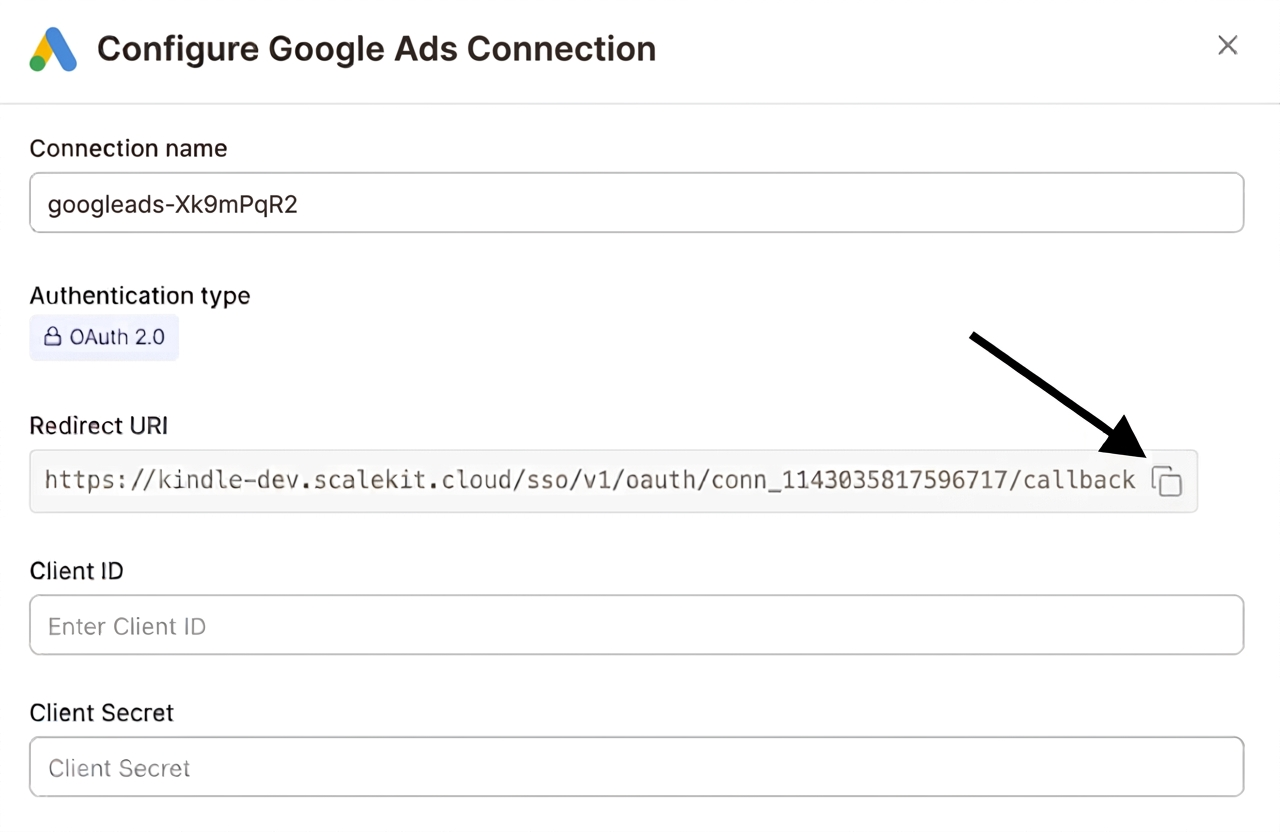
-
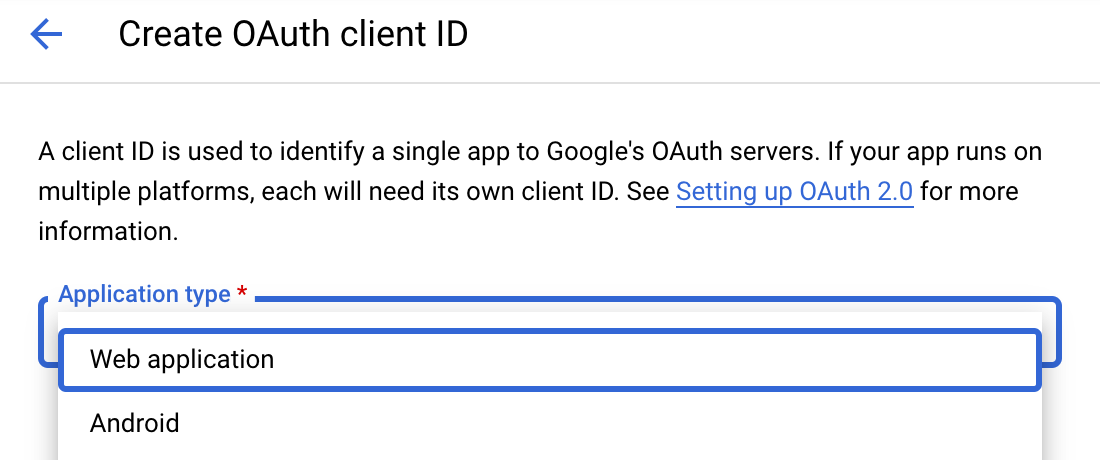
Navigate to Google Cloud Console → APIs & Services → Credentials. Select + Create Credentials, then OAuth client ID. Choose Web application from the Application type menu.
-
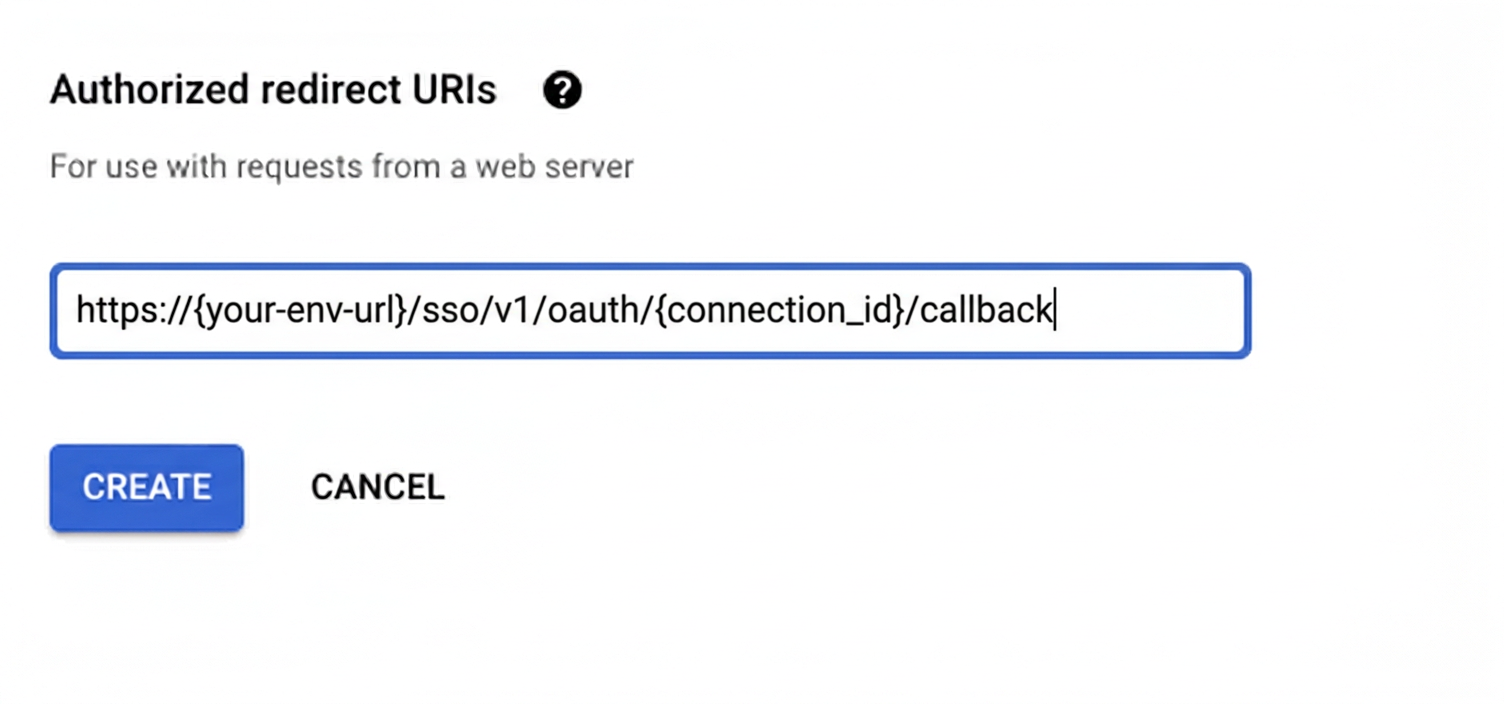
Under Authorized redirect URIs, click + Add URI, paste the redirect URI, and click Create.
-
-
Enable the Google Ads API
- In Google Cloud Console, go to APIs & Services → Library. Search for “Google Ads API” and click Enable.
-
Get client credentials
- Google provides your Client ID and Client Secret after you create the OAuth client ID in step 1.
-
Add credentials in Scalekit
-
In Scalekit dashboard, go to AgentKit > Connections and open the connection you created.
-
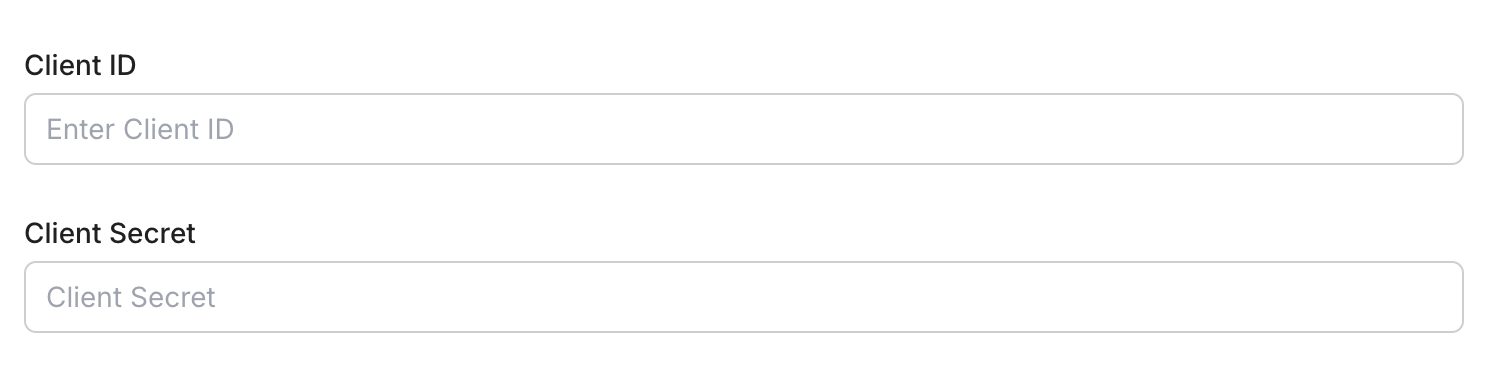
Enter your credentials:
- Client ID (from above)
- Client Secret (from above)
- Permissions (scopes — see Google API Scopes reference)
-
Click Save.
-
-
Enter your developer token
-
Enter your 22-character developer token from the Google Ads API Center. You can obtain a developer token by following the Google Ads developer token guide.

-
-
-
Authorize and make your first call
Section titled “Authorize and make your first call”quickstart.ts import { ScalekitClient } from '@scalekit-sdk/node'import 'dotenv/config'const scalekit = new ScalekitClient(process.env.SCALEKIT_ENV_URL,process.env.SCALEKIT_CLIENT_ID,process.env.SCALEKIT_CLIENT_SECRET,)const actions = scalekit.actionsconst connector = 'googleads'const identifier = 'user_123'// Generate an authorization link for the userconst { link } = await actions.getAuthorizationLink({ connectionName: connector, identifier })console.log('Authorize Google Ads:', link)process.stdout.write('Press Enter after authorizing...')await new Promise(r => process.stdin.once('data', r))// Make your first callconst result = await actions.executeTool({connector,identifier,toolName: 'googleads_customers_list',toolInput: {},})console.log(result)quickstart.py import osfrom scalekit.client import ScalekitClientfrom dotenv import load_dotenvload_dotenv()scalekit_client = ScalekitClient(env_url=os.getenv("SCALEKIT_ENV_URL"),client_id=os.getenv("SCALEKIT_CLIENT_ID"),client_secret=os.getenv("SCALEKIT_CLIENT_SECRET"),)actions = scalekit_client.actionsconnection_name = "googleads"identifier = "user_123"# Generate an authorization link for the userlink_response = actions.get_authorization_link(connection_name=connection_name,identifier=identifier,)print("Authorize Google Ads:", link_response.link)input("Press Enter after authorizing...")# Make your first callresult = actions.execute_tool(tool_input={},tool_name="googleads_customers_list",connection_name=connection_name,identifier=identifier,)print(result)
What you can do
Section titled “What you can do”Connect this agent connector to let your agent:
- List customer, user — Add or remove members of a Customer Match user list by uploading already-hashed contact details
- Link campaign asset, ad group asset — Attach an existing asset to a campaign so it can serve with that campaign, for example a sitelink, callout, structured snippet or image
- Modifier ad group bid — Create, update or remove an ad-group-level bid adjustment, so bids are raised or lowered for a segment such as a device type
- Suggest geo target constant — Look up Google Ads geo target constant resource names for location names (cities, regions, countries) or geo-target IDs
- Search responsive — Execute a GAQL (Google Ads Query Language) query to retrieve campaigns, ad groups, keywords, metrics, and any other Google Ads data
- Create label, keyword, conversion action — Create a label that can be applied to campaigns, ad groups, ads, or keywords for organization and filtering
Tool list
Section titled “Tool list”Use the exact tool names from the Tool list below when you call execute_tool. If you’re not sure which name to use, list the tools available for the current user first.
googleads_ad_group_asset_link#Attach an existing asset to an ad group so it can serve with that ad group, for example a sitelink, callout or structured snippet. Ad-group links override campaign-level links for the same field type. Create the asset first with the asset creation tool, then link it here. The link is immutable: to change which asset or field type is used, remove the link and create a new one.6 params
Attach an existing asset to an ad group so it can serve with that ad group, for example a sitelink, callout or structured snippet. Ad-group links override campaign-level links for the same field type. Create the asset first with the asset creation tool, then link it here. The link is immutable: to change which asset or field type is used, remove the link and create a new one.
ad_groupstringrequiredResource name of the ad group to attach the asset to, in the format customers/{customer_id}/adGroups/{ad_group_id}. To find it from an ad group name, run the search tool with: SELECT ad_group.resource_name, ad_group.name FROM ad_group WHERE ad_group.name = 'Your Ad Group'. It is also returned when an ad group is created.assetstringrequiredResource name of the asset to attach, in the format customers/{customer_id}/assets/{asset_id}. Returned when the asset is created. To find an existing one, run the search tool with: SELECT asset.resource_name, asset.name, asset.type FROM asset. The asset must already be of the type this link needs - sitelink, callout, structured snippet, call, price, promotion, mobile app and hotel callout assets have to exist in the account already, as the asset creation tool only makes text, image and YouTube video assets.field_typestringrequiredHow the asset is used by the ad group. Must match the asset's own type - a SitelinkAsset can only be linked as SITELINK, a CalloutAsset as CALLOUT, and so on.customer_idstringoptionalGoogle Ads customer account ID to operate on (digits only, no hyphens). Defaults to the Google Ads Customer ID entered when the account was connected; set it only to target a different account, e.g. a specific client account under a manager (MCC).schema_versionstringoptionalOptional schema version to use for tool executiontool_versionstringoptionalOptional tool version to use for executiongoogleads_ad_group_bid_modifier#Create, update or remove an ad-group-level bid adjustment, so bids are raised or lowered for a segment such as a device type. A bid modifier of 1.5 bids 50% more, 0.5 bids 50% less, and 0 opts the segment out entirely. CREATE needs the ad group and the device; UPDATE and REMOVE need the bid modifier resource name. The device cannot be changed after creation - remove the modifier and create a new one instead.8 params
Create, update or remove an ad-group-level bid adjustment, so bids are raised or lowered for a segment such as a device type. A bid modifier of 1.5 bids 50% more, 0.5 bids 50% less, and 0 opts the segment out entirely. CREATE needs the ad group and the device; UPDATE and REMOVE need the bid modifier resource name. The device cannot be changed after creation - remove the modifier and create a new one instead.
operationstringrequiredWhich action to perform. CREATE adds a new bid modifier, UPDATE changes the multiplier on an existing one, REMOVE deletes it.ad_groupstringoptionalResource name of the ad group the adjustment applies to, in the format customers/{customer_id}/adGroups/{ad_group_id}. Required for CREATE. To find it, run the search tool with: SELECT ad_group.resource_name, ad_group.name FROM ad_group WHERE ad_group.name = 'Your Ad Group'.bid_modifiernumberoptionalBid multiplier applied when the criterion matches. Google requires it to be in the range 0.1 - 10.0, or exactly 0 to opt out of the device type entirely. 1.5 bids 50% more, 0.5 bids 50% less, 1.0 leaves bids unchanged. Required for CREATE and UPDATE; it is the only field UPDATE can change.customer_idstringoptionalGoogle Ads customer account ID to operate on (digits only, no hyphens). Defaults to the Google Ads Customer ID entered when the account was connected; set it only to target a different account, e.g. a specific client account under a manager (MCC).devicestringoptionalDevice type the adjustment applies to. Required for CREATE and immutable afterwards.resource_namestringoptionalResource name of an existing bid modifier, in the format customers/{customer_id}/adGroupBidModifiers/{ad_group_id}~{criterion_id}. Required for UPDATE and REMOVE. To find it, run the search tool with: SELECT ad_group_bid_modifier.resource_name, ad_group_bid_modifier.bid_modifier, ad_group_bid_modifier.device.type FROM ad_group_bid_modifier WHERE ad_group.id = AD_GROUP_ID.schema_versionstringoptionalOptional schema version to use for tool executiontool_versionstringoptionalOptional tool version to use for executiongoogleads_ad_group_create#Create a new ad group within an existing campaign. Ad groups contain ads and keywords that share targeting and bid settings.10 params
Create a new ad group within an existing campaign. Ad groups contain ads and keywords that share targeting and bid settings.
campaignstringrequiredResource name of the campaign to add the ad group to, in the format customers/{customer_id}/campaigns/{campaign_id}.namestringrequiredName of the ad group. Should describe the theme of the ads and keywords in this group.ad_group_typestringoptionalType of the ad group. SEARCH_STANDARD is the default for Search campaigns. DISPLAY_STANDARD for Display campaigns. SEARCH_DYNAMIC_ADS for dynamic search ads.cpc_bid_microsstringoptionalDefault cost-per-click bid for this ad group in micros. 1,000,000 micros = $1.00. Individual keyword bids override this.cpm_bid_microsstringoptionalDefault cost-per-thousand-impressions bid in micros for Display campaigns.customer_idstringoptionalGoogle Ads customer account ID to operate on (digits only, no hyphens). Defaults to the Google Ads Customer ID entered when the account was connected; set it only to target a different account, e.g. a specific client account under a manager (MCC).schema_versionstringoptionalOptional schema version to use for tool executionstatusstringoptionalInitial status of the ad group. ENABLED serves ads; PAUSED stops serving ads.target_cpa_microsstringoptionalTarget CPA for this ad group in micros, overriding the campaign-level target.tool_versionstringoptionalOptional tool version to use for executiongoogleads_ad_group_label_create#Apply a label to an ad group for organization and filtering. Labels help categorize ad groups and make them easier to find and manage in the Google Ads UI.5 params
Apply a label to an ad group for organization and filtering. Labels help categorize ad groups and make them easier to find and manage in the Google Ads UI.
ad_groupstringrequiredResource name of the ad group to apply the label to, in the format customers/{customer_id}/adGroups/{ad_group_id}.labelstringrequiredResource name of the label to apply, in the format customers/{customer_id}/labels/{label_id}.customer_idstringoptionalGoogle Ads customer account ID to operate on (digits only, no hyphens). Defaults to the Google Ads Customer ID entered when the account was connected; set it only to target a different account, e.g. a specific client account under a manager (MCC).schema_versionstringoptionalOptional schema version to use for tool executiontool_versionstringoptionalOptional tool version to use for executiongoogleads_ad_group_remove#Remove an ad group and all its ads and keywords permanently. This action cannot be undone.4 params
Remove an ad group and all its ads and keywords permanently. This action cannot be undone.
resource_namestringrequiredResource name of the ad group to remove, in the format customers/{customer_id}/adGroups/{ad_group_id}.customer_idstringoptionalGoogle Ads customer account ID to operate on (digits only, no hyphens). Defaults to the Google Ads Customer ID entered when the account was connected; set it only to target a different account, e.g. a specific client account under a manager (MCC).schema_versionstringoptionalOptional schema version to use for tool executiontool_versionstringoptionalOptional tool version to use for executiongoogleads_ad_group_update#Update an ad group's name, status, or default bid amounts. Only the fields you provide will be updated.7 params
Update an ad group's name, status, or default bid amounts. Only the fields you provide will be updated.
resource_namestringrequiredResource name of the ad group to update, in the format customers/{customer_id}/adGroups/{ad_group_id}.cpc_bid_microsstringoptionalNew default CPC bid in micros for this ad group. 1,000,000 micros = $1.00.customer_idstringoptionalGoogle Ads customer account ID to operate on (digits only, no hyphens). Defaults to the Google Ads Customer ID entered when the account was connected; set it only to target a different account, e.g. a specific client account under a manager (MCC).namestringoptionalNew name for the ad group.schema_versionstringoptionalOptional schema version to use for tool executionstatusstringoptionalNew status for the ad group. ENABLED serves ads; PAUSED stops serving; REMOVED permanently deletes.tool_versionstringoptionalOptional tool version to use for executiongoogleads_ad_remove#Remove an ad from an ad group permanently. The ad will no longer serve and cannot be recovered.4 params
Remove an ad from an ad group permanently. The ad will no longer serve and cannot be recovered.
resource_namestringrequiredResource name of the ad to remove, in the format customers/{customer_id}/adGroupAds/{ad_group_id}~{ad_id}.customer_idstringoptionalGoogle Ads customer account ID to operate on (digits only, no hyphens). Defaults to the Google Ads Customer ID entered when the account was connected; set it only to target a different account, e.g. a specific client account under a manager (MCC).schema_versionstringoptionalOptional schema version to use for tool executiontool_versionstringoptionalOptional tool version to use for executiongoogleads_ad_update#Update the status of an ad group ad. Use this to enable, pause, or mark an ad for removal without deleting it.5 params
Update the status of an ad group ad. Use this to enable, pause, or mark an ad for removal without deleting it.
resource_namestringrequiredResource name of the ad group ad to update, in the format customers/{customer_id}/adGroupAds/{ad_group_id}~{ad_id}.statusstringrequiredNew status for the ad. ENABLED serves the ad; PAUSED stops it; REMOVED permanently removes it.customer_idstringoptionalGoogle Ads customer account ID to operate on (digits only, no hyphens). Defaults to the Google Ads Customer ID entered when the account was connected; set it only to target a different account, e.g. a specific client account under a manager (MCC).schema_versionstringoptionalOptional schema version to use for tool executiontool_versionstringoptionalOptional tool version to use for executiongoogleads_asset_create#Create a reusable asset (text, image, YouTube video, sitelink, callout) that can be used across Performance Max campaigns, responsive ads, and other campaign types. Assets are shared building blocks for ads.8 params
Create a reusable asset (text, image, YouTube video, sitelink, callout) that can be used across Performance Max campaigns, responsive ads, and other campaign types. Assets are shared building blocks for ads.
asset_typestringrequiredType of asset to create. TEXT=text snippet, IMAGE=image file, YOUTUBE_VIDEO=YouTube video, SITELINK=sitelink extension, CALLOUT=callout extension, CALL=call extension, STRUCTURED_SNIPPET=structured snippet, MOBILE_APP=app extension.customer_idstringoptionalGoogle Ads customer account ID to operate on (digits only, no hyphens). Defaults to the Google Ads Customer ID entered when the account was connected; set it only to target a different account, e.g. a specific client account under a manager (MCC).image_urlstringoptionalURL of the image to use for IMAGE type assets. The image will be downloaded and uploaded to Google Ads.namestringoptionalOptional name for the asset to identify it in the Google Ads asset library.schema_versionstringoptionalOptional schema version to use for tool executiontext_asset_textstringoptionalText content for TEXT type assets. Used in Performance Max campaigns and other ad formats.tool_versionstringoptionalOptional tool version to use for executionyoutube_video_idstringoptionalYouTube video ID for YOUTUBE_VIDEO type assets. Found in the YouTube video URL after 'v=', e.g., 'dQw4w9WgXcQ'.googleads_bidding_strategy_create#Create a shared portfolio bidding strategy that can be applied to multiple campaigns. Portfolio strategies allow centralized bid management across campaigns.9 params
Create a shared portfolio bidding strategy that can be applied to multiple campaigns. Portfolio strategies allow centralized bid management across campaigns.
namestringrequiredName of the portfolio bidding strategy. Must be unique within the account.strategy_typestringrequiredThe type of bidding strategy. TARGET_CPA=optimize for conversions at a target cost. TARGET_ROAS=optimize for revenue at target return. MAXIMIZE_CLICKS=get most clicks. MAXIMIZE_CONVERSIONS=get most conversions. TARGET_IMPRESSION_SHARE=achieve a target impression share.cpc_bid_ceiling_microsstringoptionalMaximum CPC bid ceiling in micros for MAXIMIZE_CLICKS strategy. 1,000,000 micros = $1.00.cpc_bid_floor_microsstringoptionalMinimum CPC bid floor in micros. Bids will not go below this value.customer_idstringoptionalGoogle Ads customer account ID to operate on (digits only, no hyphens). Defaults to the Google Ads Customer ID entered when the account was connected; set it only to target a different account, e.g. a specific client account under a manager (MCC).schema_versionstringoptionalOptional schema version to use for tool executiontarget_cpa_microsstringoptionalTarget cost-per-acquisition in micros for TARGET_CPA strategy. 1,000,000 micros = $1.00.target_roasnumberoptionalTarget return on ad spend for TARGET_ROAS strategy. For example, 3.5 means 350% ROAS.tool_versionstringoptionalOptional tool version to use for executiongoogleads_bidding_strategy_update#Update a portfolio bidding strategy's name or target values. Only the fields you provide will be updated.7 params
Update a portfolio bidding strategy's name or target values. Only the fields you provide will be updated.
resource_namestringrequiredResource name of the bidding strategy to update, in the format customers/{customer_id}/biddingStrategies/{bidding_strategy_id}.customer_idstringoptionalGoogle Ads customer account ID to operate on (digits only, no hyphens). Defaults to the Google Ads Customer ID entered when the account was connected; set it only to target a different account, e.g. a specific client account under a manager (MCC).namestringoptionalNew name for the bidding strategy. Must be unique within the account.schema_versionstringoptionalOptional schema version to use for tool executiontarget_cpa_microsstringoptionalNew target cost-per-acquisition in micros for TARGET_CPA strategy. 1,000,000 micros = $1.00.target_roasnumberoptionalNew target return on ad spend for TARGET_ROAS strategy. For example, 3.5 means 350% ROAS.tool_versionstringoptionalOptional tool version to use for executiongoogleads_budget_create#Create a new campaign budget in Google Ads. The budget amount is specified in micros (1,000,000 micros = $1.00). Budgets can be shared across multiple campaigns.7 params
Create a new campaign budget in Google Ads. The budget amount is specified in micros (1,000,000 micros = $1.00). Budgets can be shared across multiple campaigns.
amount_microsstringrequiredDaily budget amount in micros. 1,000,000 micros = $1.00. For a $10/day budget, enter 10000000.namestringrequiredName of the campaign budget. Must be unique within the account.customer_idstringoptionalGoogle Ads customer account ID to operate on (digits only, no hyphens). Defaults to the Google Ads Customer ID entered when the account was connected; set it only to target a different account, e.g. a specific client account under a manager (MCC).delivery_methodstringoptionalBudget delivery method. STANDARD spreads budget evenly throughout the day. ACCELERATED spends budget as quickly as possible.explicitly_sharedbooleanoptionalWhether this budget is explicitly shared across campaigns. If false, the budget is exclusive to a single campaign.schema_versionstringoptionalOptional schema version to use for tool executiontool_versionstringoptionalOptional tool version to use for executiongoogleads_budget_remove#Remove a campaign budget permanently. The budget must not be linked to any active campaigns before removal.4 params
Remove a campaign budget permanently. The budget must not be linked to any active campaigns before removal.
resource_namestringrequiredResource name of the budget to remove, in the format customers/{customer_id}/campaignBudgets/{budget_id}.customer_idstringoptionalGoogle Ads customer account ID to operate on (digits only, no hyphens). Defaults to the Google Ads Customer ID entered when the account was connected; set it only to target a different account, e.g. a specific client account under a manager (MCC).schema_versionstringoptionalOptional schema version to use for tool executiontool_versionstringoptionalOptional tool version to use for executiongoogleads_budget_update#Update an existing campaign budget's name, daily amount, or delivery method. Only the fields you provide will be updated.7 params
Update an existing campaign budget's name, daily amount, or delivery method. Only the fields you provide will be updated.
resource_namestringrequiredResource name of the budget to update, in the format customers/{customer_id}/campaignBudgets/{budget_id}.amount_microsstringoptionalNew daily budget amount in micros. 1,000,000 micros = $1.00. For a $10/day budget, enter 10000000.customer_idstringoptionalGoogle Ads customer account ID to operate on (digits only, no hyphens). Defaults to the Google Ads Customer ID entered when the account was connected; set it only to target a different account, e.g. a specific client account under a manager (MCC).delivery_methodstringoptionalBudget delivery method. STANDARD spreads budget evenly throughout the day. ACCELERATED spends as fast as possible.namestringoptionalNew name for the campaign budget. Must be unique within the account.schema_versionstringoptionalOptional schema version to use for tool executiontool_versionstringoptionalOptional tool version to use for executiongoogleads_campaign_asset_link#Attach an existing asset to a campaign so it can serve with that campaign, for example a sitelink, callout, structured snippet or image. Create the asset first with the asset creation tool, then link it here. The link is immutable: to change which asset or field type is used, remove the link and create a new one.6 params
Attach an existing asset to a campaign so it can serve with that campaign, for example a sitelink, callout, structured snippet or image. Create the asset first with the asset creation tool, then link it here. The link is immutable: to change which asset or field type is used, remove the link and create a new one.
assetstringrequiredResource name of the asset to attach, in the format customers/{customer_id}/assets/{asset_id}. Returned when the asset is created. To find an existing one, run the search tool with: SELECT asset.resource_name, asset.name, asset.type FROM asset. The asset must already be of the type this link needs - sitelink, callout, structured snippet, call, price, promotion, mobile app and hotel callout assets have to exist in the account already, as the asset creation tool only makes text, image and YouTube video assets.campaignstringrequiredResource name of the campaign to attach the asset to, in the format customers/{customer_id}/campaigns/{campaign_id}. To find it from a campaign name, run the search tool with: SELECT campaign.resource_name, campaign.name FROM campaign WHERE campaign.name = 'Your Campaign'. It is also returned when a campaign is created.field_typestringrequiredHow the asset is used by the campaign. Must match the asset's own type - a SitelinkAsset can only be linked as SITELINK, a CalloutAsset as CALLOUT, and so on.customer_idstringoptionalGoogle Ads customer account ID to operate on (digits only, no hyphens). Defaults to the Google Ads Customer ID entered when the account was connected; set it only to target a different account, e.g. a specific client account under a manager (MCC).schema_versionstringoptionalOptional schema version to use for tool executiontool_versionstringoptionalOptional tool version to use for executiongoogleads_campaign_create#Create a new advertising campaign in Google Ads. Specify the campaign name, channel type, linked budget, and optional bidding strategy. The campaign is created in PAUSED status by default for safety.13 params
Create a new advertising campaign in Google Ads. Specify the campaign name, channel type, linked budget, and optional bidding strategy. The campaign is created in PAUSED status by default for safety.
advertising_channel_typestringrequiredThe advertising channel type for the campaign. Determines where ads are served. SEARCH=text ads on Google Search, DISPLAY=banner ads on Google Display Network, SHOPPING=product listings, VIDEO=YouTube ads, PERFORMANCE_MAX=automated across all channels.campaign_budgetstringrequiredResource name of the campaign budget to link, in the format customers/{customer_id}/campaignBudgets/{budget_id}. Create a budget first using googleads_budget_create.namestringrequiredName of the campaign. Must be unique within the account.bidding_strategy_typestringoptionalBidding strategy type to use. TARGET_CPA=optimize for conversions at a target cost. TARGET_ROAS=optimize for revenue at a target return. MAXIMIZE_CLICKS=get the most clicks. MAXIMIZE_CONVERSIONS=get the most conversions. MANUAL_CPC=set bids manually.customer_idstringoptionalGoogle Ads customer account ID to operate on (digits only, no hyphens). Defaults to the Google Ads Customer ID entered when the account was connected; set it only to target a different account, e.g. a specific client account under a manager (MCC).end_datestringoptionalCampaign end date in YYYYMMDD format. Leave blank for campaigns with no end date.schema_versionstringoptionalOptional schema version to use for tool executionstart_datestringoptionalCampaign start date in YYYYMMDD format. Defaults to today if not specified.statusstringoptionalInitial status of the campaign. PAUSED is recommended to review settings before enabling. ENABLED starts serving ads immediately.target_cpa_microsstringoptionalTarget cost-per-acquisition in micros when using TARGET_CPA bidding. 1,000,000 micros = $1.00.target_roasnumberoptionalTarget return on ad spend as a decimal when using TARGET_ROAS bidding. For example, 3.5 means 350% ROAS ($3.50 revenue per $1.00 spent).target_spend_microsstringoptionalMaximum daily spend target in micros when using MAXIMIZE_CLICKS bidding. 1,000,000 micros = $1.00.tool_versionstringoptionalOptional tool version to use for executiongoogleads_campaign_criterion_create#Add a targeting criterion to a campaign, such as a geographic location, device type, or negative keyword. Location criteria use geo target constant IDs, and device criteria specify DESKTOP, MOBILE, TABLET, or CONNECTED_TV.9 params
Add a targeting criterion to a campaign, such as a geographic location, device type, or negative keyword. Location criteria use geo target constant IDs, and device criteria specify DESKTOP, MOBILE, TABLET, or CONNECTED_TV.
campaignstringrequiredResource name of the campaign to add the criterion to, in the format customers/{customer_id}/campaigns/{campaign_id}.criterion_typestringrequiredThe type of targeting criterion to add. LOCATION=geographic targeting, DEVICE=device type targeting, KEYWORD=negative keyword exclusion, PLACEMENT=placement exclusion.bid_modifiernumberoptionalBid modifier multiplier for this criterion. 1.5 means +50% bid, 0.5 means -50% bid. Only applicable to non-negative criteria.customer_idstringoptionalGoogle Ads customer account ID to operate on (digits only, no hyphens). Defaults to the Google Ads Customer ID entered when the account was connected; set it only to target a different account, e.g. a specific client account under a manager (MCC).device_typestringoptionalDevice type for DEVICE criterion. One of DESKTOP, MOBILE, TABLET, or CONNECTED_TV.location_idstringoptionalGeo target constant ID for LOCATION criterion. For example, 2840 = United States, 2826 = United Kingdom. Find IDs via the GeoTargetConstant resource.negativebooleanoptionalWhether this is a negative (exclusion) criterion. If true, the campaign will exclude traffic matching this criterion.schema_versionstringoptionalOptional schema version to use for tool executiontool_versionstringoptionalOptional tool version to use for executiongoogleads_campaign_criterion_remove#Remove a targeting criterion from a campaign. This removes the targeting or exclusion rule (e.g., location targeting, device bid modifier, or negative keyword) from the campaign.4 params
Remove a targeting criterion from a campaign. This removes the targeting or exclusion rule (e.g., location targeting, device bid modifier, or negative keyword) from the campaign.
resource_namestringrequiredResource name of the campaign criterion to remove, in the format customers/{customer_id}/campaignCriteria/{campaign_id}~{criterion_id}.customer_idstringoptionalGoogle Ads customer account ID to operate on (digits only, no hyphens). Defaults to the Google Ads Customer ID entered when the account was connected; set it only to target a different account, e.g. a specific client account under a manager (MCC).schema_versionstringoptionalOptional schema version to use for tool executiontool_versionstringoptionalOptional tool version to use for executiongoogleads_campaign_label_create#Apply a label to a campaign for organization and filtering. Labels help categorize campaigns and make them easier to find and manage in the Google Ads UI.5 params
Apply a label to a campaign for organization and filtering. Labels help categorize campaigns and make them easier to find and manage in the Google Ads UI.
campaignstringrequiredResource name of the campaign to apply the label to, in the format customers/{customer_id}/campaigns/{campaign_id}.labelstringrequiredResource name of the label to apply, in the format customers/{customer_id}/labels/{label_id}.customer_idstringoptionalGoogle Ads customer account ID to operate on (digits only, no hyphens). Defaults to the Google Ads Customer ID entered when the account was connected; set it only to target a different account, e.g. a specific client account under a manager (MCC).schema_versionstringoptionalOptional schema version to use for tool executiontool_versionstringoptionalOptional tool version to use for executiongoogleads_campaign_remove#Remove (permanently delete) a Google Ads campaign and all its child ad groups and ads. This action cannot be undone.4 params
Remove (permanently delete) a Google Ads campaign and all its child ad groups and ads. This action cannot be undone.
resource_namestringrequiredResource name of the campaign to remove, in the format customers/{customer_id}/campaigns/{campaign_id}.customer_idstringoptionalGoogle Ads customer account ID to operate on (digits only, no hyphens). Defaults to the Google Ads Customer ID entered when the account was connected; set it only to target a different account, e.g. a specific client account under a manager (MCC).schema_versionstringoptionalOptional schema version to use for tool executiontool_versionstringoptionalOptional tool version to use for executiongoogleads_campaign_update#Update an existing Google Ads campaign's settings such as name, status, budget, or bidding strategy. Only the fields you provide will be updated.9 params
Update an existing Google Ads campaign's settings such as name, status, budget, or bidding strategy. Only the fields you provide will be updated.
resource_namestringrequiredResource name of the campaign to update, in the format customers/{customer_id}/campaigns/{campaign_id}.campaign_budgetstringoptionalNew budget resource name to link, in the format customers/{customer_id}/campaignBudgets/{budget_id}.customer_idstringoptionalGoogle Ads customer account ID to operate on (digits only, no hyphens). Defaults to the Google Ads Customer ID entered when the account was connected; set it only to target a different account, e.g. a specific client account under a manager (MCC).namestringoptionalNew name for the campaign. Must be unique within the account.schema_versionstringoptionalOptional schema version to use for tool executionstatusstringoptionalNew status for the campaign. ENABLED starts serving ads; PAUSED stops serving ads; REMOVED permanently deletes the campaign.target_cpa_microsstringoptionalNew target cost-per-acquisition in micros for TARGET_CPA bidding. 1,000,000 micros = $1.00.target_roasnumberoptionalNew target return on ad spend for TARGET_ROAS bidding. For example, 3.5 means 350% ROAS.tool_versionstringoptionalOptional tool version to use for executiongoogleads_conversion_action_create#Create a conversion action to track valuable customer actions such as purchases, form submissions, phone calls, or app downloads. Conversion actions are used for Smart Bidding and performance measurement.11 params
Create a conversion action to track valuable customer actions such as purchases, form submissions, phone calls, or app downloads. Conversion actions are used for Smart Bidding and performance measurement.
categorystringrequiredCategory that best describes the conversion. PURCHASE=e-commerce transactions, SIGNUP=account registrations, LEAD=lead form submissions, CONTACT=contact page actions, PHONE_CALL_LEAD=phone call initiated, PAGE_VIEW=page views, OTHER=custom conversions.namestringrequiredName of the conversion action. Should clearly identify the customer action being tracked.typestringrequiredConversion type that determines how the conversion is tracked. WEBPAGE=tag on a webpage, CLICK_TO_CALL=phone call from an ad, GOOGLE_PLAY_DOWNLOAD=app download, UPLOAD_CLICKS=offline conversion imported from clicks, UPLOAD_CALLS=offline conversion imported from calls.click_through_lookback_window_daysintegeroptionalNumber of days after a click to attribute a conversion. Typical values are 7, 30, or 90 days.counting_typestringoptionalHow conversions are counted. ONE_PER_CLICK counts at most one conversion per ad click. MANY_PER_CLICK counts all conversions per click (useful for purchases where a user might buy multiple times).customer_idstringoptionalGoogle Ads customer account ID to operate on (digits only, no hyphens). Defaults to the Google Ads Customer ID entered when the account was connected; set it only to target a different account, e.g. a specific client account under a manager (MCC).schema_versionstringoptionalOptional schema version to use for tool executiontool_versionstringoptionalOptional tool version to use for executionvalue_settings_default_currency_codestringoptionalCurrency code for the default conversion value, e.g., USD, EUR, GBP.value_settings_default_valuenumberoptionalDefault monetary value of each conversion. For example, 50.0 for a $50 conversion value.view_through_lookback_window_daysintegeroptionalNumber of days after an ad view (without a click) to attribute a conversion.googleads_conversion_action_update#Update a conversion action's name, status, default value, or counting type. Only the fields you provide will be updated.8 params
Update a conversion action's name, status, default value, or counting type. Only the fields you provide will be updated.
resource_namestringrequiredResource name of the conversion action to update, in the format customers/{customer_id}/conversionActions/{conversion_action_id}.counting_typestringoptionalUpdated counting type. ONE_PER_CLICK counts at most one conversion per ad click. MANY_PER_CLICK counts all conversions per click.customer_idstringoptionalGoogle Ads customer account ID to operate on (digits only, no hyphens). Defaults to the Google Ads Customer ID entered when the account was connected; set it only to target a different account, e.g. a specific client account under a manager (MCC).namestringoptionalNew name for the conversion action.schema_versionstringoptionalOptional schema version to use for tool executionstatusstringoptionalNew status for the conversion action. ENABLED tracks conversions; REMOVED permanently removes the action.tool_versionstringoptionalOptional tool version to use for executionvalue_settings_default_valuenumberoptionalNew default monetary value for each conversion.googleads_customer_list_members_mutate#Add or remove members of a Customer Match user list by uploading already-hashed contact details. The list must be a CRM-based (Customer Match) user list; a basic remarketing list cannot accept members. Each email or phone number is treated as one person, and Google caps a single upload at 10 people, so send large audiences in batches. Values must be normalised then SHA-256 hashed and hex encoded before they are passed in: trim whitespace, lowercase the whole value, and put phone numbers in E.164 form first. This service does not update the "Segment members" count shown in the Google Ads UI.7 params
Add or remove members of a Customer Match user list by uploading already-hashed contact details. The list must be a CRM-based (Customer Match) user list; a basic remarketing list cannot accept members. Each email or phone number is treated as one person, and Google caps a single upload at 10 people, so send large audiences in batches. Values must be normalised then SHA-256 hashed and hex encoded before they are passed in: trim whitespace, lowercase the whole value, and put phone numbers in E.164 form first. This service does not update the "Segment members" count shown in the Google Ads UI.
operationstringrequiredWhether to add the supplied people to the list or remove them from it.user_liststringrequiredResource name of the Customer Match user list to modify, in the format customers/{customer_id}/userLists/{user_list_id}. It must be a CRM-based list; a basic remarketing list cannot hold uploaded members and will be rejected. To find eligible lists, run the search tool with: SELECT user_list.resource_name, user_list.name FROM user_list WHERE user_list.type = 'CRM_BASED'.customer_idstringoptionalGoogle Ads customer account ID to operate on (digits only, no hyphens). Defaults to the Google Ads Customer ID entered when the account was connected; set it only to target a different account, e.g. a specific client account under a manager (MCC).hashed_emailsarrayoptionalEmail addresses of the people to add or remove, each normalised then SHA-256 hashed and hex encoded. Normalise by removing leading and trailing whitespace and lowercasing the whole address; additionally, for gmail.com and googlemail.com addresses only, strip every period from the part before the @ and drop the + together with everything after it, so Jane.Doe+Shop@gmail.com is hashed as janedoe@gmail.com. Skipping those Gmail rules produces a hash that silently fails to match anyone. Each entry counts as one person.hashed_phone_numbersarrayoptionalPhone numbers of the people to add or remove, each converted to E.164 format with a leading + and the country code (for example +14155550123), then SHA-256 hashed and hex encoded. Each entry counts as one person.schema_versionstringoptionalOptional schema version to use for tool executiontool_versionstringoptionalOptional tool version to use for executiongoogleads_customers_list#List all Google Ads customer accounts accessible with the current OAuth credentials. Returns resource names for all accounts the authenticated user can access.2 params
List all Google Ads customer accounts accessible with the current OAuth credentials. Returns resource names for all accounts the authenticated user can access.
schema_versionstringoptionalOptional schema version to use for tool executiontool_versionstringoptionalOptional tool version to use for executiongoogleads_geo_target_constant_suggest#Look up Google Ads geo target constant resource names for location names (cities, regions, countries) or geo-target IDs. Use this to resolve human-readable place names into the geoTargetConstants resource names required by googleads_keyword_ideas_generate and location targeting.3 params
Look up Google Ads geo target constant resource names for location names (cities, regions, countries) or geo-target IDs. Use this to resolve human-readable place names into the geoTargetConstants resource names required by googleads_keyword_ideas_generate and location targeting.
geo_target_idsarrayoptionalList of known geo target IDs to resolve directly into geoTargetConstants resource names.localestringoptionalLocale to use for returning location names in the response.location_namesarrayoptionalList of free-text location names to resolve, such as city, region, or country names. Provide either location_names or geo_target_ids (or both).googleads_keyword_create#Add a keyword to an ad group for search targeting. Specify the keyword text, match type (EXACT, PHRASE, or BROAD), and an optional CPC bid. Set negative=true to add it as a negative keyword.9 params
Add a keyword to an ad group for search targeting. Specify the keyword text, match type (EXACT, PHRASE, or BROAD), and an optional CPC bid. Set negative=true to add it as a negative keyword.
ad_groupstringrequiredResource name of the ad group to add the keyword to, in the format customers/{customer_id}/adGroups/{ad_group_id}.keyword_textstringrequiredThe keyword text to target. For EXACT match, use the exact phrase. For PHRASE, the query must contain this phrase. For BROAD, Google shows ads for related searches.match_typestringrequiredKeyword match type. EXACT=matches only the exact query. PHRASE=matches queries containing the phrase. BROAD=matches related queries (widest reach).cpc_bid_microsstringoptionalCPC bid for this keyword in micros. 1,000,000 micros = $1.00. Overrides the ad group default bid.customer_idstringoptionalGoogle Ads customer account ID to operate on (digits only, no hyphens). Defaults to the Google Ads Customer ID entered when the account was connected; set it only to target a different account, e.g. a specific client account under a manager (MCC).negativebooleanoptionalIf true, creates a negative keyword that prevents ads from showing for searches matching this keyword.schema_versionstringoptionalOptional schema version to use for tool executionstatusstringoptionalInitial status of the keyword. ENABLED means the keyword can trigger ads. PAUSED disables it.tool_versionstringoptionalOptional tool version to use for executiongoogleads_keyword_ideas_generate#Generate keyword ideas and traffic estimates for keyword research and campaign planning using seed keywords or a seed URL.10 params
Generate keyword ideas and traffic estimates for keyword research and campaign planning using seed keywords or a seed URL.
customer_idstringoptionalGoogle Ads customer account ID to operate on (digits only, no hyphens). Defaults to the Google Ads Customer ID entered when the account was connected; set it only to target a different account, e.g. a specific client account under a manager (MCC).geo_target_constantsarrayoptionalList of geo target constant resource names to filter results by location. Example: ["geoTargetConstants/2840"] for United States.include_adult_keywordsbooleanoptionalWhether to include adult keywords in the response.keyword_plan_networkstringoptionalThe network to target for keyword ideas. GOOGLE_SEARCH returns ideas for Google Search only. GOOGLE_SEARCH_AND_PARTNERS includes Google Search Partners.keywordsarrayoptionalList of seed keyword strings for idea generation. Example: ["running shoes","athletic footwear"]. Provide either keywords or url_seed (or both).languagestringoptionalLanguage resource name to filter keyword ideas. Use the languageConstants resource name, e.g., languageConstants/1000 for English.page_sizeintegeroptionalNumber of keyword ideas to return. Defaults to 1000 if not specified.schema_versionstringoptionalOptional schema version to use for tool executiontool_versionstringoptionalOptional tool version to use for executionurl_seedstringoptionalURL to use as seed for keyword ideas (alternative to keyword seeds). The content of the page is analyzed to generate related keyword suggestions.googleads_keyword_remove#Remove a keyword from an ad group permanently. The keyword can no longer trigger ads after removal.4 params
Remove a keyword from an ad group permanently. The keyword can no longer trigger ads after removal.
resource_namestringrequiredResource name of the keyword (ad group criterion) to remove, in the format customers/{customer_id}/adGroupCriteria/{ad_group_id}~{criterion_id}.customer_idstringoptionalGoogle Ads customer account ID to operate on (digits only, no hyphens). Defaults to the Google Ads Customer ID entered when the account was connected; set it only to target a different account, e.g. a specific client account under a manager (MCC).schema_versionstringoptionalOptional schema version to use for tool executiontool_versionstringoptionalOptional tool version to use for executiongoogleads_keyword_update#Update a keyword's bid amount or status. The keyword text and match type cannot be changed after creation; remove and recreate the keyword if those need to change.6 params
Update a keyword's bid amount or status. The keyword text and match type cannot be changed after creation; remove and recreate the keyword if those need to change.
resource_namestringrequiredResource name of the keyword (ad group criterion) to update, in the format customers/{customer_id}/adGroupCriteria/{ad_group_id}~{criterion_id}.cpc_bid_microsstringoptionalNew CPC bid for this keyword in micros. 1,000,000 micros = $1.00.customer_idstringoptionalGoogle Ads customer account ID to operate on (digits only, no hyphens). Defaults to the Google Ads Customer ID entered when the account was connected; set it only to target a different account, e.g. a specific client account under a manager (MCC).schema_versionstringoptionalOptional schema version to use for tool executionstatusstringoptionalNew status for the keyword. ENABLED allows the keyword to trigger ads; PAUSED disables it.tool_versionstringoptionalOptional tool version to use for executiongoogleads_label_create#Create a label that can be applied to campaigns, ad groups, ads, or keywords for organization and filtering. Labels help categorize and manage large accounts.6 params
Create a label that can be applied to campaigns, ad groups, ads, or keywords for organization and filtering. Labels help categorize and manage large accounts.
namestringrequiredName of the label. Must be unique within the account. Should describe the categorization purpose.customer_idstringoptionalGoogle Ads customer account ID to operate on (digits only, no hyphens). Defaults to the Google Ads Customer ID entered when the account was connected; set it only to target a different account, e.g. a specific client account under a manager (MCC).schema_versionstringoptionalOptional schema version to use for tool executiontext_label_background_colorstringoptionalBackground color for the label displayed in the Google Ads UI. Must be a valid hex color code.text_label_descriptionstringoptionalOptional description for the label explaining its purpose or categorization criteria.tool_versionstringoptionalOptional tool version to use for executiongoogleads_responsive_search_ad_create#Create a responsive search ad in an ad group. Provide 3-15 headlines (max 30 chars each) and 2-4 descriptions (max 90 chars each) as JSON arrays. Google automatically tests combinations to find the best performing ads.10 params
Create a responsive search ad in an ad group. Provide 3-15 headlines (max 30 chars each) and 2-4 descriptions (max 90 chars each) as JSON arrays. Google automatically tests combinations to find the best performing ads.
ad_groupstringrequiredResource name of the ad group to add the ad to, in the format customers/{customer_id}/adGroups/{ad_group_id}.descriptionsarrayrequiredList of 2-4 description strings, each max 90 characters. Google will test combinations. Example: ["Shop top brands with free shipping.","Order now and save 50%."]final_urlsarrayrequiredList of landing page URLs for the ad. The first URL is the primary destination. Example: ["https://example.com/shoes"]headlinesarrayrequiredList of 3-15 headline strings, each max 30 characters. Google will test combinations. Example: ["Buy Shoes Online","Free Shipping","Best Prices"]customer_idstringoptionalGoogle Ads customer account ID to operate on (digits only, no hyphens). Defaults to the Google Ads Customer ID entered when the account was connected; set it only to target a different account, e.g. a specific client account under a manager (MCC).path1stringoptionalFirst display URL path appended to the domain (max 15 characters). Shown in the ad URL but not the actual landing page.path2stringoptionalSecond display URL path appended after path1 (max 15 characters). Shown in the ad URL.schema_versionstringoptionalOptional schema version to use for tool executionstatusstringoptionalInitial status of the ad. ENABLED serves the ad; PAUSED pauses it.tool_versionstringoptionalOptional tool version to use for executiongoogleads_search#Execute a GAQL (Google Ads Query Language) query to retrieve campaigns, ad groups, keywords, metrics, and any other Google Ads data. Returns paginated results.6 params
Execute a GAQL (Google Ads Query Language) query to retrieve campaigns, ad groups, keywords, metrics, and any other Google Ads data. Returns paginated results.
querystringrequiredGAQL query string to execute. Use SELECT, FROM, WHERE, ORDER BY, and LIMIT clauses. Example: SELECT campaign.id, campaign.name, campaign.status FROM campaign WHERE campaign.status != 'REMOVED' LIMIT 50customer_idstringoptionalGoogle Ads customer account ID to operate on (digits only, no hyphens). Defaults to the Google Ads Customer ID entered when the account was connected; set it only to target a different account, e.g. a specific client account under a manager (MCC).page_sizeintegeroptionalNumber of results to return per page. Maximum is 10000. Defaults to 10000 if not specified.page_tokenstringoptionalToken for retrieving the next page of results. Obtained from the nextPageToken field of a previous response.schema_versionstringoptionalOptional schema version to use for tool executiontool_versionstringoptionalOptional tool version to use for executiongoogleads_user_list_create#Create a remarketing audience list (user list) for targeting or exclusion in campaigns. User lists can be used to re-engage past visitors, customers, or users who completed specific actions.6 params
Create a remarketing audience list (user list) for targeting or exclusion in campaigns. User lists can be used to re-engage past visitors, customers, or users who completed specific actions.
namestringrequiredName of the user list. Should describe the audience segment.customer_idstringoptionalGoogle Ads customer account ID to operate on (digits only, no hyphens). Defaults to the Google Ads Customer ID entered when the account was connected; set it only to target a different account, e.g. a specific client account under a manager (MCC).descriptionstringoptionalDescription of the audience list explaining what kind of users it targets.membership_life_spanintegeroptionalNumber of days users remain on the list after their most recent qualifying action. Range: 1-540 days. Use 10000 for no expiration.schema_versionstringoptionalOptional schema version to use for tool executiontool_versionstringoptionalOptional tool version to use for executiongoogleads_user_list_update#Update a remarketing audience list's name, description, or membership duration. Only the fields you provide will be updated.7 params
Update a remarketing audience list's name, description, or membership duration. Only the fields you provide will be updated.
resource_namestringrequiredResource name of the user list to update, in the format customers/{customer_id}/userLists/{user_list_id}.customer_idstringoptionalGoogle Ads customer account ID to operate on (digits only, no hyphens). Defaults to the Google Ads Customer ID entered when the account was connected; set it only to target a different account, e.g. a specific client account under a manager (MCC).descriptionstringoptionalNew description of the audience list.membership_life_spanintegeroptionalNew number of days users remain on the list. Range: 1-540 days. Use 10000 for no expiration.namestringoptionalNew name for the user list.schema_versionstringoptionalOptional schema version to use for tool executiontool_versionstringoptionalOptional tool version to use for execution