


Google Search Console
scalekit10 toolsOAuth 2.0SearchAnalyticsGoogle Search Console (the Search Console API, formerly Webmaster Tools API) lets you monitor and manage a site's presence in Google Search results —...
Google Search Console connector
-
Install the SDK
Section titled “Install the SDK”Terminal window npm install @scalekit-sdk/nodeTerminal window pip install scalekit -
Set your credentials
Section titled “Set your credentials”Add your Scalekit credentials to your
.envfile. Find values in app.scalekit.com > Developers > API Credentials..env SCALEKIT_ENVIRONMENT_URL=<your-environment-url>SCALEKIT_CLIENT_ID=<your-client-id>SCALEKIT_CLIENT_SECRET=<your-client-secret> -
Set up the connector
Section titled “Set up the connector”Register your Google Search Console credentials with Scalekit so it handles the token lifecycle. You do this once per environment.
Dashboard setup steps
Register your Scalekit environment with the Google Search Console connector so Scalekit handles the OAuth flow and token lifecycle for you. The connection name you create will be used to identify and invoke the connection programmatically. Then complete the configuration in your application as follows:
-
Set up auth redirects
-
In Scalekit dashboard, go to AgentKit > Connections > Create Connection. Find Google Search Console and click Create. Click Use your own credentials and copy the redirect URI. It looks like
https://<SCALEKIT_ENVIRONMENT_URL>/sso/v1/oauth/<CONNECTION_ID>/callback. -
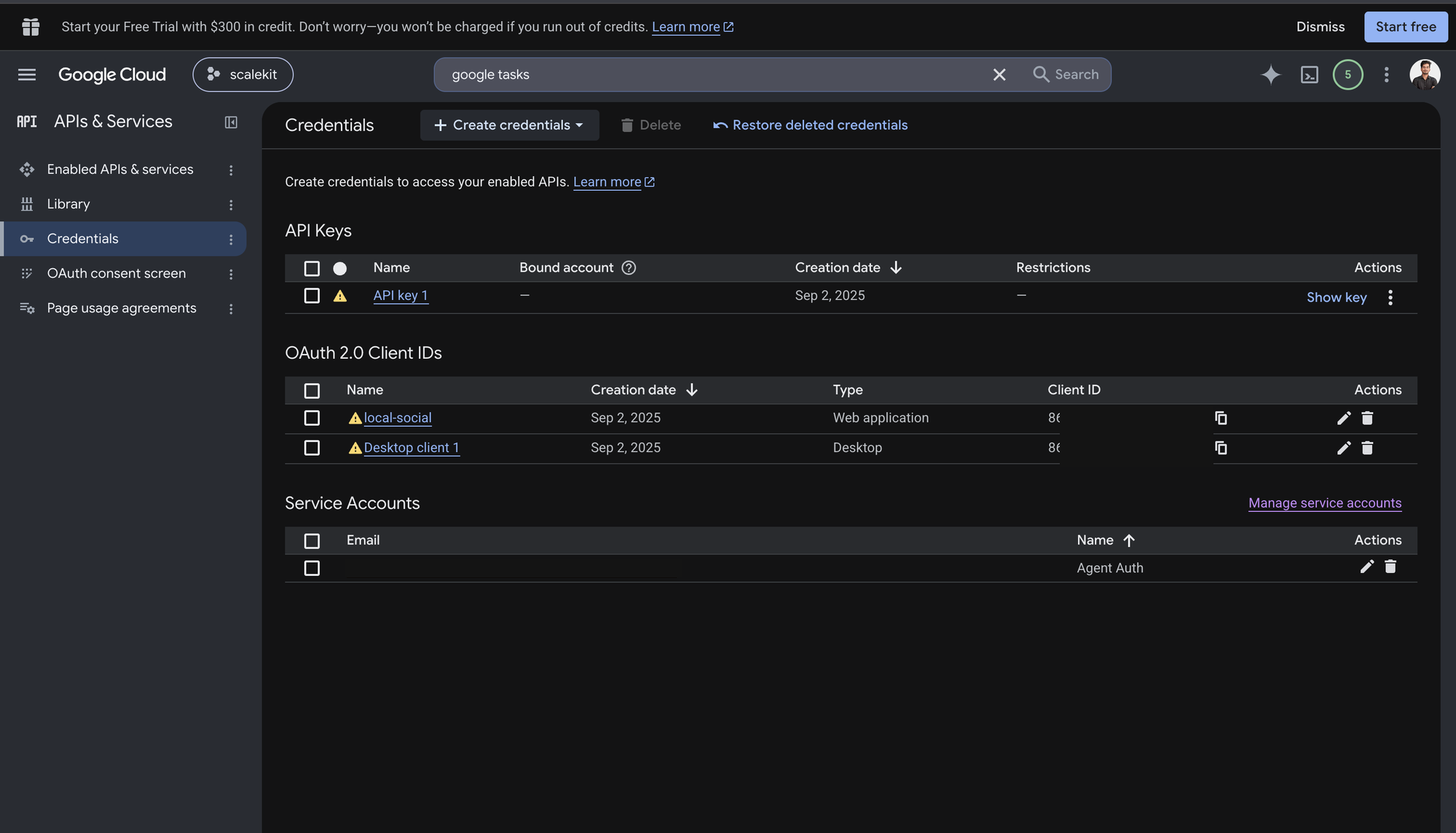
Navigate to Google Cloud Console → APIs & Services → Credentials.
-
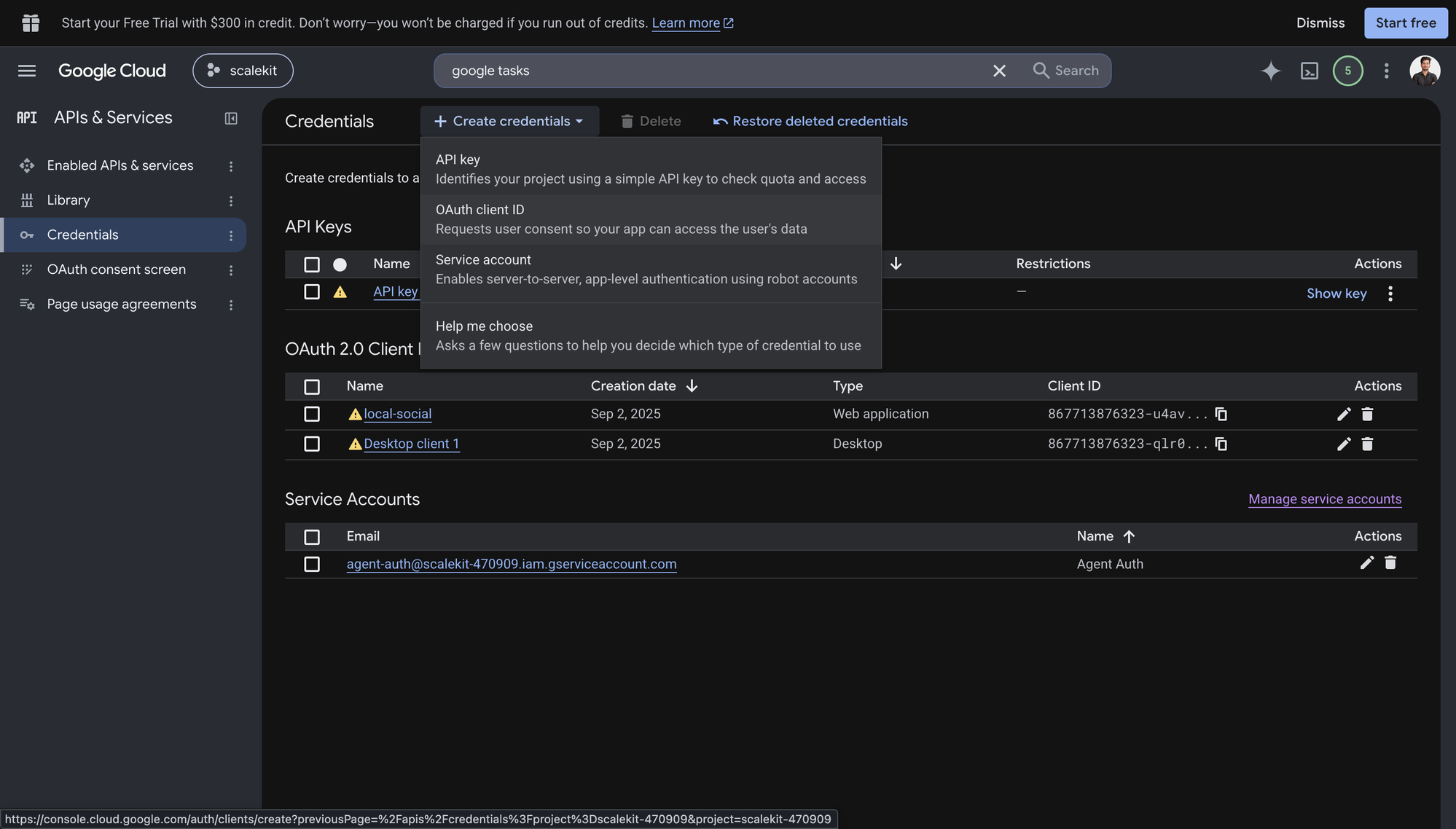
Click + Create Credentials, then OAuth client ID.
-
Choose Web application from the Application type menu and give the client a name, for example
Agent Auth.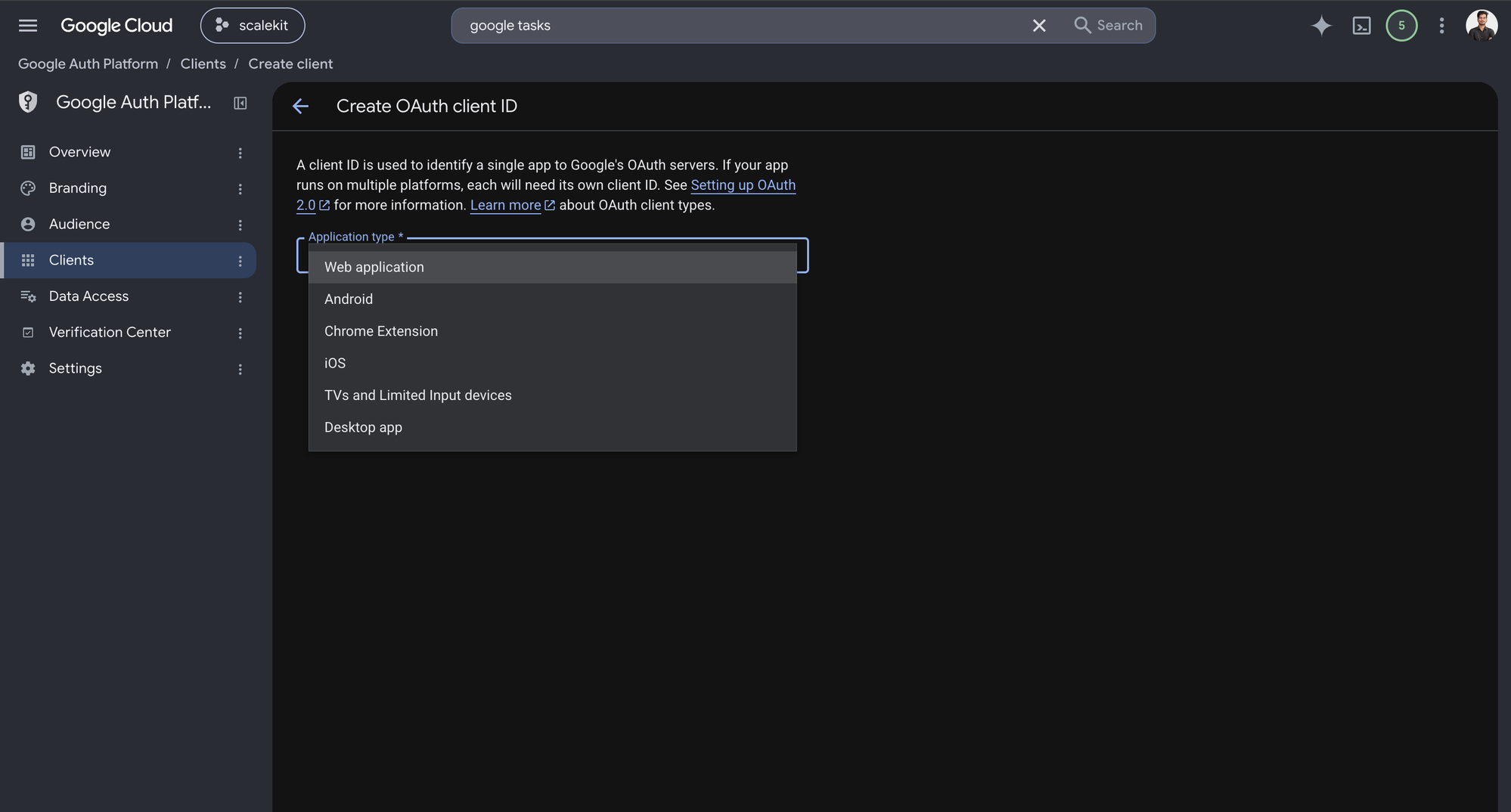
-
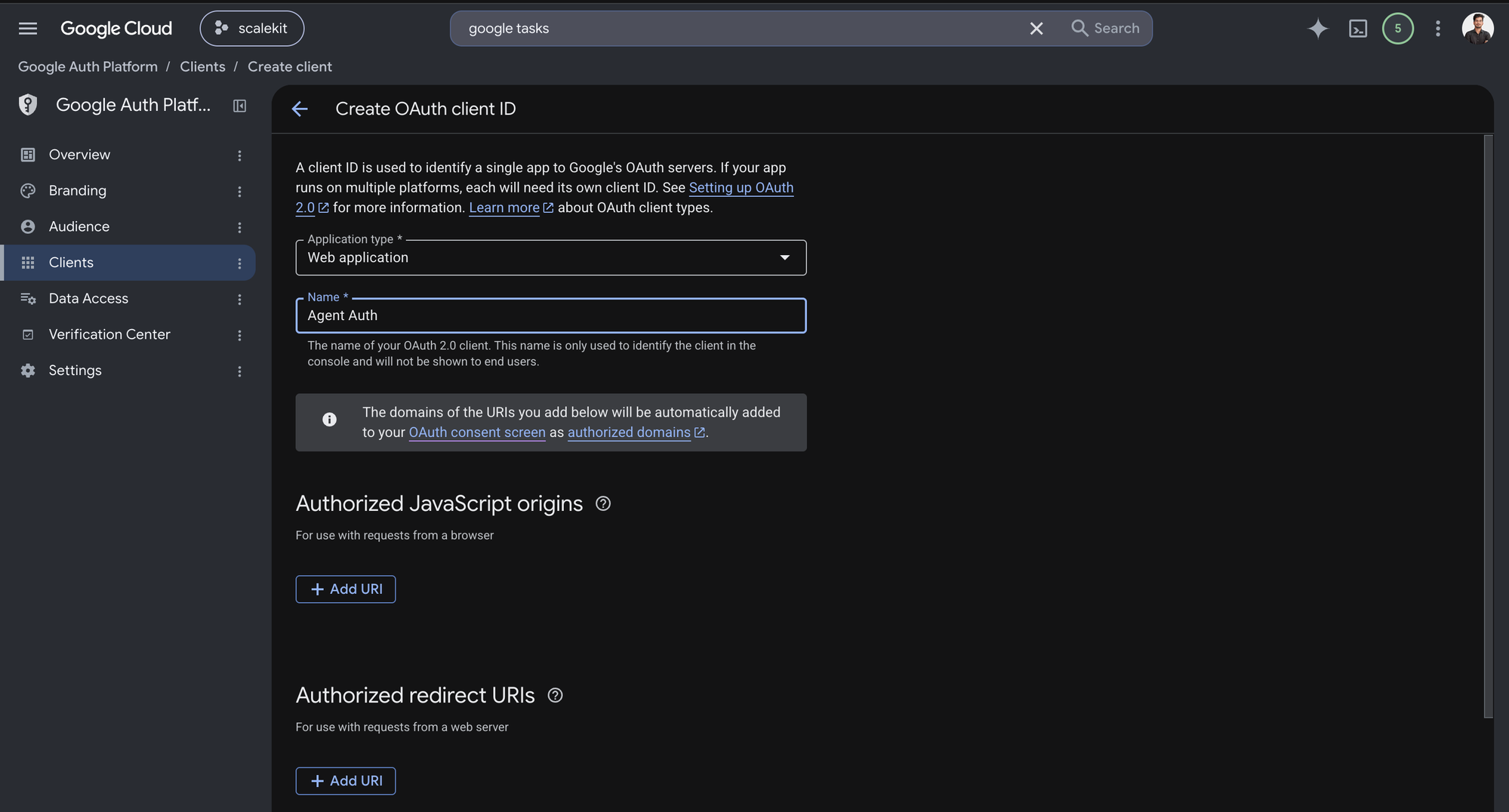
Under Authorized redirect URIs, click + Add URI, paste the redirect URI you copied from Scalekit, and click Create.
-
-
Enable the Google Search Console API
-
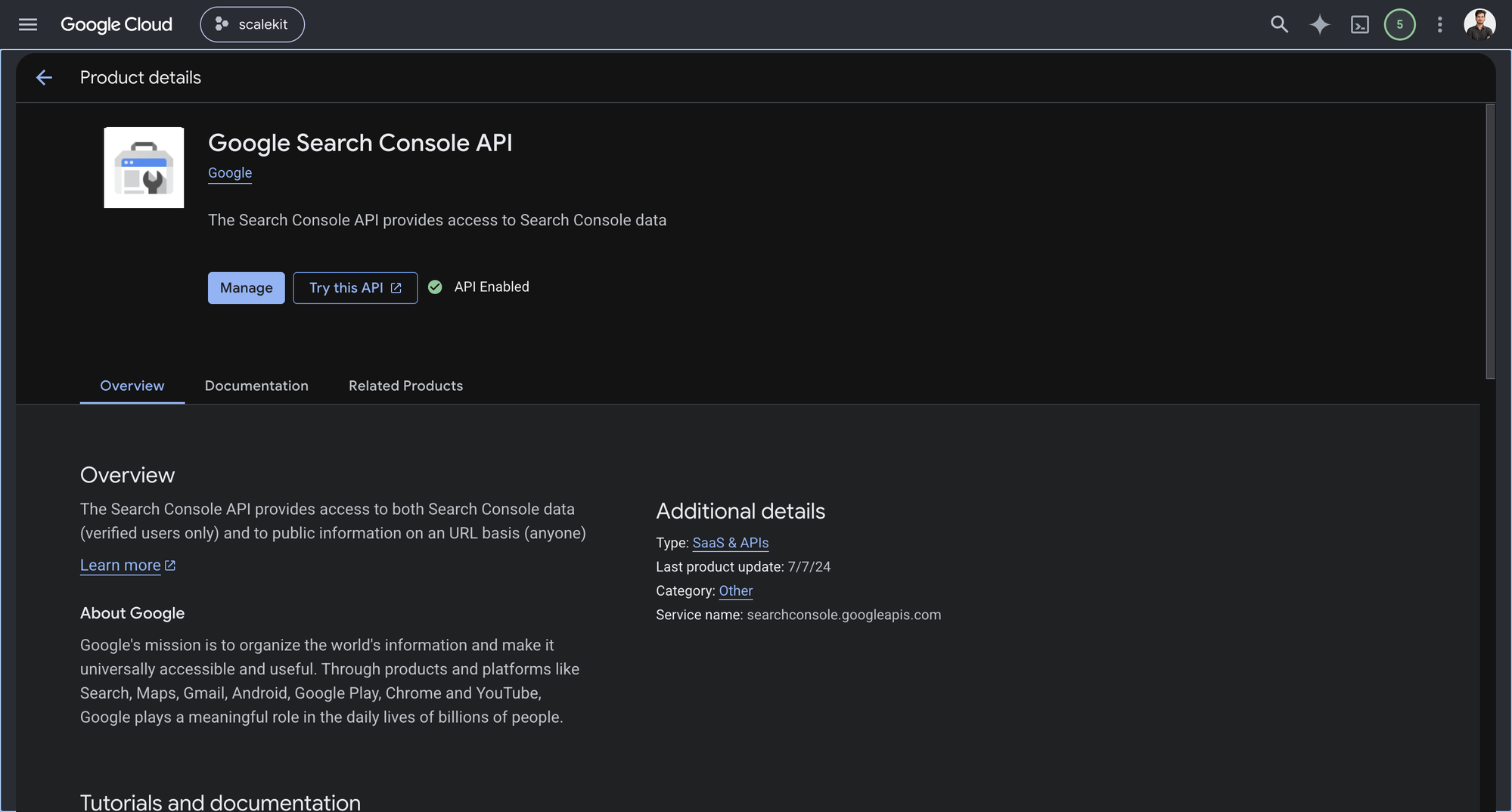
In Google Cloud Console, go to APIs & Services → Library. Search for “Google Search Console API” and click Enable.
-
-
Get client credentials
-
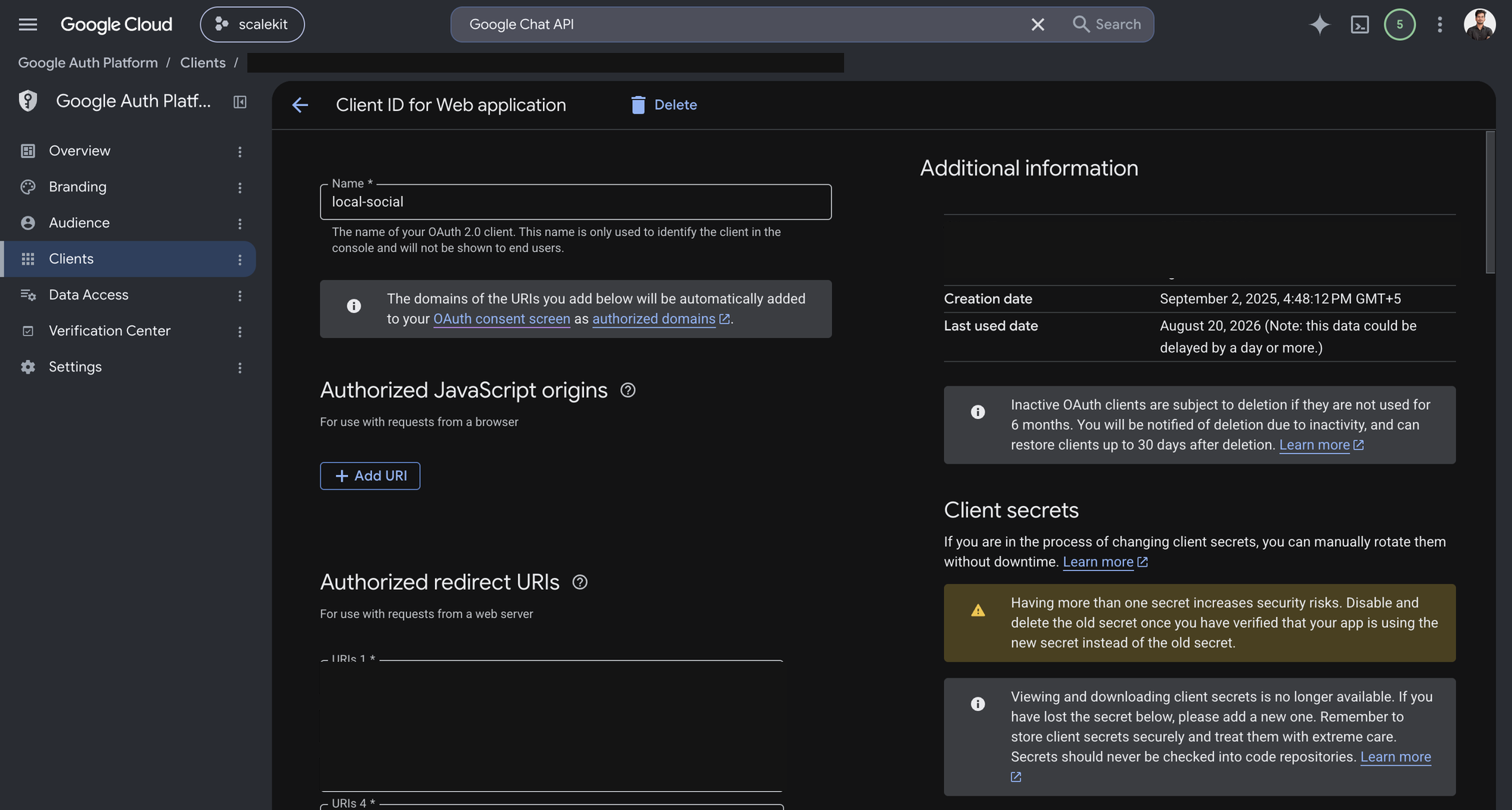
Open the OAuth client you created in step 1. Google shows the Client ID under Additional information, and lets you generate a Client secret from the same page.
-
-
Add credentials in Scalekit
- In Scalekit dashboard, go to AgentKit > Connections and open the connection you created.
- Copy the Connection name shown on that connection and use that exact value in your code as
connection_nameorconnectionName. - Enter your credentials:
- Client ID (from above)
- Client Secret (from above)
- Permissions (scopes — see Google API Scopes reference)
- Click Save.
-
-
Authorize and make your first call
Section titled “Authorize and make your first call”quickstart.ts import { ScalekitClient } from '@scalekit-sdk/node'import 'dotenv/config'const scalekit = new ScalekitClient(process.env.SCALEKIT_ENV_URL,process.env.SCALEKIT_CLIENT_ID,process.env.SCALEKIT_CLIENT_SECRET,)const actions = scalekit.actionsconst connector = 'googlesearchconsole'const identifier = 'user_123'// Generate an authorization link for the userconst { link } = await actions.getAuthorizationLink({ connectionName: connector, identifier })console.log('Authorize Google Search Console:', link)process.stdout.write('Press Enter after authorizing...')await new Promise(r => process.stdin.once('data', r))// Make your first callconst result = await actions.executeTool({connector,identifier,toolName: 'googlesearchconsole_list_sites',toolInput: {},})console.log(result)quickstart.py import osfrom scalekit.client import ScalekitClientfrom dotenv import load_dotenvload_dotenv()scalekit_client = ScalekitClient(env_url=os.getenv("SCALEKIT_ENV_URL"),client_id=os.getenv("SCALEKIT_CLIENT_ID"),client_secret=os.getenv("SCALEKIT_CLIENT_SECRET"),)actions = scalekit_client.actionsconnection_name = "googlesearchconsole"identifier = "user_123"# Generate an authorization link for the userlink_response = actions.get_authorization_link(connection_name=connection_name,identifier=identifier,)print("Authorize Google Search Console:", link_response.link)input("Press Enter after authorizing...")# Make your first callresult = actions.execute_tool(tool_input={},tool_name="googlesearchconsole_list_sites",connection_name=connection_name,identifier=identifier,)print(result)
What you can do
Section titled “What you can do”Connect this agent connector to let your agent:
- Sitemap submit — Submits a sitemap for a site so Google will fetch and process it
- Query search analytics — Queries Google Search performance data (clicks, impressions, CTR, position) for a site, filtered and grouped by the dimensions you define
- List sites, sitemaps — Lists the user’s Search Console sites (properties) along with the caller’s permission level for each — SITE_OWNER, SITE_FULL_USER, SITE_RESTRICTED_USER, or SITE_UNVERIFIED_USER
- Url inspect — Runs a Google index inspection for a single URL and reports its Google Search index status — whether and when it was last crawled and indexed, the canonical URL Google selected, mobile-usability/rich-result summary info, and any indexing issues
- Get sitemap, site — Retrieves information about one specific sitemap submitted for a site — its type, whether it is a sitemap index, processing status (pending/downloaded), and error/warning counts
- Delete sitemap, site — Removes a sitemap from the Sitemaps report for a site
Tool list
Section titled “Tool list”Use the exact tool names from the Tool list below when you call execute_tool. If you’re not sure which name to use, list the tools available for the current user first.
googlesearchconsole_add_site#Adds a site (property) to the set of the authorized user's sites in Search Console. The site is added with the caller as owner if verification is already established, otherwise it is added as an unverified site pending verification. Requires the webmasters (full-access) scope. NOTE: this API requires siteUrl as a single percent-encoded path segment — Scalekit does not auto-encode path values, so you must pass siteUrl already percent-encoded (replace ':' with %3A and every '/' with %2F). Returns an empty response on success.1 param
Adds a site (property) to the set of the authorized user's sites in Search Console. The site is added with the caller as owner if verification is already established, otherwise it is added as an unverified site pending verification. Requires the webmasters (full-access) scope. NOTE: this API requires siteUrl as a single percent-encoded path segment — Scalekit does not auto-encode path values, so you must pass siteUrl already percent-encoded (replace ':' with %3A and every '/' with %2F). Returns an empty response on success.
siteUrlstringrequiredRequired. The percent-encoded URL of the site to add, e.g. 'https://www.example.com/' percent-encoded to 'https%3A%2F%2Fwww.example.com%2F', or 'sc-domain:example.com' percent-encoded to 'sc-domain%3Aexample.com'.googlesearchconsole_delete_site#Removes a site (property) from the set of the authorized user's Search Console sites. This only removes the site from this user's Search Console account — it does NOT affect the site itself, its verification status for other users, or Google's crawling/indexing of it. Requires the webmasters (full-access) scope. NOTE: this API requires siteUrl as a single percent-encoded path segment — Scalekit does not auto-encode path values, so you must pass siteUrl already percent-encoded (replace ':' with %3A and every '/' with %2F). Returns an empty response on success.1 param
Removes a site (property) from the set of the authorized user's Search Console sites. This only removes the site from this user's Search Console account — it does NOT affect the site itself, its verification status for other users, or Google's crawling/indexing of it. Requires the webmasters (full-access) scope. NOTE: this API requires siteUrl as a single percent-encoded path segment — Scalekit does not auto-encode path values, so you must pass siteUrl already percent-encoded (replace ':' with %3A and every '/' with %2F). Returns an empty response on success.
siteUrlstringrequiredRequired. The percent-encoded URI of the property to remove, as defined in Search Console. Get the raw value from the List Sites tool, then percent-encode it: 'https://www.example.com/' becomes 'https%3A%2F%2Fwww.example.com%2F'; 'sc-domain:example.com' becomes 'sc-domain%3Aexample.com'.googlesearchconsole_delete_sitemap#Removes a sitemap from the Sitemaps report for a site. This does NOT stop Google from crawling the sitemap or the URLs that were previously discovered through it — it only removes the sitemap entry from Search Console's report. Requires the webmasters (full-access) scope. NOTE: both siteUrl and feedpath must be single percent-encoded path segments — Scalekit does not auto-encode path values, so pass both already percent-encoded (replace ':' with %3A and every '/' with %2F). Returns an empty response on success.2 params
Removes a sitemap from the Sitemaps report for a site. This does NOT stop Google from crawling the sitemap or the URLs that were previously discovered through it — it only removes the sitemap entry from Search Console's report. Requires the webmasters (full-access) scope. NOTE: both siteUrl and feedpath must be single percent-encoded path segments — Scalekit does not auto-encode path values, so pass both already percent-encoded (replace ':' with %3A and every '/' with %2F). Returns an empty response on success.
feedpathstringrequiredRequired. The percent-encoded URL of the sitemap to remove, e.g. 'http://www.example.com/sitemap.xml' percent-encoded to 'http%3A%2F%2Fwww.example.com%2Fsitemap.xml'. Get the raw value from the List Sitemaps tool's `path` field, then percent-encode it the same way as siteUrl.siteUrlstringrequiredRequired. The percent-encoded URI of the property as defined in Search Console. Get the raw value from the List Sites tool, then percent-encode it: 'https://www.example.com/' becomes 'https%3A%2F%2Fwww.example.com%2F'; 'sc-domain:example.com' becomes 'sc-domain%3Aexample.com'.googlesearchconsole_get_site#Retrieves the caller's permission level (SITE_OWNER, SITE_FULL_USER, SITE_RESTRICTED_USER, or SITE_UNVERIFIED_USER) for one specific Search Console property. Requires the webmasters or webmasters.readonly scope. NOTE: this API requires siteUrl as a single percent-encoded path segment — Scalekit does not auto-encode path values, so you must pass siteUrl already percent-encoded (replace ':' with %3A and every '/' with %2F).1 param
Retrieves the caller's permission level (SITE_OWNER, SITE_FULL_USER, SITE_RESTRICTED_USER, or SITE_UNVERIFIED_USER) for one specific Search Console property. Requires the webmasters or webmasters.readonly scope. NOTE: this API requires siteUrl as a single percent-encoded path segment — Scalekit does not auto-encode path values, so you must pass siteUrl already percent-encoded (replace ':' with %3A and every '/' with %2F).
siteUrlstringrequiredRequired. The percent-encoded URI of the property as defined in Search Console. Get the raw value from the List Sites tool, then percent-encode it: 'https://www.example.com/' becomes 'https%3A%2F%2Fwww.example.com%2F'; 'sc-domain:example.com' becomes 'sc-domain%3Aexample.com'.googlesearchconsole_get_sitemap#Retrieves information about one specific sitemap submitted for a site — its type, whether it is a sitemap index, processing status (pending/downloaded), and error/warning counts. Requires the webmasters or webmasters.readonly scope. NOTE: both siteUrl and feedpath must be single percent-encoded path segments — Scalekit does not auto-encode path values, so pass both already percent-encoded (replace ':' with %3A and every '/' with %2F).2 params
Retrieves information about one specific sitemap submitted for a site — its type, whether it is a sitemap index, processing status (pending/downloaded), and error/warning counts. Requires the webmasters or webmasters.readonly scope. NOTE: both siteUrl and feedpath must be single percent-encoded path segments — Scalekit does not auto-encode path values, so pass both already percent-encoded (replace ':' with %3A and every '/' with %2F).
feedpathstringrequiredRequired. The percent-encoded URL of the sitemap, e.g. 'http://www.example.com/sitemap.xml' percent-encoded to 'http%3A%2F%2Fwww.example.com%2Fsitemap.xml'. Get the raw value from the List Sitemaps tool's `path` field, then percent-encode it the same way as siteUrl.siteUrlstringrequiredRequired. The percent-encoded URI of the property as defined in Search Console. Get the raw value from the List Sites tool, then percent-encode it: 'https://www.example.com/' becomes 'https%3A%2F%2Fwww.example.com%2F'; 'sc-domain:example.com' becomes 'sc-domain%3Aexample.com'.googlesearchconsole_inspect_url#Runs a Google index inspection for a single URL and reports its Google Search index status — whether and when it was last crawled and indexed, the canonical URL Google selected, mobile-usability/rich-result summary info, and any indexing issues. This is the API equivalent of the URL Inspection tool in the Search Console UI. The inspectionUrl must belong to the property identified by siteUrl. Requires the webmasters or webmasters.readonly scope.3 params
Runs a Google index inspection for a single URL and reports its Google Search index status — whether and when it was last crawled and indexed, the canonical URL Google selected, mobile-usability/rich-result summary info, and any indexing issues. This is the API equivalent of the URL Inspection tool in the Search Console UI. The inspectionUrl must belong to the property identified by siteUrl. Requires the webmasters or webmasters.readonly scope.
inspectionUrlstringrequiredRequired. The URL to inspect. Must be under the property specified in siteUrl.siteUrlstringrequiredRequired. The URL of the property as defined in Search Console that owns inspectionUrl. Examples: `https://www.example.com/` for a URL-prefix property, or `sc-domain:example.com` for a Domain property.languageCodestringoptionalOptional. An IETF BCP-47 language code for translated issue messages, e.g. "en-US" or "de-CH". Defaults to "en-US" if not specified.googlesearchconsole_list_sitemaps#Lists the sitemap entries submitted for a site, or the entries included in a specific sitemap index file when sitemapIndex is provided. Returns each sitemap's path, type, processing status, and error/warning counts. Requires the webmasters or webmasters.readonly scope. NOTE: siteUrl must be a single percent-encoded path segment — Scalekit does not auto-encode path values, so pass siteUrl already percent-encoded (replace ':' with %3A and every '/' with %2F). sitemapIndex, in contrast, is a query parameter and should be passed as a normal (non-encoded) URL — Scalekit encodes query values automatically.2 params
Lists the sitemap entries submitted for a site, or the entries included in a specific sitemap index file when sitemapIndex is provided. Returns each sitemap's path, type, processing status, and error/warning counts. Requires the webmasters or webmasters.readonly scope. NOTE: siteUrl must be a single percent-encoded path segment — Scalekit does not auto-encode path values, so pass siteUrl already percent-encoded (replace ':' with %3A and every '/' with %2F). sitemapIndex, in contrast, is a query parameter and should be passed as a normal (non-encoded) URL — Scalekit encodes query values automatically.
siteUrlstringrequiredRequired. The percent-encoded URI of the property as defined in Search Console. Get the raw value from the List Sites tool, then percent-encode it: 'https://www.example.com/' becomes 'https%3A%2F%2Fwww.example.com%2F'; 'sc-domain:example.com' becomes 'sc-domain%3Aexample.com'.sitemapIndexstringoptionalOptional. A URL of a site's sitemap index file, e.g. 'http://www.example.com/sitemapindex.xml'. When set, lists the sitemaps contained in that index instead of the site's top-level submitted sitemaps. Pass the plain (not percent-encoded) URL — this is a query parameter and is encoded automatically.googlesearchconsole_list_sites#Lists the user's Search Console sites (properties) along with the caller's permission level for each — SITE_OWNER, SITE_FULL_USER, SITE_RESTRICTED_USER, or SITE_UNVERIFIED_USER. Use this to discover the exact siteUrl values (e.g. `https://www.example.com/` or `sc-domain:example.com`) needed by every other tool in this connector. Requires the webmasters or webmasters.readonly scope.0 params
Lists the user's Search Console sites (properties) along with the caller's permission level for each — SITE_OWNER, SITE_FULL_USER, SITE_RESTRICTED_USER, or SITE_UNVERIFIED_USER. Use this to discover the exact siteUrl values (e.g. `https://www.example.com/` or `sc-domain:example.com`) needed by every other tool in this connector. Requires the webmasters or webmasters.readonly scope.
googlesearchconsole_query_search_analytics#Queries Google Search performance data (clicks, impressions, CTR, position) for a site, filtered and grouped by the dimensions you define. Returns zero or more rows grouped by the row keys you specify via `dimensions`. You must supply a date range (startDate/endDate) of one or more days. When `DATE` is one of the group-by dimensions, days without data are omitted from the results. Requires the webmasters or webmasters.readonly scope. NOTE: siteUrl must be a single percent-encoded path segment — Scalekit does not auto-encode path values, so pass siteUrl already percent-encoded (replace ':' with %3A and every '/' with %2F).10 params
Queries Google Search performance data (clicks, impressions, CTR, position) for a site, filtered and grouped by the dimensions you define. Returns zero or more rows grouped by the row keys you specify via `dimensions`. You must supply a date range (startDate/endDate) of one or more days. When `DATE` is one of the group-by dimensions, days without data are omitted from the results. Requires the webmasters or webmasters.readonly scope. NOTE: siteUrl must be a single percent-encoded path segment — Scalekit does not auto-encode path values, so pass siteUrl already percent-encoded (replace ':' with %3A and every '/' with %2F).
endDatestringrequiredRequired. End date of the requested date range, in YYYY-MM-DD format, in PST time (UTC-8:00). Must be >= startDate. Inclusive.siteUrlstringrequiredRequired. The percent-encoded URI of the property as defined in Search Console. Get the raw value from the List Sites tool, then percent-encode it: 'https://www.example.com/' becomes 'https%3A%2F%2Fwww.example.com%2F'; 'sc-domain:example.com' becomes 'sc-domain%3Aexample.com'.startDatestringrequiredRequired. Start date of the requested date range, in YYYY-MM-DD format, in PST time (UTC-8:00). Must be <= endDate. Inclusive.aggregationTypestringoptionalOptional; default AUTO. How data is aggregated — AUTO, BY_PROPERTY, or BY_PAGE (BY_NEWS_SHOWCASE_PANEL for News Showcase reporting). If you filter or group by PAGE, you must use AUTO. An invalid combination returns an API error rather than silently changing your request.dataStatestringoptionalOptional. The data freshness to include — FINAL (final data only, the default behavior when omitted), ALL (final + partial/fresh data), or HOURLY_ALL (hourly partial + full data; required when dimensions includes HOUR).dimensionFilterGroupsarrayoptionalOptional. Zero or more filter groups to apply to the dimension values, e.g. 'query contains "buy"'. You can filter by a dimension without grouping by it. All filter groups are AND'ed together; filters within a group follow the group's groupType.dimensionsarrayoptionalOptional. Zero or more dimensions to group results by — DATE, QUERY, PAGE, COUNTRY, DEVICE, SEARCH_APPEARANCE, or HOUR (HOUR requires dataState=HOURLY_ALL and data is only available for the last 10 days). Results are grouped in the order supplied.rowLimitintegeroptionalOptional; default 1000. The maximum number of rows to return. Must be from 1 to 25000 (inclusive).startRowintegeroptionalOptional; default 0. Zero-based index of the first row to return, for paging through results beyond rowLimit.typestringoptionalOptional; default WEB. The Search type to report on — WEB, IMAGE, VIDEO, NEWS, DISCOVER, or GOOGLE_NEWS.googlesearchconsole_submit_sitemap#Submits a sitemap for a site so Google will fetch and process it. Requires the webmasters (full-access) scope. NOTE: both siteUrl and feedpath must be single percent-encoded path segments — Scalekit does not auto-encode path values, so pass both already percent-encoded (replace ':' with %3A and every '/' with %2F). Returns an empty response on success.2 params
Submits a sitemap for a site so Google will fetch and process it. Requires the webmasters (full-access) scope. NOTE: both siteUrl and feedpath must be single percent-encoded path segments — Scalekit does not auto-encode path values, so pass both already percent-encoded (replace ':' with %3A and every '/' with %2F). Returns an empty response on success.
feedpathstringrequiredRequired. The percent-encoded URL of the sitemap to submit, e.g. 'http://www.example.com/sitemap.xml' percent-encoded to 'http%3A%2F%2Fwww.example.com%2Fsitemap.xml'.siteUrlstringrequiredRequired. The percent-encoded URI of the property as defined in Search Console. Get the raw value from the List Sites tool, then percent-encode it: 'https://www.example.com/' becomes 'https%3A%2F%2Fwww.example.com%2F'; 'sc-domain:example.com' becomes 'sc-domain%3Aexample.com'.